 Stack
Choosing a password manager by seat count
Count the people who will get a vault before you compare a single feature, because the cheapest password manager changes three times between one seat and fifty. Vendors in this category meter the same thing, a user, but they package it three different ways: a flat rate per seat, a bundle of ten seats sold as one price, and a per-seat rate that only unlocks single sign-on one tier up. Those shapes mean the entry price and the twelve-month bill rank the plans in a different order. Our top pick for most headcounts is Bitwarden Teams at $4 per user per month billed annually, with one clear exception between seven and twenty seats. Every figure here was read from a vendor pricing page on October 22, 2026.
Count seats first, because the cheapest plan changes three times
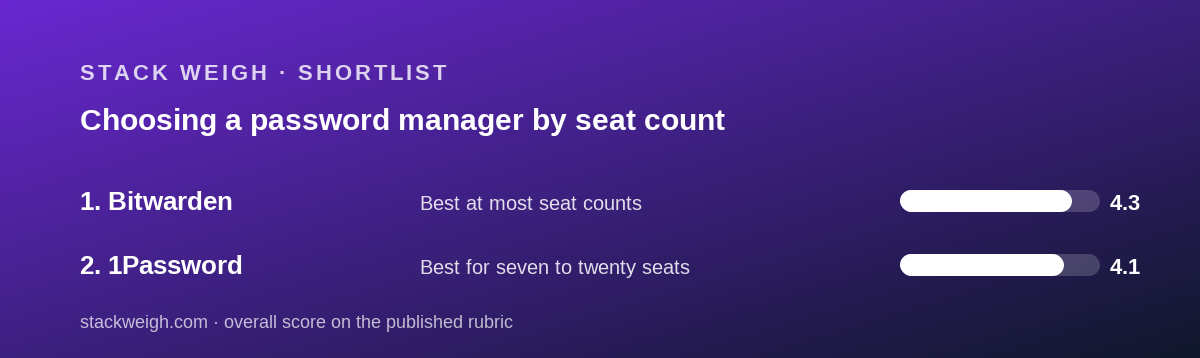
Seat count is the only input that matters before features in this category, and most buyers reach for it last.
Password managers all meter the same unit, a person with a vault. What differs is how that unit is sold. Three shapes exist, and each one has a headcount band it wins in.
A flat per-seat rate charges the same for the first person and the fiftieth. A bundled pack charges one price for the first ten and a surcharge after that, up to a cap.
A per-seat tier ladder keeps the rate flat and moves the features you need up a rung.
Those shapes cross each other twice inside a range most small companies live in. Our two-way price comparison at 1, 5, 20 and 50 seats runs the full arithmetic, and the short version is below.
- One to six seats: a flat per-seat rate wins. Six people cost $288 a year at $4 per user per month, against $299.40 for the smallest bundled pack
- Seven to twenty seats: the bundled pack wins. Ten people cost $299.40 a year against $480 on a flat seat, a 38 percent saving
- Twenty-one seats and up: the flat rate wins, heavily. Twenty-one people cost $1,008 against $2,265.48, because the pack caps at twenty and the whole account reprices
- Any headcount, if single sign-on is required: the flat rate wins. Fifty seats cost $3,600 on an SSO-capable tier at $6 a seat against $5,394 at $8.99
Under seven seats, the seat minimum is the whole bill
Below seven people the per-seat rate stops being the number that decides anything. The floor does.
A bundled pack with a ten-member minimum costs $299.40 a year whether you put three people in it or ten. A flat $4 seat costs $144 for those three people, which is less than half.
The flat-rate vendor we priced states no seat minimum at all, and its Number of users row reads Unlimited on both business tiers.
That is unusual and it is worth a premium in itself at small headcounts, because it means the smallest possible purchase is one seat.
There is a second trap at this end of the range. On the bundled vendor, the cheapest route below three seats is not the pack but the business tier at $8.99 a user, because $107.88 for one person beats a $299.40 floor.
So the same vendor has two different cheapest answers depending on whether you are one person or five, and its card shows only the pack rate of $2.49 a user. That figure is $24.95 divided by ten members and rounded down. You cannot buy it.
Treating a derived per-seat figure as a purchasable rate is the commonest mistake in this category, and how to read a per-seat pricing page sets out the habit that prevents it.
From seven to twenty seats, a bundle is genuinely cheaper
This is the one band where a pack beats a flat rate, and it is a real saving rather than a marketing artefact.
At ten seats, a $299.40 pack against $480 of flat seats is a difference of $180.60 a year. A ten-person company is paying roughly the same for a year of password management as it pays for two months of a flat-rate plan.
The crossover is at seven seats. Six people cost $288 on the flat rate and $299.40 on the pack. Seven cost $336 and $299.40.
Above ten members, the advantage narrows every hire. Extra pack seats cost $4.99 per seat per month, which is $59.88 a year, against $48 for a flat seat.
So each marginal hire past the tenth costs 25 percent more on the pack than on the rival.
By twenty seats the gap is down to $61.80 a year, from $180.60 at ten. The pack is still cheaper, but it is winning on the ten seats it bundles rather than on the ten it sells.
A buyer at exactly ten seats who expects to stay there has the best deal available in this category. A buyer at eighteen who expects to hire does not, and should read the next section before signing anything annual.
The seat cap is the most expensive number nobody budgets for
Caps are rarer than minimums and far more costly. One of the two plans we priced has one, and it is published rather than hidden.
The card reads Up to 20 users. The FAQ repeats it: you can add up to 10 additional seats, for 20 members total.
So the twenty-first member cannot join the pack. The account moves to the business tier at $8.99 per user per month, and that rate applies to all twenty-one seats, not only the new one.
The arithmetic is brutal. Twenty seats on the pack is $898.20 a year. Twenty-one seats on the business tier is $2,265.48. One hire has added $1,367.28 to the annual bill, which is a 152 percent increase.
The flat-rate alternative has no such step at any point. The twenty-first seat costs $48, the same as the first and the fiftieth.
The practical rule is to price the tier you will be in at renewal, not the tier you are in at signup.
If your headcount plan crosses a published cap inside the contract term, buy the upper tier from the start and treat the pack saving as unavailable.
This is the same discipline that decides a storage or a document budget, which we set out in budgeting for usage-based pricing and applied to volume thresholds in choosing an e-signature plan by monthly volume.
Single sign-on is never on the entry tier, so price the second rung
If your company runs an identity provider, the entry rate in this category is not your rate. Both plans we priced put identity integration one tier up.
One puts passwordless SSO integration on its $6 per user per month tier, alongside enterprise policies, custom roles, an account recovery workflow and a self-host option.
The other puts integration with Okta, Entra ID, OneLogin and Duo on its $8.99 per user per month tier, alongside Watchtower alerts and role-based vault sharing.
At that like-for-like level there is no crossover anywhere in the seat range. One seat is $72 a year against $107.88. Twenty seats are $1,440 against $2,157.60. Fifty seats are $3,600 against $5,394.
The cheaper of the two is 33 percent below the other at every one of those points, by our arithmetic from the published annual rates.
So the single most useful question to answer before opening a pricing page is whether SSO is a requirement. If it is, the ranking in this guide inverts: the flat-rate vendor wins at every headcount including the seven-to-twenty window.
Check whether a monthly rate exists before you assume a discount
Annual billing is cheaper in this category where both rates are published. The problem is that one of the two vendors publishes only one of them.
Where both appear, the gap is measurable: $2.49 against $2.99 on the entry tier, which is 16.7 percent, and $8.99 against $10.99 on the business tier, which is 18.2 percent.
Where only an annual figure appears, the phrase billed annually carries no measurable discount behind it. The page states that pricing is based on an annual subscription and stops there.
That is a cost, not an omission. A company that cannot commit twelve months of cash has one published option rather than two, and the cheaper plan on paper may be unavailable in practice.
There is one further gap worth checking on bundled plans. A pack total is often published for annual billing and not for monthly, so a ten-person team cannot read its monthly bill off the page even when a per-user monthly figure exists.
Our note on turning a pricing page into a bill covers the fix: write the twelve-month total for both billing states side by side, and mark the ones the vendor does not publish as unknown rather than as equal.
Free plans in this category are personal, not business
One of the two vendors offers a free tier and it is not a business tier. The page describes it as basic password management, always free, for a single user.
The paid personal tiers sit next to it at $1.65 per month billed annually at $19.80, and a family plan at $3.99 per month for up to six users, billed annually at $47.88.
None of those is an organisation with admin controls, event logs, directory sync or policy enforcement, which is what a company is buying.
The other vendor publishes no free plan of any kind on its business pricing page, only a 14-day trial of its business tier.
One Enterprise perk is worth naming because it appears on a price list rather than in marketing: a complimentary family plan for every user, to share with five friends or family members.
At fifty seats that is fifty family plans a company does not have to buy.
What to confirm in writing before you sign a year
Four questions close the gap between a published rate and an invoice, and none of them is a feature question.
- The twelve-month total at your real headcount, not the per-seat rate. Multiply, then compare. A rate of $2.49 and a rate of $4 rank differently once the floor and the cap are applied
- The seat floor and the seat cap, both in writing. A ten-member minimum and a twenty-member maximum are the two numbers that move a bill most and they are often one line of card copy
- The rate that applies at the next tier, because tier changes in this category reprice every seat rather than only the new one
- The renewal rate against the signup rate, which matters whenever a promotion or a bundle is involved. A page that advertises a discount for new accounts is telling you the renewal is different
- The tier that carries single sign-on, if you run an identity provider, since that decides which column you are actually comparing
- Whether a monthly-billed option exists at all, before planning cash flow around it
Bottom line
Buy on headcount, not on the per-seat number, and the answer in this category is simple in three bands.
Under seven seats, buy the flat per-seat plan at $4 per user per month billed annually. It has no minimum, so three people cost $144 a year rather than $299.40.
Between seven and twenty seats, buy the bundled pack at $299.40 a year. At ten seats it is 38 percent below the flat-rate alternative, which is the largest saving available anywhere in this comparison.
From twenty-one seats, go back to the flat rate and do not look at the pack again. The cap reprices the whole account and fifty seats cost $2,400 instead of $5,394.
If single sign-on is a requirement, ignore all of that and buy the $6 per user per month tier, which is a third cheaper than its rival at every headcount we priced.
Full pillar scores sit in our Bitwarden review and our 1Password review, and the seat-by-seat arithmetic is laid out in 1Password vs Bitwarden. Quotes arriving in different units should go through comparing quotes priced in different units first.
All figures in this guide were read from vendor pricing pages and their FAQ sections on October 22, 2026, and every twelve-month total is editorial arithmetic from those published rates, excluding tax.
Best at most seat counts: Bitwarden
Bitwarden is the only plan in this group that prices a seat and nothing else.
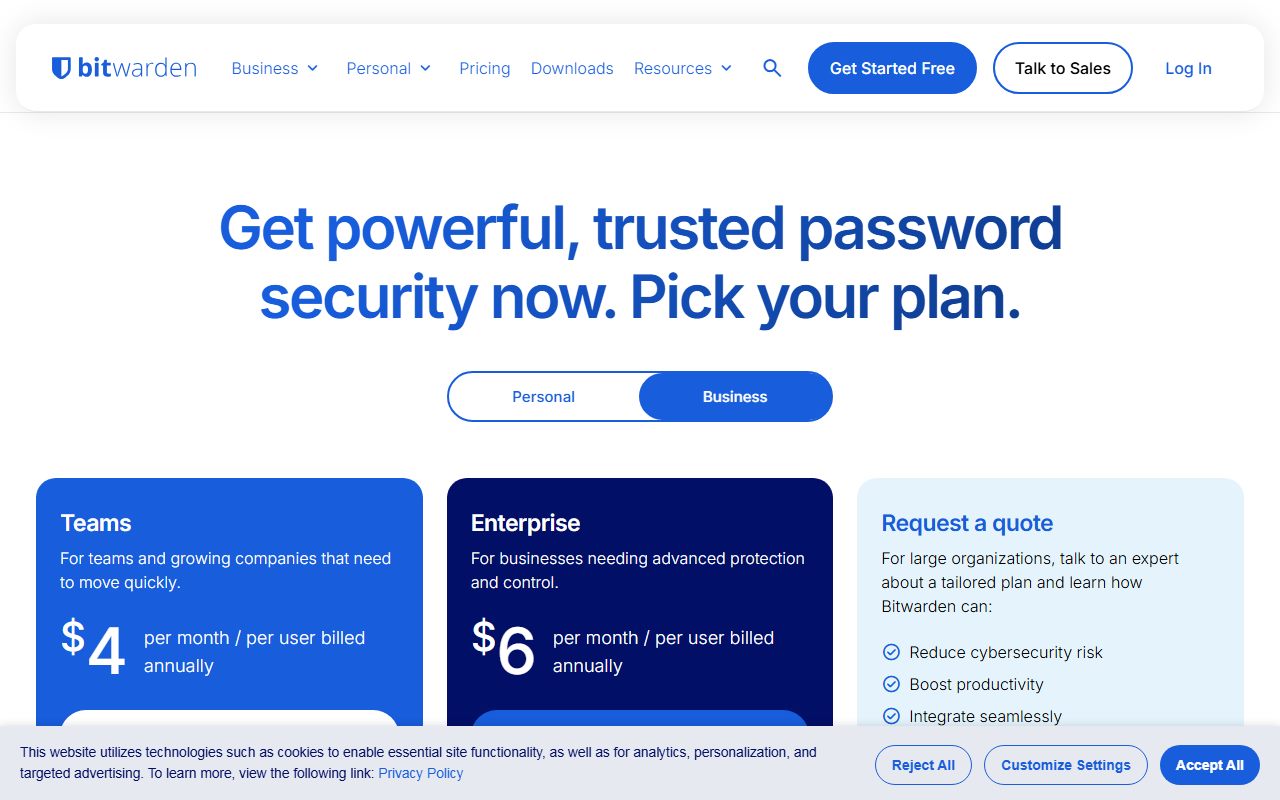
Teams is $4 per month per user billed annually and Enterprise is $6, with the Number of users row reading Unlimited on both. No seat minimum is stated anywhere on the page, and no cap.
That shape makes it the cheapest published option from one to six seats and again from twenty-one seats upward, which covers most companies. One person is $48 a year by our arithmetic, fifty people are $2,400.
It also publishes the longer compliance list of the two: its FAQ names ISO 27001, SOC 2 Type II, SOC 3, GDPR, CCPA, HIPAA and the Data Privacy Framework. Enterprise adds passwordless SSO, enterprise policies, custom roles, an account recovery workflow and a self-host option.
The gaps are real and worth naming. No monthly-billing rate is published for either business tier, only per month / per user billed annually with a footnote that pricing is based on an annual subscription. There is no phone support channel at all.
And at exactly ten seats it is the dearer of the two picks here.
It wins the ranking because it is cheapest at both ends of the seat range, never caps a plan, and publishes more of what a buyer has to verify. Its one weakness is a seven-to-twenty-seat window where a rival pack undercuts it.
Visit Bitwarden
We have no affiliate relationship with this vendor. Link goes to the official site.
Best for seven to twenty seats: 1Password
1Password is the only plan here that bundles seats, and between seven and twenty people that bundle is the cheapest published price in the category.
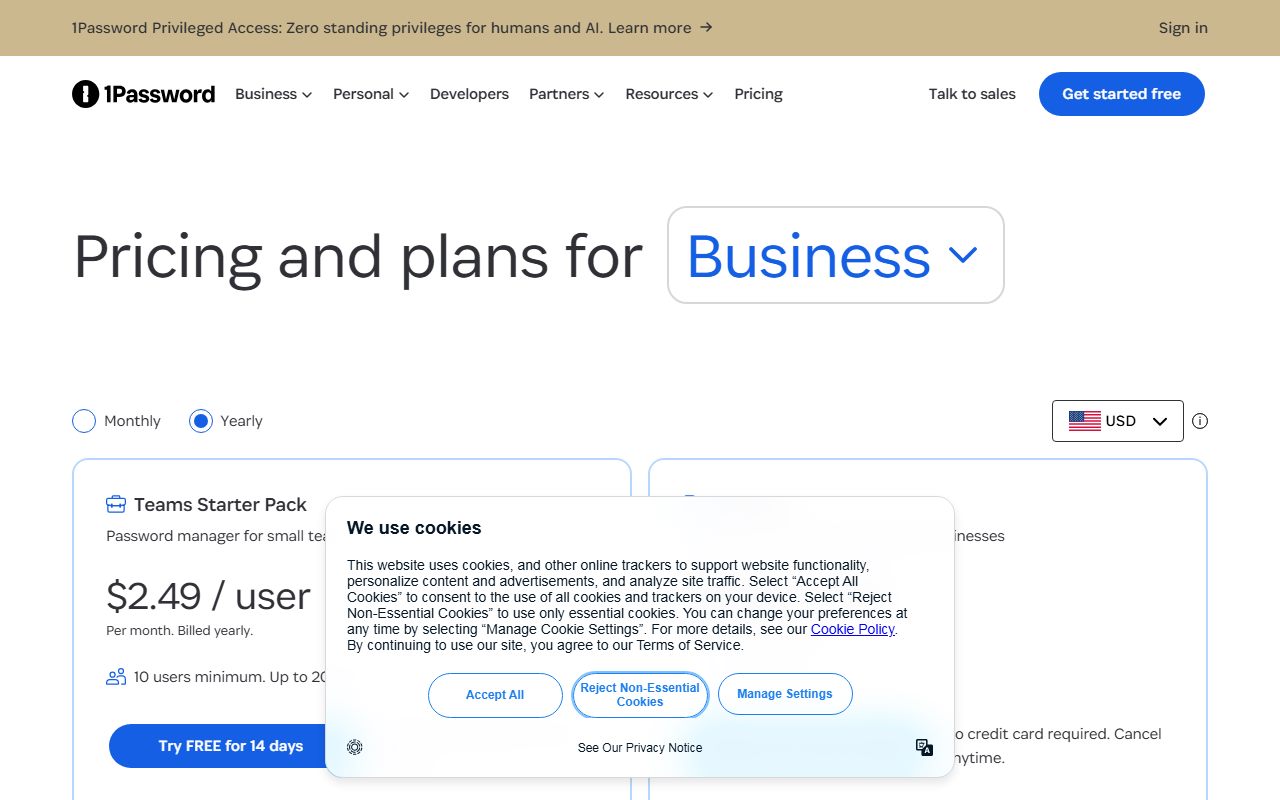
The Teams Starter Pack is restated in its own FAQ as $24.95 per month when billed annually, or $299.40 per year, and includes 10 members. The card adds 10 users minimum.
Up to 20 users, and additional seats at $4.99 per seat per month in USD on annual billing.
At ten seats that is $299.40 a year against $480 for a flat $4 seat, a 38 percent saving. At twenty seats it is $898.20 against $960.
Business is the other route, at $8.99 per user per month billed yearly, restated as $107.88 per user per year, with a 1 user minimum. That tier carries the identity-provider integrations with Okta, Entra ID, OneLogin and Duo, plus Watchtower alerts.
The risks are the floor and the cap. Below three seats the pack costs more than Business.
Above twenty seats it is unavailable, and the whole account reprices at $8.99 a user. 1Password also publishes a single compliance row, SOC 2 Type II, where its rival names seven.
It sits second because its advantage lives inside a fourteen-seat window and reverses sharply outside it. Inside that window it is the clear price winner, and it is the only one of the two that publishes a monthly-billing rate and a phone support window.
Visit 1Password
We have no affiliate relationship with this vendor. Link goes to the official site.
How we chose
We did not run tests of our own. Grades come from business pricing pages, their FAQ sections and their feature comparison tables, read on October 22, 2026, with every figure carrying the date it was read.
Two pricing pages were read in full for this guide, each through two independent tools on the same URL so that no figure rests on a single read.
Where a page rendered prices only to a browser, we say so in the review rather than printing a number we could not confirm.
Four things decided the ranking, in this order. First, the twelve-month total at 1, 5, 20 and 50 seats, calculated from published rates. Second, whether a seat minimum or a seat cap exists, because both change the bill without changing the product.
Third, what tier single sign-on sits on, since that is the row most buyers discover late.
Fourth, how much the page publishes at all: a vendor that prints its certifications, its support hours and its seat limits is cheaper to buy from than one that does not.
We did not score brand, interface or password-filling quality. This is a pricing desk and the grade is a grade of the price list.
Frequently asked
What is the cheapest password manager for a 10-person team?
The 1Password Teams Starter Pack at $299.40 a year on annual billing, per its pricing FAQ read on October 22, 2026. A flat $4 per user per month plan costs $480 for the same ten people by our arithmetic, so the pack saves $180.60.
At what seat count should I stop using a bundled pack?
Twenty-one. The pack caps at twenty members, so the twenty-first hire moves the whole account to a per-seat tier at $8.99 a user. The annual bill goes from $898.20 to $2,265.48, a 152 percent increase for one person.
Is a seat minimum worth worrying about at three or four people?
Yes. A ten-member pack costs $299.40 whether three people use it or ten. A flat $4 seat costs $144 for three people. On small teams the minimum, not the rate, is the number that decides the bill.
Which tier includes single sign-on?
Never the entry tier, in either product. Bitwarden puts passwordless SSO on Enterprise at $6 per user per month. 1Password puts Okta, Entra ID, OneLogin and Duo integration on Business at $8.99. Budget the upper tier if your identity stack is non-negotiable.
Can I pay for a business password manager monthly?
Sometimes. 1Password prints $2.99 and $10.99 per user per month behind a monthly toggle. Bitwarden's business tiers print only per month / per user billed annually, so a monthly option is not published for them on the page we read.
How much does annual billing actually save?
Where both rates are published, 16.7 percent on the entry tier and 18.2 percent on the business tier, by our arithmetic from $2.49 against $2.99 and $8.99 against $10.99. Where only an annual rate is printed, the discount cannot be measured at all.
Does a free plan help a small business here?
Not much. The free plans in this category are personal accounts, described as basic password management, always free for one user. Neither vendor sells a free business organisation, so the real entry cost is a trial plus a decision.
What should I get in writing before signing?
Three things. The twelve-month total at your actual headcount, not the per-seat rate. What happens at the next seat tier or cap. And whether the renewal rate matches the signup rate, which pages with promotional pricing often do not state.