 Stack
StackChoosing an e-signature plan by monthly volume
Count the agreements you send in a month before you count the people who will send them. E-signature vendors meter three different things, and the cheapest plan flips three times between a quiet month and a busy one. Below is a shortlist built from four pricing pages read on October 13, 2026, arranged by the only number that decides the bill: completed signatures per month. Under 8 a month, the cheapest published route in this group costs $96 a year for any headcount. Over 100 a month, it costs more than everything else on the list.
Our picks
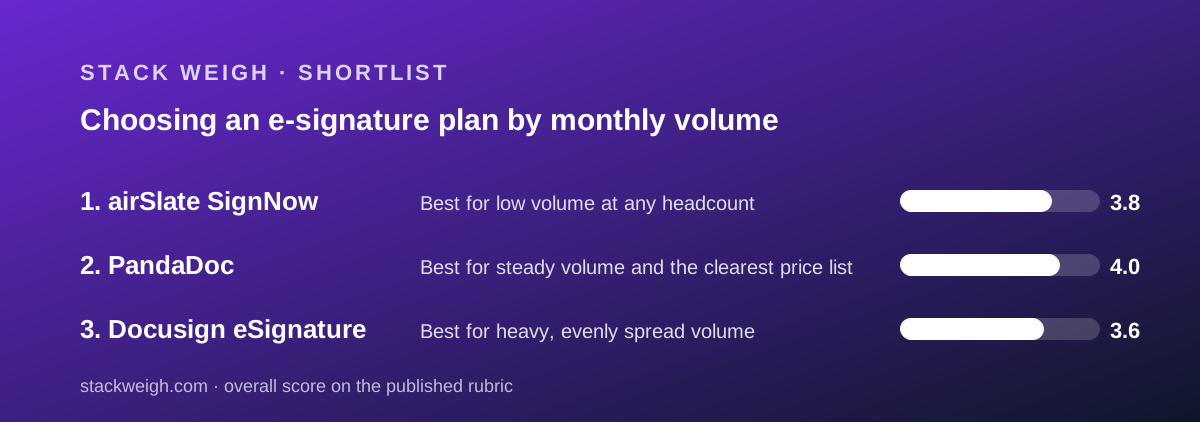
- Best for low volume at any headcount: airSlate SignNow
- Best for steady volume and the clearest price list: PandaDoc
- Best for heavy, evenly spread volume: Docusign eSignature
Count signatures per month first, seats second
The seat count is the number buyers know and the signature count is the number that sets the bill. Three of the four price lists we read meter volume, and two of them cap it hard enough to matter in the first quarter.
Work out one figure before you open a pricing page: completed agreements sent per month, averaged across a year, with your busiest month noted separately.
Then read the allowance. Docusign gives 100 envelopes per user per year on annual plans, which is about 8 a month per person. SignNow gives 100 signature invites per account per year, which is about 8 a month for the whole company.
Those two sentences differ by your headcount.
That single distinction is why a 20-person team can pay $96 a year or $7,200 a year for what looks like the same product. Our three-way price comparison at 1, 5, 20 and 50 people runs the arithmetic at every step.
Under 8 agreements a month: pay for the account, not the seats
This band covers more businesses than vendors like to admit: a clinic sending consent forms, a landlord issuing leases, an agency signing one or two statements of work a month.
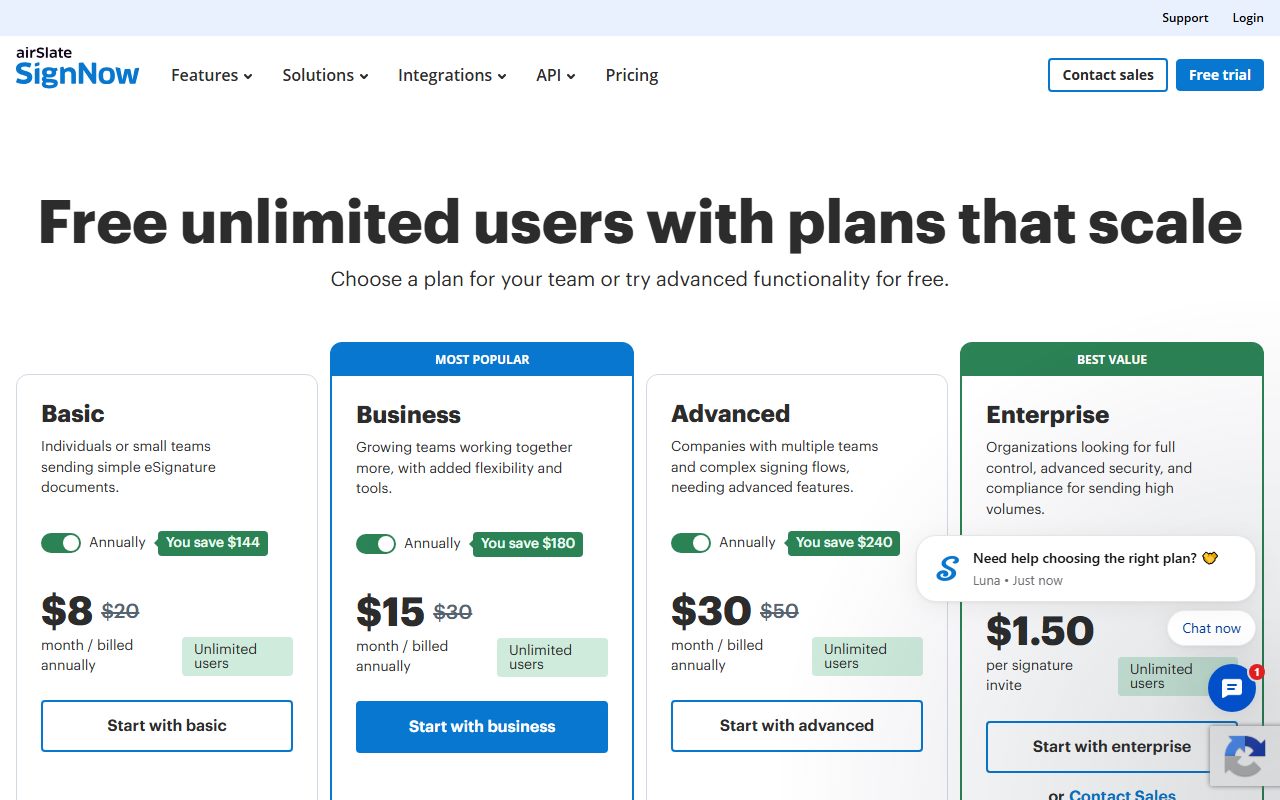
The cheapest published route here is SignNow Starter at $8 a month billed annually, or $96 a year, for any number of people. The allowance is 100 completed signature invites a year across the whole account.
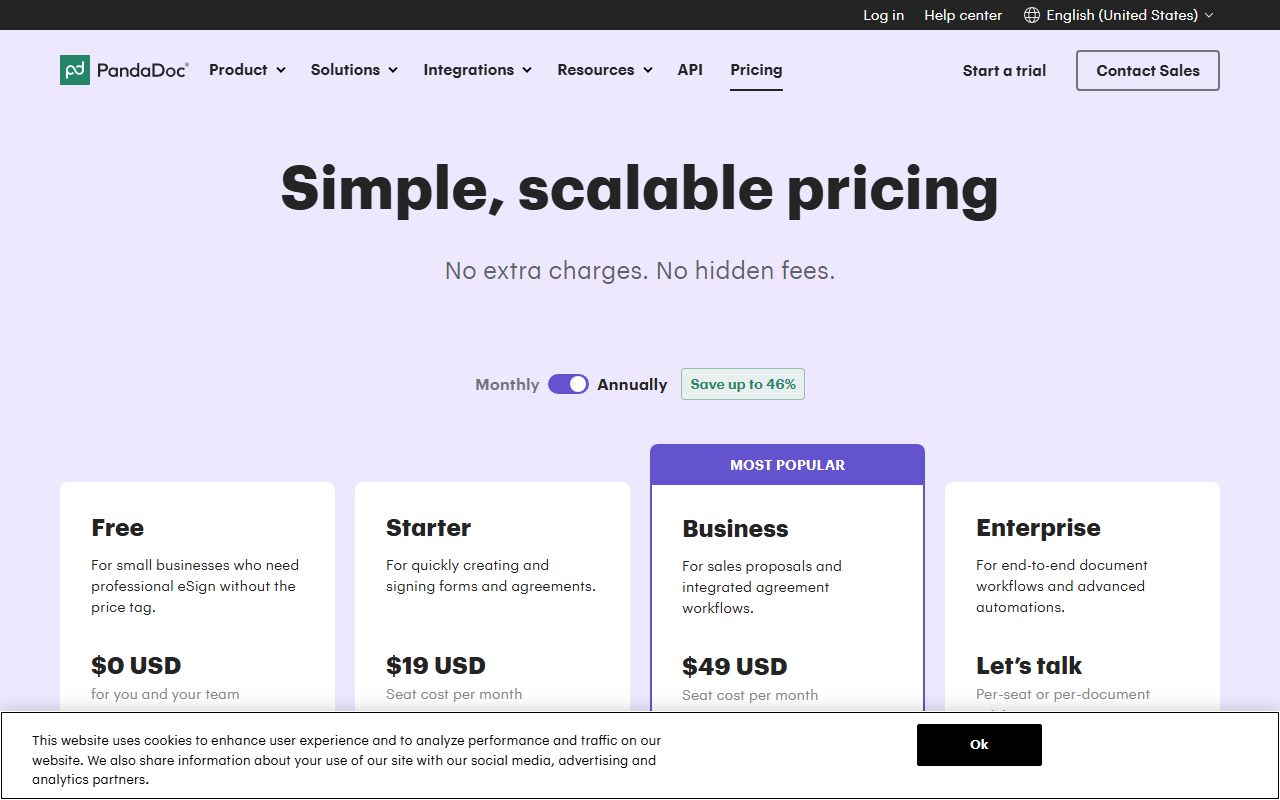
The second route is free. PandaDoc Free is $0 USD with 5 documents a month shared across the team, which is 60 a year. If your volume fits and your team is small, that is the whole bill.
The third is Dropbox Sign Essentials at $10.05 USD a month, billed as $120.60 USD a year, for one user with unlimited signature requests and a 30-day trial, per its pricing page checked October 13, 2026.
For a sole trader with lumpy volume, unlimited beats a cap.
What to avoid in this band is per-seat pricing with a per-seat allowance. A 15-person team sending 60 agreements a year on Docusign Standard would pay $5,400 for an allowance of 1,500 by our arithmetic.
8 to 100 agreements a month: the uncapped seat wins
Once volume passes roughly 100 a year, account-priced plans stop being cheap because the overflow rate is unpublished. This is where a per-seat plan with no volume cap is the cheapest shape.
PandaDoc Starter at $19 USD per seat per month billed annually is $228 a seat a year. Across 5 seats that is $1,140 for what the feature table calls unlimited interface documents.
Two cautions apply. The same page prices per-document overage for Starter, so the unlimited claim needs confirming in the order form. And documents created through the API, Zapier, Make, Forms or bulk send run on usage credits whose pack price is not published.
Dropbox Sign Standard is the other uncapped option, at $17.50 USD per user per month billed yearly from $420 USD. It is capped at 5 users, and the page says for 5-plus users, contact us.
So between 8 and 100 agreements a month, the shortlist is two vendors wide, and one of them stops selling at five people.
Over 100 agreements a month: buy the allowance that scales
At this volume the question changes from how little can we pay to whose cap we can live inside. Docusign is the only plan among the four whose included volume multiplies by headcount.
Standard at $30 per user per month is $360 per user a year with 100 envelopes per user. Twenty users carry 2,000 envelopes for $7,200. Fifty users carry 5,000 for $18,000, which is the last headcount the website will sell.
The cost per included envelope is flat at $3.60 on Standard and $5.40 on Business Pro, because price and allowance scale together. That is unusual, and it means the plan neither rewards nor punishes growth.
SignNow has an answer at this volume too, and it is the only vendor of the four that prints a volume rate: Enterprise is quoted from $1.50 per signature invite with stated volume discounts above that.
For 2,000 signatures a year, $1.50 each is $3,000 as a floor by our arithmetic, against $7,200 on Docusign Standard for the same volume at 20 seats. Both numbers need a quote to confirm.
Ask whether the allowance is per user or per account
Two plans in this group include the same headline number, 100, and mean completely different things by it. Reading the preposition is the whole exercise.
SignNow's FAQ says annual plans include up to 100 signature invites per account per year. One allowance, shared by everyone, however many people you add for free.
Docusign's cards say a total of 100 envelopes per user per year. The allowance multiplies by headcount, so 20 users carry 2,000 and 50 carry 5,000.
There is a third possibility neither page settles: whether a per-user allowance pools. Docusign never says whether one user may draw on a colleague's unused envelopes, which matters for any team with one heavy sender and nine light ones.
Monthly billing changes the arithmetic again on both. SignNow drops to 10 invites per account per month and Docusign to 10 per user per month, and neither page describes any carry-over between months.
So a quiet January followed by a busy February is handled worse on monthly billing than on annual billing, at both vendors, regardless of the discount.
Check the currency before you check the price
This matters more than it should. Pricing pages localise by IP address, and a page read from outside the United States can return a different currency with the same layout.
Of the four pages read on October 13, 2026, only PandaDoc labelled every figure USD. Docusign printed a bare dollar sign, with the code USD present in the page's plan data and the footer region set to United States.
SignNow printed a bare dollar sign with no currency code anywhere on the page. Dropbox Sign printed USD explicitly on each tier.
The rule we follow on this desk is to report the unit the page displays and never convert. A converted figure looks authoritative and is wrong the moment the exchange rate moves or the localisation changes.
Price the surcharges, not just the subscription
Three lines sit outside the seat price in this category, and only one vendor publishes figures for all of its own.
- Signature overage. Docusign calls it a set per-envelope rate and does not print it. SignNow says the plan transitions to pay-as-you-go and prints a rate only for Enterprise. PandaDoc prints $3.50, $2 and $2.60 per document depending on plan and billing period, with no rate for Business Annual
- SMS delivery. Docusign sells it from $0.36 per delivery plus tax. SignNow includes SMS document delivery in the $30 Business tier. PandaDoc lists SMS verification as included on paid tiers
- Identity verification. Docusign charges from $2.40 per ID verification attempt, and attempt means a retried failure reads as a second charge. PandaDoc lists knowledge-based authentication with ID verification as included
- Notarisation. None of the four prices it. PandaDoc places notary on Enterprise and SignNow lists remote online notary in its feature matrix without a figure
- Usage credits. PandaDoc runs API, bulk send, web forms and CRM-driven documents on credit packs that are not priced on the page
A quote that covers only the subscription is half a quote. Budgeting for usage-based pricing sets out how to put a ceiling on a metered line before it is switched on.
Confirm the annual discount against a printed monthly rate
All four vendors advertise a saving for paying yearly. Three of them print the comparison price so the claim can be checked.
SignNow prints $8 against $20, $15 against $30 and $30 against $50, and states each annual saving in dollars: $144, $180 and $240. Each equals the monthly gap times twelve, which confirms which figure is which.
PandaDoc prints $19 USD against $35 USD and $49 USD against $65 USD. Its banner claims up to 46 percent, which matches the Starter pair and overstates the Business pair at about 25 percent.
Docusign displays only the Annual, Billed monthly view with a banner claiming up to 33 percent. Neither read on October 13, 2026 surfaced a month-to-month rate, so the claim has no reference price on the page.
Where a page advertises a discount without the comparison figure, treat the saving as unverified and ask for both numbers in writing. How to read a per-seat pricing page covers the order to check them in.
Know which tier stops being a price and becomes a phone call
Every vendor here has a band where the price list ends. Finding that band early saves a wasted shortlist.
Docusign stops at 50 users. Above that the page shows Enhanced plans with a telephone number, custom envelope limits and no published rate. Single sign-on and organization management read Contact sales on all three self-serve tiers.
Dropbox Sign stops at 5 users on Standard, with Premium shown as get a custom quote for 5 or more.
PandaDoc Enterprise reads Let us talk, offered as per-seat or per-document, and holds single sign-on, team workspaces, notarisation and configure-price-quote.
SignNow Enterprise holds single sign-on, phone support, HIPAA compliance and full API access, and is the only sales-led tier of the four with a published floor rate.
If single sign-on is a day-one requirement, none of these four will give you a self-serve price. Plan for a quote rather than a checkout.
A four-step shortlist
- Step one. Write down completed agreements per month for the last twelve months, plus the busiest single month. Averages hide the month that triggers overage
- Step two. Divide the plan's yearly allowance by twelve and compare it with your busiest month, not your average. On SignNow annual that is about 8 a month for the whole account; on Docusign annual it is about 8 per user
- Step three. Ask for the overage rate in writing before signing, because three of the four pages do not print one for self-serve tiers
- Step four. Check the currency on the page you are actually looking at, then recheck the figures from a browser in your billing country
Done in that order, the shortlist usually narrows to one plan. Done in the reverse order, it narrows to whichever plan had the smallest number on the card.
Bottom line
Volume picks the plan. Under about 8 agreements a month, SignNow Starter at $96 a year for any headcount is the cheapest published route in this group, and PandaDoc Free at $0 USD covers 60 documents a year for nothing.
Between 8 and 100 a month, PandaDoc Starter at $19 USD per seat per month billed annually is the cheapest uncapped shape, subject to confirming whether unlimited means unlimited.
Over 100 a month, Docusign Standard at $30 per user per month is the only allowance that scales with the team, at $3.60 per included envelope by our arithmetic.
All figures in this guide come from the four pricing pages as displayed on October 13, 2026, in the currency each page showed. They will drift. The method will not.
Our note on turning a pricing page into a bill is the next step once you have a shortlist.
Best for low volume at any headcount: airSlate SignNow
airSlate SignNow is the only plan in this group that does not charge for people.
Every tier states unlimited users and free team members, and what is metered instead is the signature invite: 100 per account per year on annual plans, 10 per account per month on monthly ones.
Starter is displayed at $8 a month billed annually against $20 billed monthly, which is $96 a year for one person or fifty by our arithmetic. That works out to $0.96 per included invite.
The cap is strict and the FAQ is honest about it: a declined document counts, a cancelled invite counts, and only completed invites count. The missing figure is the pay-as-you-go rate past the allowance, published only for Enterprise at $1.50 per invite.
Visit airSlate SignNow
We have no affiliate relationship with this vendor. Link goes to the official site.
Best for steady volume and the clearest price list: PandaDoc
PandaDoc is the only plan here with a working free tier, at $0 USD with 5 documents a month shared across the team, and the only one that labels every price USD rather than printing a bare dollar sign.
Starter is $19 USD per seat per month billed annually or $35 USD billed monthly; Business is $49 USD against $65 USD. Both pairs are on the same card, so the save-up-to-46-percent banner can be checked rather than trusted.
The feature table shows unlimited documents created in the interface on Starter and Business, which would remove the volume cap entirely.
The FAQ on the same page contradicts that, pricing overage at $3.50 per document on Starter Monthly, $2 on Starter Annual and $2.60 on Business Monthly. Get the allowance confirmed at checkout.
Visit PandaDoc
We have no affiliate relationship with this vendor. Link goes to the official site.
Best for heavy, evenly spread volume: Docusign eSignature
Docusign is the only plan in this group whose included volume grows with the team.
Standard at $30 per user per month and Business Pro at $45 both carry 100 envelopes per user per year on annual billing, so a 20-user account carries 2,000 envelopes and a 50-user account carries 5,000.
Each card restates the monthly figure as a yearly commitment: $132 on Personal, $360 per user on Standard, $540 per user on Business Pro.
Business Pro is the only tier among all four vendors with payments during signing, web forms, interactive fields and bulk send on a self-serve price. The envelope definition is the clearest in the category.
Two numbers are missing: the month-to-month rate, hidden behind a banner claiming up to 33 percent, and the per-envelope overage rate.
Visit Docusign eSignature
We have no affiliate relationship with this vendor. Link goes to the official site.
How we chose
We did not run tests of our own. Grades come from pricing pages, vendor FAQs and feature tables read on October 13, 2026, with every figure carrying the date it was read.
Four pricing pages were read in full: Docusign eSignature, PandaDoc, airSlate SignNow and Dropbox Sign. Docusign, SignNow and Dropbox Sign all redirect their published pricing URL to a separate commerce host, so each was read through a headless browser as well as a direct fetch.
PandaDoc rate-limited a direct fetch and was read through a headless browser.
Adobe was dropped from the shortlist. Its Acrobat Sign pricing URL served the general Acrobat plan line-up rather than a Sign tier list on both reads of October 13, 2026, so no Sign tier structure could be quoted.
Four things were graded. Whether the included volume is stated as a number. Whether the overage rate past that volume is published. Whether both billing periods appear so the advertised annual discount can be checked.
And whether the currency is named rather than implied by a dollar sign.
No plan was ranked on commission, and no affiliate link appears anywhere in this guide.
Frequently asked
How many signatures a month do I need before per-seat pricing is worth it?
Roughly 8 a month for the whole company, which is where SignNow's 100-invite annual allowance runs out. Below that, an account-priced plan at $96 a year beats any per-seat plan. Above it, the overage rate becomes the deciding number, and it is not published below Enterprise.
Which e-signature plan is cheapest for a 10-person team?
On published prices, SignNow Starter at $96 a year for the whole team, by our arithmetic from the $8 monthly rate billed annually. PandaDoc Starter is $2,280 for 10 seats and Docusign Standard is $3,600. The trade-off is volume: SignNow includes 100 signature invites a year in total.
Which vendors publish an overage rate?
Only PandaDoc, and only partly: $3.50 per document on Starter Monthly, $2 on Starter Annual and $2.60 on Business Monthly, with nothing for Business Annual. Docusign and SignNow both describe pay-as-you-go billing without printing a self-serve rate, as of October 13, 2026.
Is there a genuinely free e-signature plan?
One of the four we read. PandaDoc shows Free at $0 USD with 5 documents a month shared across the team, the editor, tracking and 24/7 email and chat support. Docusign shows no free tier, and SignNow offers a 7-day trial plus 250 free API invites for developers.
Why do some pricing pages show a different currency?
Because they localise by IP address. On this desk we report the unit the page displays and never convert. Of the four pages read on October 13, 2026, PandaDoc and Dropbox Sign labelled figures USD, while Docusign and SignNow printed a bare dollar sign.
Can I get single sign-on without a sales call?
Not from any of these four. Docusign reads Contact sales for access management and SSO on Personal, Standard and Business Pro alike. PandaDoc and SignNow both place single sign-on on Enterprise, priced by quote, as of October 13, 2026.
What should I ask for in writing before signing?
Four things: the included volume as a number, the overage rate per signature, the month-to-month rate alongside the annual one, and the currency of the quote. Three of the four pricing pages omit at least one of those, which makes the order form the only place to fix it.