 Stack
Stack
Bitwarden
Two business tiers, two round numbers, no seat floor and no seat ceiling, with the whole annual bill derivable from one multiplication
Scored on the published rubric, from documentation, pricing and verified user reports.
Best for: Teams of any size that want one rate that does not change shape as headcount moves, and the cheapest published route to single sign-on in this category.
Verdict
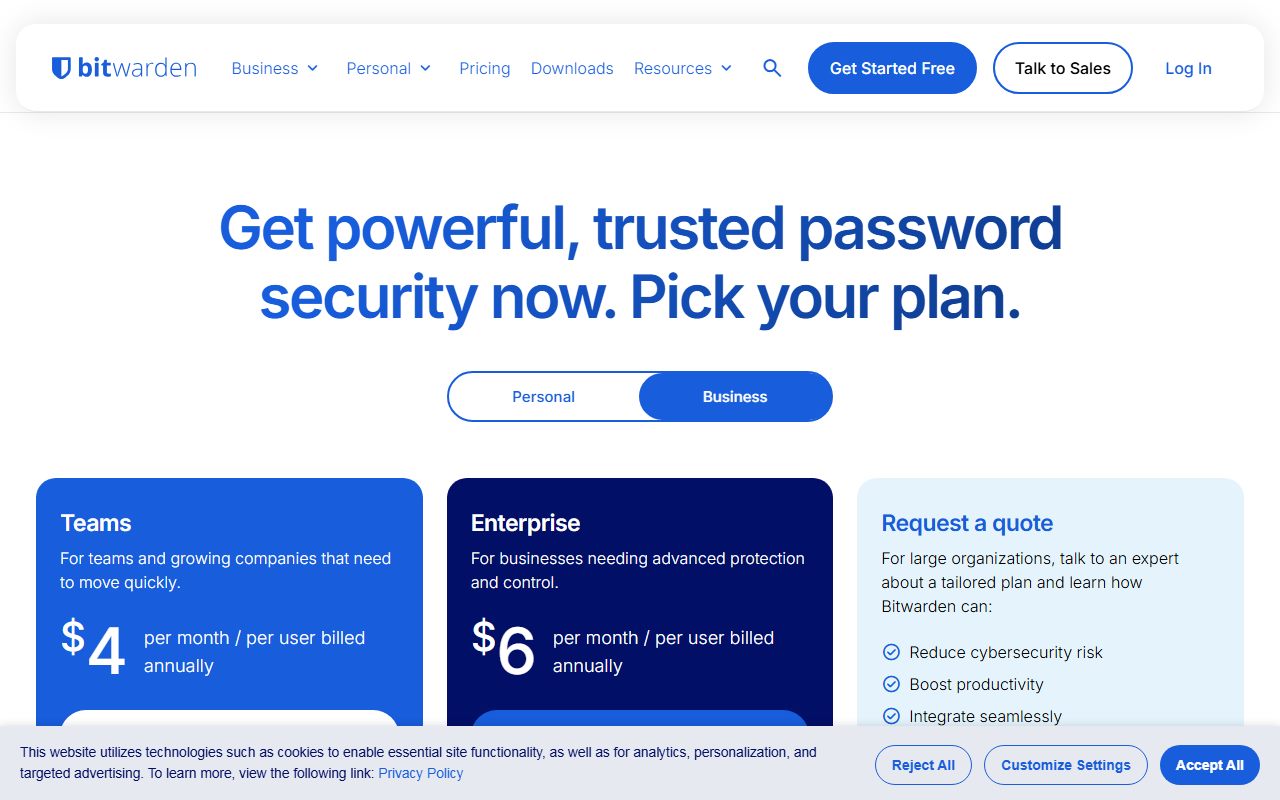
Bitwarden prices a business password manager the way a spreadsheet would like it priced. This is a documentation review built from the business pricing page as displayed on October 20, 2026, not from direct use. Teams shows $4 per month per user billed annually and Enterprise shows $6, both as whole dollars with no cents and no rounding to unpick. The feature table states the number of users as Unlimited on both tiers, with the explanatory line Add as many users as you like with a flat rate per seat. There is no floor, no ceiling and no pack. Ten people therefore cost $480 or $720 for twelve months by our arithmetic, and a hundred people cost ten times that. Value scores 4.5 because Enterprise at $720 a year for ten seats is the cheapest published plan on this desk that carries passwordless single sign-on. The page also states Pricing shown in USD and based on an annual subscription. Taxes not included., which is the clearest currency statement of the four pages we read. The silence is the month-to-month rate, which this page never prints.
Visit Bitwarden
We have no affiliate relationship with this vendor. Link goes to the official site.
Where it is strong
- Both tiers are whole dollars per user per month, so the twelve-month bill is one multiplication with no rounding and no pack arithmetic
- The currency is stated in words on the page twice: Pricing shown in USD and based on an annual subscription. Taxes not included.
- The number of users row reads Unlimited on both Teams and Enterprise, with the line Add as many users as you like with a flat rate per seat
- Enterprise at $6 per user per month is the cheapest published plan in this category that lists passwordless SSO integration, enterprise policies and a self-host option
- The feature table marks absences with a dash rather than omitting the row, so what Teams does not include is visible rather than inferred
- Priority 24/7 email support is listed on Teams, not held back for the dearer tier
- Enterprise includes a free Families plan for all users, which the comparison table places at Enterprise only
Where it falls short
- No month-to-month rate appears anywhere on the business pricing page, so the annual-billing discount cannot be measured against anything
- The free account offered on this page is a personal one: the card reads Get basic password management today. Always free., and no free business organisation tier is displayed
- The trial length is on the navigation button as Start Free 14 Day Trial but not on either business plan card, which both read only Start Free Trial
- Single sign-on, policies, custom roles, account recovery and the self-host option are all dashed out on Teams, so a company with a written security policy starts at $6 rather than $4
- A dedicated engagement success manager and dedicated onboarding are both qualified with for qualified customers, with no threshold published
- No seat minimum is stated, which is generous, but no renewal or true-up rule is stated either
What Bitwarden actually charges for
Bitwarden charges for seats, in whole dollars, with no boundaries. That is the whole structure, and it takes one sentence because the page needs one sentence.
Teams shows $4 per month per user billed annually. Enterprise shows $6. Neither card carries cents, a pack, a floor or a ceiling.
The comparison table states the number of users as Unlimited on both tiers, and explains it in plain words: Add as many users as you like with a flat rate per seat.
Above those two tiers sits a Request a quote card for large organisations, with no figure and three benefit lines rather than features.
This review reads the business pricing page as displayed on October 20, 2026. It grades the price list and the twelve-month arithmetic, not the vault. The editors have not run an account for this piece.
If you are setting this against a plan priced in packs or in documents, read comparing quotes priced in different units before you compare the headline numbers.
Who Bitwarden is best for
A flat per-seat rate with no boundaries suits the companies that pack-priced plans punish, and it is worth naming them.
- Teams whose headcount is a moving number, because no seat crosses a pricing boundary on the way up or down
- Companies that need single sign-on but not an enterprise contract, which Enterprise covers at $6 per user per month
- Buyers who have to put a figure in a budget today and defend it at any headcount, since the rate never changes shape
- Organisations with a self-hosting requirement, which is a listed Enterprise feature rather than a quote
- Security teams that want the certification list in writing before the first call, which the page FAQ provides
- Teams of two to nine people, who have no seat floor to clear here and do have one elsewhere in this category
Who should skip it
Three buyers will find the simplicity costs them something.
- Anyone who needs a month-to-month commitment priced in advance, because the page prints no monthly rate
- Teams of exactly ten who want the lowest possible figure, where a pack-priced plan lands under $480 a year
- Buyers expecting a free organisation tier, which this page does not show
How the pricing is structured
Two business tiers, one billing period, one currency, and the currency stated in words rather than implied by a symbol.
The footnote appears twice on the page: Pricing shown in USD and based on an annual subscription. Taxes not included.
That sentence does more work than it looks. Read from a connection in Vietnam on October 20, 2026 the figures rendered as dollars, and the page says in words which dollars they are.
Two of the four pricing pages we read for this category print a bare dollar sign and never name the currency at all.
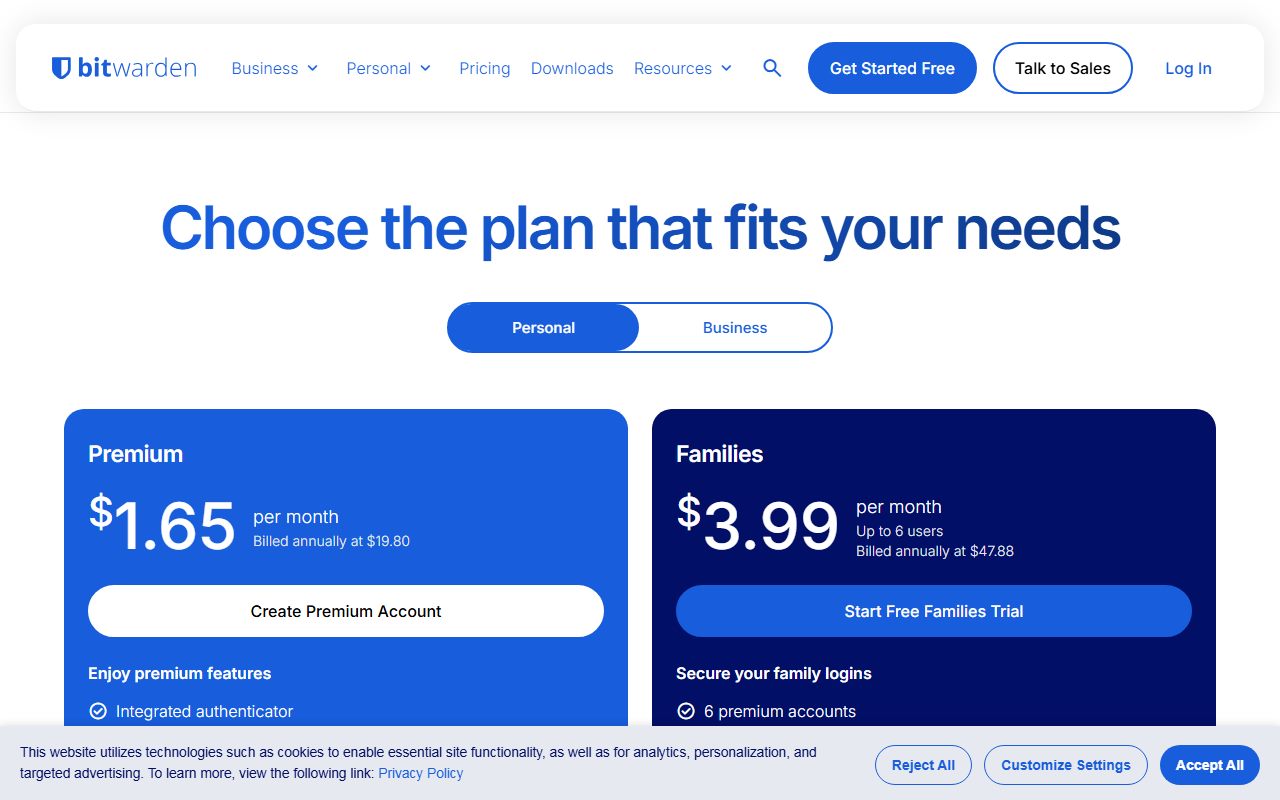
The personal plans on the same page show the structure the business tiers lack. Premium reads $1.65 per month with Billed annually at $19.80, and Families reads $3.99 per month, Up to 6 users, Billed annually at $47.88.
So Bitwarden is perfectly willing to print the annual total next to the monthly rate. It does it for consumers and not for businesses, where the only suffix is per month / per user billed annually.
There is no month-to-month business rate on the page. That is the one figure a buyer cannot check here, which is the same gap we flagged on the e-signature desk in how to read a per-seat pricing page.
What 1, 10, 20 and 50 people pay for 12 months
This is the shortest arithmetic on the desk, because the rate is flat and the units are whole dollars. These are editorial calculations from the displayed annual-billing prices on October 20, 2026, excluding tax.
- Teams at 1 person: $48 a year. Enterprise at 1 person: $72 a year
- Teams at 10 people: $480 a year. Enterprise at 10 people: $720 a year
- Teams at 20 people: $960 a year. Enterprise at 20 people: $1,440 a year
- Teams at 50 people: $2,400 a year. Enterprise at 50 people: $3,600 a year
- The step from Teams to Enterprise is a flat 50 percent at every headcount, which is $240 a year across ten seats
- Cost of one extra hire: $48 a year on Teams, $72 on Enterprise, at any point in the headcount range
The absence of boundaries is the feature worth paying for
Most price lists in this category are shaped by thresholds. This one is not, and the difference shows up at renewal rather than at purchase.
There is no seat minimum, so a four-person company pays for four seats. There is no seat ceiling, so a company that doubles pays double rather than entering a different plan.
The dearest consequence of a boundary is the one nobody budgets for: the hire that moves a team from inside a pack to outside it.
On a pack-priced competitor in this category, the twenty-first person raises the annual bill from $898.20 to $2,265.48 by our arithmetic from published rates.
On Bitwarden the twenty-first person costs $48 a year on Teams. That is the whole event.
The cost of this flatness is that Bitwarden is never the cheapest plan at one specific headcount. A pack built for ten people beats $480 at exactly ten people and nowhere else.
So the choice is a small premium today against no cliff later. Teams that have been caught by a threshold before tend to pay it, and our note on turning a pricing page into a bill explains how to put that risk in writing.
What Teams does not include
Bitwarden marks absences with a dash instead of leaving the row out, so the Teams tier can be read as a list of what you are not buying.
Dashed out on Teams: passwordless SSO integration, policies, Access Intelligence risk remediation, custom roles, a free Families plan for users, the account recovery workflow and the self-host option.
Also dashed on Teams: a dedicated engagement success manager and dedicated onboarding, implementation and training, both of which carry the qualifier for qualified customers on Enterprise.
Included on Teams: API access, event and audit logs described as over 50 types of events retained indefinitely, organisation two-step login via Duo, user groups, the Directory Connector, SCIM support and priority 24/7 email support.
That split is unusually sensible. Directory sync and SCIM are provisioning, and they sit on the cheap tier. Single sign-on and policy enforcement are governance, and they sit on the dear one.
The practical reading is that $4 buys a managed vault and $6 buys a governed one. A company with a compliance questionnaire to answer is buying the $6 plan whatever its headcount.
Ease of use: what the score is built from
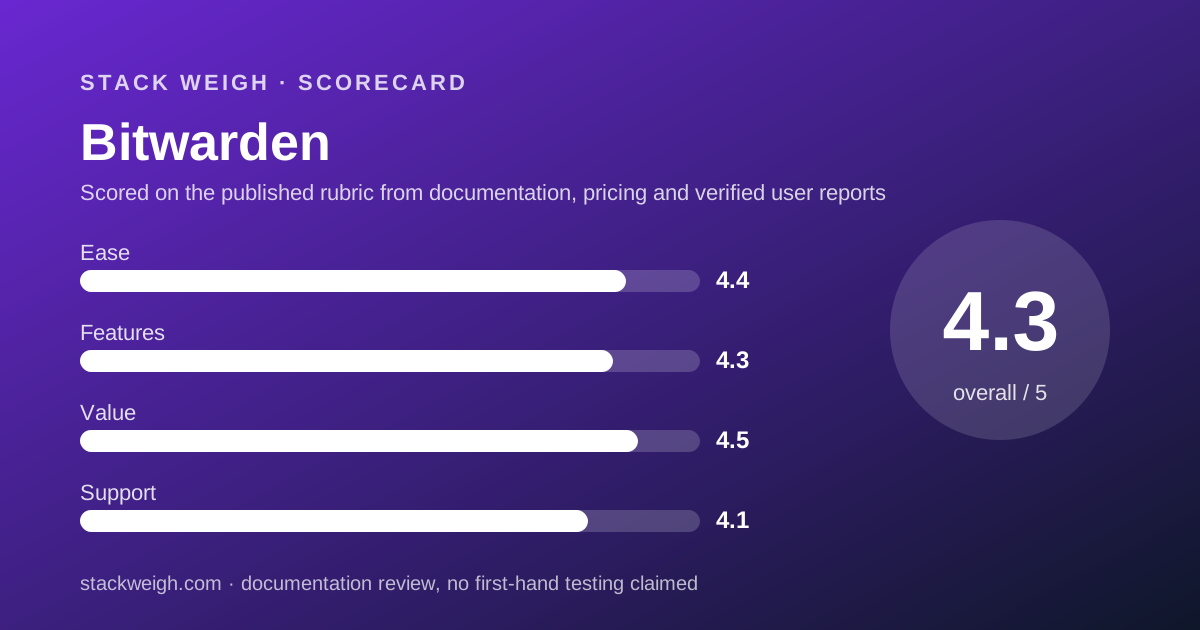
4.4 out of 5. This pillar grades the pricing page and the documented buying path, not the vault.
Whole dollars are worth real credit. A buyer can compute any headcount in their head, which removes the class of error that pack rounding and per-seat cents introduce.
Naming the currency in words, twice, removes the second class of error. So does marking every absent feature with a dash rather than hiding the row.
The deduction is for two omissions. There is no month-to-month rate, and the trial length lives on a navigation button rather than on either plan card.
The page also mixes consumer and business plans in one view, which makes the free card easy to read as a business offer when it is not.
Features: what the score is built from
4.3 out of 5. The documented set on Teams is complete for a small team and the Enterprise additions are governance rather than padding.
The core rows apply to every account: open source code, zero-knowledge encryption, advanced two-step login, built-in phishing protection, unlimited devices and unlimited passwords, and Bitwarden Send.
Event logging is the strongest row on the cheap tier. Over 50 event types with timestamps, client type, IP address and user, retained indefinitely and exportable, is more than most plans at this price document.
Enterprise adds the governance layer and one genuine sweetener: a complimentary Families plan for every user, to share with five friends or family members.
The deduction is for Access Intelligence, which is the newest and least documented row on the page, described in benefit language rather than with a limit or a unit.
Value: what the score is built from
4.5 out of 5, the highest value score on this desk, and it rests on one comparison.
Across the four password-manager price lists we read on October 20, 2026, the cheapest published plan carrying single sign-on is Bitwarden Enterprise at $6 per user per month, or $720 a year for ten people by our arithmetic.
One rival matches that figure exactly at the same headcount. The next published route to single sign-on in this group costs $960 a year for ten people, and the one after that $1,078.80.
Teams at $480 a year for ten people is mid-field rather than cheapest, and it is the cheapest flat rate with no boundary attached.
The half point withheld is for the unpriced monthly option. A value score cannot be complete when one of the two billing choices has no number.
Teams pricing a whole stack should set these totals beside the collaboration invoices in the cheapest team chat and video for a 10-person team, where ten seats of Slack or Zoom Workplace dwarf a credential line.
Support: what the score is built from
4.1 out of 5, the strongest support documentation of the four pages we read for this category.
Priority 24/7 email support appears on Teams as well as Enterprise, described as priority support from the global, 24/7 Bitwarden support team. Most plans at four dollars a seat do not name a channel at all.
Enterprise adds a dedicated engagement success manager and dedicated onboarding, implementation and training, both marked for qualified customers.
The deduction is for that qualifier, which has no published threshold, and for the absence of any response-time target on either tier.
No phone channel is listed on either business tier.
What verified users report
This review is built from the vendor's own price list. We have not compiled a dated sample of G2, Capterra or Reddit reports on Bitwarden billing, and we will not summarise impressions we have not collected.
Two questions are worth putting to other buyers. Whether mid-term seat additions prorate at the annual rate, and what the qualified-customer threshold for onboarding turned out to be in practice.
Limits stated by the vendor
From the business pricing page, checked October 20, 2026: no seat minimum; the number of users listed as Unlimited on Teams and Enterprise; unlimited sharing through collections on both; event logs retained indefinitely.
The currency footnote reads Pricing shown in USD and based on an annual subscription. Taxes not included. The FAQ claims ISO 27001, SOC 2 Type II, SOC 3, GDPR and CCPA.
Not published on this page: any month-to-month business rate, a trial length on the plan cards, a support response target, a refund window, a data residency list, and the qualified-customer threshold for dedicated onboarding.
Alternatives
The alternative to Bitwarden is a different relationship with thresholds, not a different feature set.
A pack-priced plan beats $480 a year at exactly ten seats and then ends abruptly at twenty, which converts a pricing question into a hiring question. It is the right answer for a team that knows its headcount will not move.
A tier-plus-add-on plan undercuts $4 a seat on the entry vault and then charges separately for dark-web monitoring and reporting. It wins for teams that want a thin base, and it needs the add-on list priced before signing.
A two-product plan that splits the vault and the risk detection into separate per-seat lines is the dearest shape in this group and the only one that prices detection at all.
Choose Bitwarden if you want one rate that survives growth. Choose a pack if your headcount is fixed, and a modular plan if your requirements are. Budgeting for usage-based pricing covers how to cap the modular kind before it is switched on.
Buy it if, skip it if
Buy Bitwarden if your headcount moves, you want whole-dollar arithmetic, and you need single sign-on at the lowest published figure in this category. Skip it if you need a monthly commitment priced in advance or a free business tier.
Before committing, ask for the month-to-month rate in writing. It is the only number this page does not give you, and it is the one that decides whether an annual commitment is worth making.
Bottom line
Bitwarden publishes the least complicated price list in this category and one of the two cheapest routes to single sign-on. Ten people cost $480 a year on Teams and $720 on Enterprise, by our arithmetic from the displayed rates.
Nothing about those figures changes at the eleventh seat, the twenty-first or the fifty-first, which is the real product here. The flatness costs a small premium at exactly ten seats and saves a cliff everywhere else.
All figures come from the business pricing page as displayed on October 20, 2026, in the currency the page names in words. The month-to-month rate is not on the page, so ask for it before you commit a year.
Visit Bitwarden
We have no affiliate relationship with this vendor. Link goes to the official site.