 Stack
Stack1Password vs Bitwarden: the 12-month bill
Two password managers, two different billing units, and the cheaper one changes twice between one seat and fifty. Bitwarden charges a flat $4 per user per month on Teams with no seat minimum and no ceiling. 1Password sells a Teams Starter Pack as a flat $24.95 a month for up to ten members, with a ten-member floor and a twenty-member cap, then switches to $8.99 per user per month on Business. That shape means Bitwarden is cheaper from one to six seats, 1Password is cheaper from seven to twenty, and Bitwarden is cheaper again from twenty-one upward by a very large margin. All figures were read from both vendors' business pricing pages on October 22, 2026.
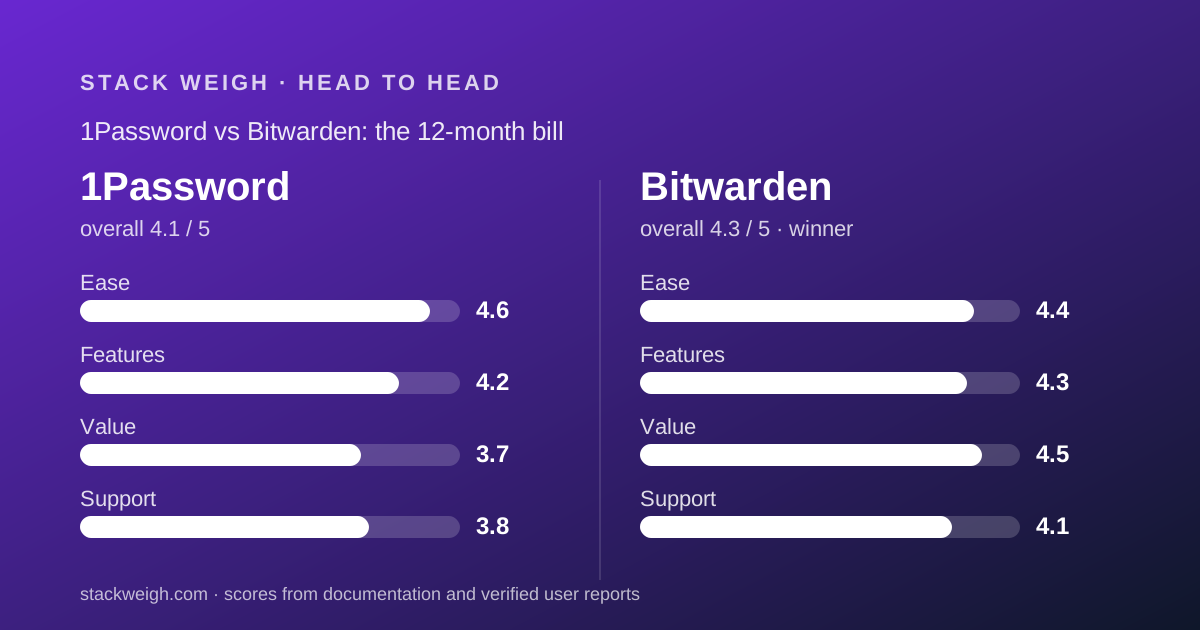
 4.11Password
 4.3Bitwarden
The short answer depends on how many seats you are buying
On our rubric Bitwarden takes this comparison, because it is cheaper at both ends of the seat range, prints a longer certification list and never caps a plan. That is why it carries the winner badge above.
In the middle of the range it loses on price, and the gap is not small.
- Cheapest from one to six seats: Bitwarden. Teams is $4 per user per month billed annually, so six people cost $288 a year against $299.40 for the smallest 1Password pack
- Cheapest from seven to twenty seats: 1Password. The Teams Starter Pack is a flat $24.95 a month, or $299.40 a year, for up to ten members, with extra seats at $4.99 each per month
- Cheapest from twenty-one seats upward: Bitwarden, heavily. At twenty-one people Bitwarden Teams is $1,008 a year and 1Password Business is $2,265.48
- No direct use is involved on either side. Both grades come from the two business pricing pages and their FAQs, read on October 22, 2026
The two price lists, as the vendors print them
Every figure below is a string from one of the two pricing pages or their FAQ sections, read on October 22, 2026. Nothing here is interpolated.
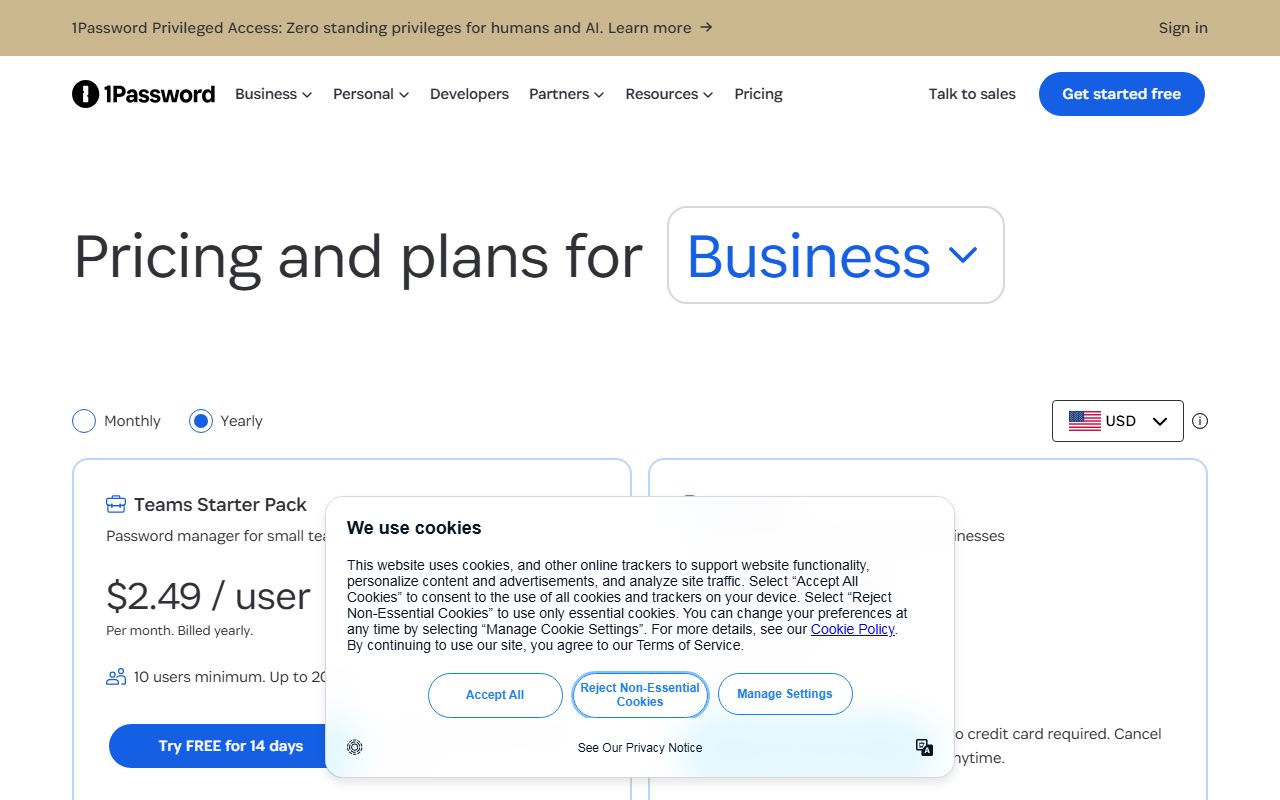
- 1Password Teams Starter Pack: $2.49 / user, Per month. Billed yearly. The FAQ restates it as $24.95 per month, or $299.40 per year, including ten members
- 1Password Teams, monthly billing: $3.49 / user in Canadian dollars and $2.99 / user in US dollars, Per month. No pack total is published for monthly billing
- 1Password Teams seat limits: 10 users minimum. Up to 20 users. Additional seats cost $4.99 per seat per month in USD, on annual billing
- 1Password Business: $8.99 / user, Per month. Billed yearly, restated in the FAQ as $107.88 per user per year. 1 user minimum. $10.99 on monthly billing
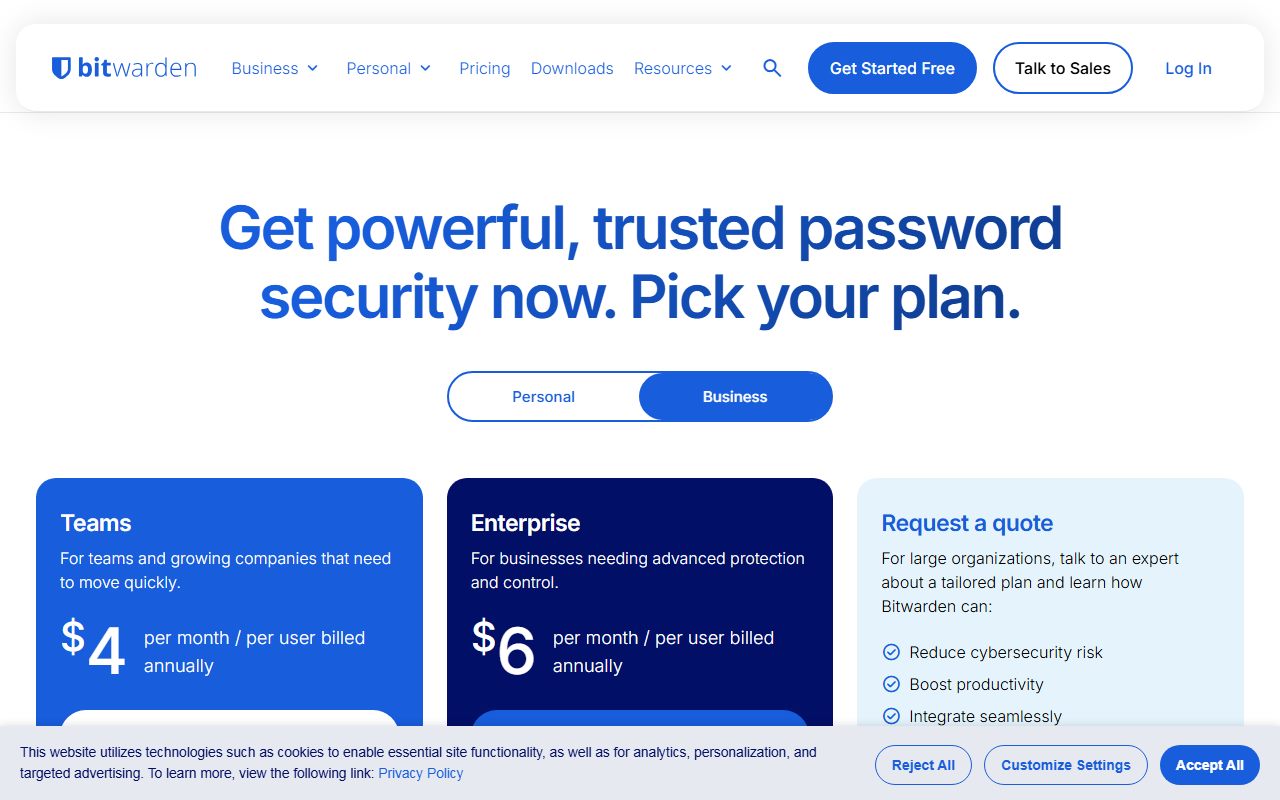
- Bitwarden Teams: $4 per month / per user billed annually. The Number of users row reads Unlimited. No seat minimum is stated
- Bitwarden Enterprise: $6 per month / per user billed annually. Number of users also reads Unlimited
- Bitwarden currency and billing footnote: Pricing shown in USD and based on an annual subscription. Taxes not included
- Above those tiers: 1Password routes to customized, volume-based pricing options via sales. Bitwarden offers Request a Quote for large organizations
Twelve-month totals at 1, 5, 20 and 50 seats
These are editorial calculations from the published annual-billing rates, excluding tax. The 1Password column always takes the cheaper of its own two routes.
- 1 seat: Bitwarden Teams $48. 1Password Business $107.88. Bitwarden is 55 percent cheaper
- 5 seats: Bitwarden Teams $240. 1Password Teams Starter Pack $299.40, which is the floor price whether you fill it or not. Bitwarden is cheaper by $59.40
- 10 seats: Bitwarden Teams $480. 1Password pack $299.40. 1Password is cheaper by $180.60
- 20 seats: Bitwarden Teams $960. 1Password pack plus ten extra seats at $4.99 each per month, which is $299.40 plus $598.80, or $898.20. 1Password is cheaper by $61.80
- 21 seats: Bitwarden Teams $1,008. 1Password Business $2,265.48, because the pack stops at twenty. Bitwarden is cheaper by $1,257.48
- 50 seats: Bitwarden Teams $2,400. 1Password Business $5,394. Bitwarden is cheaper by $2,994
- Like for like on single sign-on at 20 seats: Bitwarden Enterprise $1,440 against 1Password Business $2,157.60
1Password prices a pack; Bitwarden prices a seat
This is the whole comparison in one sentence, and everything else follows from it.
Bitwarden's business tiers are flat per-seat rates with the Number of users row reading Unlimited on both. Four dollars buys one seat, forty dollars buys ten, two hundred buys fifty. There is no floor and no ceiling.
1Password sells the first ten seats as a bundle. The FAQ is explicit: Teams Starter Pack costs $24.95 per month when billed annually, or $299.40 per year, and includes 10 members.
That pack has a floor and a cap. The card reads 10 users minimum. Up to 20 users.
So a three-person company pays the ten-person price, and a twenty-five-person company cannot use the pack at all.
The card also prints $2.49 / user next to the pack. That is a derived figure, not a rate you can buy: $24.95 divided by ten members is $2.495, rounded down. The pack is the price.
This is the exact distinction comparing quotes priced in different units exists to handle: a per-seat number and a per-pack number cannot be compared until both are twelve-month totals.
Bitwarden wins the small end because 1Password has a floor
At one, two or three seats the comparison is lopsided, and the reason is structural rather than a matter of discounting.
Bitwarden Teams has no stated seat minimum. One person pays $48 a year. Three people pay $144.
1Password's cheapest route at those headcounts is not the pack but Business, at $8.99 per user per month, because the pack's ten-member floor makes it dearer than Business until you reach three people. One person pays $107.88 a year.
From three seats upward the pack is the cheaper 1Password route, but it is still $299.40 whether three people use it or ten.
So a five-person company pays $299.40 on 1Password and $240 on Bitwarden. The gap is modest in dollars and large in percentage: 25 percent.
The crossover sits at seven seats. Six people cost $288 on Bitwarden and $299.40 on 1Password. Seven cost $336 and $299.40. That is where the pack starts paying for itself.
1Password wins from seven to twenty seats, by up to 38 percent
Between seven and twenty seats the pack is the best price in this comparison, and it is not close in the middle of that band.
At ten seats, 1Password is $299.40 and Bitwarden is $480. That is 38 percent less.
At fifteen seats the pack costs $299.40 plus five extra seats at $4.99 per seat per month, which is $598.80 against Bitwarden's $720.
At twenty seats, the last point the pack is available, 1Password is $898.20 and Bitwarden is $960.
Notice how the advantage erodes. The extra-seat rate of $4.99 per month is $59.88 a year, which is more than Bitwarden's whole $48 seat. So every hire past the tenth narrows the gap.
A buyer at exactly ten seats is in the best position any 1Password customer can be in. A buyer at nineteen is paying a premium per marginal hire while still being slightly ahead overall.
The twenty-first hire is a cliff on 1Password and a rounding error on Bitwarden
This is the single most expensive number in the comparison, and it is published rather than inferred.
The 1Password card reads Up to 20 users. The FAQ repeats it: you can add up to 10 additional seats, for 20 members total.
So the twenty-first member cannot be added to the pack. The account moves to Business at $8.99 per user per month, which applies to every seat, not just the new one.
Twenty seats on the pack is $898.20 a year. Twenty-one seats on Business is $2,265.48. One hire has raised the bill by $1,367.28, a 152 percent increase.
Bitwarden has no such step. The twenty-first seat costs $48, the same as the first.
There is a smaller version of the same problem at the bottom of the range. 1Password's pack floor means seats one through nine all cost $299.40 collectively, so hiring your second employee is free and hiring your eleventh costs $59.88.
Any company planning to cross twenty people inside a contract term should price Business from the start rather than the pack, which is the budgeting habit set out in how to read a per-seat pricing page and in budgeting for usage-based pricing.
On single sign-on, Bitwarden is cheaper at every headcount
Both vendors put identity-provider integration one tier above their entry plan, so the honest comparison for a company with an identity stack is Business against Enterprise.
1Password Business, at $8.99 per user per month billed yearly, is described in its own card copy as Everything from Teams Starter Pack, plus integration with Okta, Entra ID, OneLogin, Duo, and more, Watchtower alerts and role-based vault sharing.
Bitwarden Enterprise, at $6 per month per user billed annually, carries passwordless SSO integration, enterprise policies, Access Intelligence, custom roles, a self-host option, account recovery workflow and a free Families plan for every user.
At that like-for-like level there is no crossover. One seat is $72 against $107.88. Twenty seats are $1,440 against $2,157.60. Fifty seats are $3,600 against $5,394.
Bitwarden is 33 percent cheaper at every one of those points, and it is the only one of the two that publishes a self-host option on a price list.
Monthly billing is published by one vendor and not the other
A buyer who will not commit a year has one option here rather than two.
1Password publishes both states. Behind the monthly toggle, Teams reads $2.99 / user and Business reads $10.99 / user, both Per month. Against the annual rates of $2.49 and $8.99, that is a discount of 16.7 percent on Teams and 18.2 percent on Business.
There is one gap. No pack total is published for monthly billing, only the per-user figure, so a ten-person team cannot read its monthly bill off the page.
Bitwarden publishes no monthly business rate at all. Teams and Enterprise print only per month / per user billed annually, and the page footnote says Pricing shown in USD and based on an annual subscription.
So on monthly terms the comparison stops being a comparison. 1Password Business at $10.99 a seat is the only published monthly business rate of the two.
Our note on turning a pricing page into a bill treats a missing monthly rate as a real cost rather than an omission: it means the cheapest quote requires a year of cash up front. The same pattern decides the winner in choosing an e-signature plan by monthly volume.
Free tiers exist on both sides and neither is a business plan
Bitwarden has the more generous free offer and it is a personal one.
Its page reads Get basic password management today. Always free, alongside Premium at $1.65 per month billed annually at $19.80, and Families at $3.99 per month for up to 6 users, billed annually at $47.88.
The free account is not a business organisation. Neither business tier has a free version.
1Password publishes no free plan of any kind on its business pricing page. Its FAQ offers a 14-day trial of Business, and the Teams card carries Try FREE for 14 days.
Bitwarden's business cards read Start Free Trial with no length stated on the page we read.
One genuine Bitwarden perk is worth naming because it is on the price list rather than in marketing: Enterprise includes a Free Families plan for users, described as a complimentary Families plan for every user to share with five friends or family members.
What each page publishes about security and limits
On documented compliance this is not a close comparison, and it is worth separating from price.
Bitwarden's FAQ names ISO 27001, SOC 2 Type II and SOC 3, plus GDPR, CCPA, HIPAA and the Data Privacy Framework. The page also states 5 GB personal and 5 GB for organization items (expandable), event logs covering over 50 types of events retained indefinitely, and two-step login with up to 10 hardware security keys.
Its Secrets Manager rows are priced in units rather than left vague: up to 20 machine accounts on Teams and 50 on Enterprise, with $1 per additional machine account.
1Password's feature table carries a single compliance row: Meet industry standards with SOC 2 Type II certification. It publishes phone support Monday to Friday, 9 AM to 5 PM EST, which Bitwarden does not offer at all.
Bitwarden's support row is Priority 24/7 email support on both tiers, with a dedicated engagement success manager and dedicated onboarding on Enterprise for qualified customers.
So 1Password publishes a phone line and Bitwarden publishes round-the-clock email, a longer certification list and more numeric limits.
Choose 1Password if, choose Bitwarden if
The decision is almost entirely a headcount decision, with one exception for buyers who need a phone line.
- Choose 1Password if your team is between seven and twenty people and will stay there, where the $299.40 pack is the cheapest published price in this comparison
- Choose 1Password if a published phone support window matters, since Monday to Friday, 9 AM to 5 PM EST is on its feature table and Bitwarden offers no phone channel
- Choose 1Password if you need a monthly-billed business plan, because it is the only one of the two that prints a monthly rate
- Choose Bitwarden if you are under seven seats or over twenty, which covers most companies at either end of the range
- Choose Bitwarden if single sign-on is a requirement, because Enterprise at $6 a seat undercuts 1Password Business at $8.99 by a third at every headcount
- Choose Bitwarden if you need a named certification list or a self-host option, both of which are published rows rather than sales conversations
- Choose Bitwarden if you are hiring fast, since no seat on it ever triggers a tier change
What verified users report
This comparison is built from the two vendors' own price lists. We have not compiled a dated sample of G2, Capterra or Reddit reports on either vendor's billing, and we will not summarise impressions we have not collected.
Both pages carry customer quotes, which we have not verified and do not treat as a source for anything priced. The Bitwarden page also cites a third-party comparison report naming itself the leading solution, which is a vendor citation rather than independent evidence.
One question is worth putting to buyers who have signed with 1Password: whether the move from the Teams pack to Business was pro-rated or charged from the renewal date.
Bottom line
Bitwarden is the better default and 1Password has a genuine window.
If you employ between seven and twenty people, the 1Password Teams Starter Pack at $299.40 a year is the cheapest published password management in this comparison, and at exactly ten seats it is 38 percent below Bitwarden.
Outside that window Bitwarden wins and the margins grow. Fifty seats are $2,400 against $5,394. Twenty-one seats are $1,008 against $2,265.48, because 1Password's pack stops at twenty and the whole account reprices.
On single sign-on, certifications and self-hosting, Bitwarden wins at every headcount. On phone support and monthly billing, 1Password is the only option.
All figures come from the two business pricing pages and their FAQ sections as displayed on October 22, 2026. Our twelve-month totals are editorial arithmetic from those published rates and exclude tax. Read the full 1Password review and Bitwarden review for the pillar scores behind this verdict, and how to read a per-seat pricing page for the method.
Frequently asked
Which is cheaper for a 10-person team?
1Password, by $180.60 a year. The Teams Starter Pack is $299.40 a year for up to ten members on annual billing, per its pricing FAQ. Bitwarden Teams at $4 per user per month is $480 a year for the same ten people by our arithmetic.
Which is cheaper for a 50-person team?
Bitwarden, by $2,994 a year. Bitwarden Teams is $2,400 a year at $4 per user per month. 1Password has no pack above twenty members, so fifty seats go to Business at $107.88 per user per year, or $5,394.
Where exactly does the cheaper option change?
Twice. At seven seats, where the $299.40 1Password pack beats Bitwarden's $336, and at twenty-one seats, where the pack's twenty-member cap forces a move to $107.88 a user and the annual bill jumps from $898.20 to $2,265.48.
Does either one have a free plan?
Bitwarden does, for individuals: the page reads Get basic password management today. Always free. Neither sells a free business organisation. 1Password offers only a 14-day trial, which its FAQ states for Business.
Which one includes single sign-on?
Both, one tier up. On 1Password, identity-provider integration with Okta, Entra ID, OneLogin and Duo is a Business feature at $8.99 per user per month. On Bitwarden, passwordless SSO is an Enterprise row at $6 per user per month.
Can I pay either of them monthly?
1Password yes, Bitwarden not on the page we read. 1Password prints $2.99 and $10.99 per user per month behind its monthly toggle. The Bitwarden business tiers print only per month / per user billed annually, with a footnote that pricing is based on an annual subscription.
Which publishes more certifications?
Bitwarden. Its FAQ names ISO 27001, SOC 2 Type II, SOC 3, GDPR, CCPA, HIPAA and the Data Privacy Framework. The 1Password feature table carries one row: Meet industry standards with SOC 2 Type II certification.
Visit 1Password
We have no affiliate relationship with this vendor. Link goes to the official site.
Visit Bitwarden
We have no affiliate relationship with this vendor. Link goes to the official site.