 Stack
Stack
Slack
Per-seat team chat where the real decision is Pro at $7.25 versus Business+ at $15, billed annually
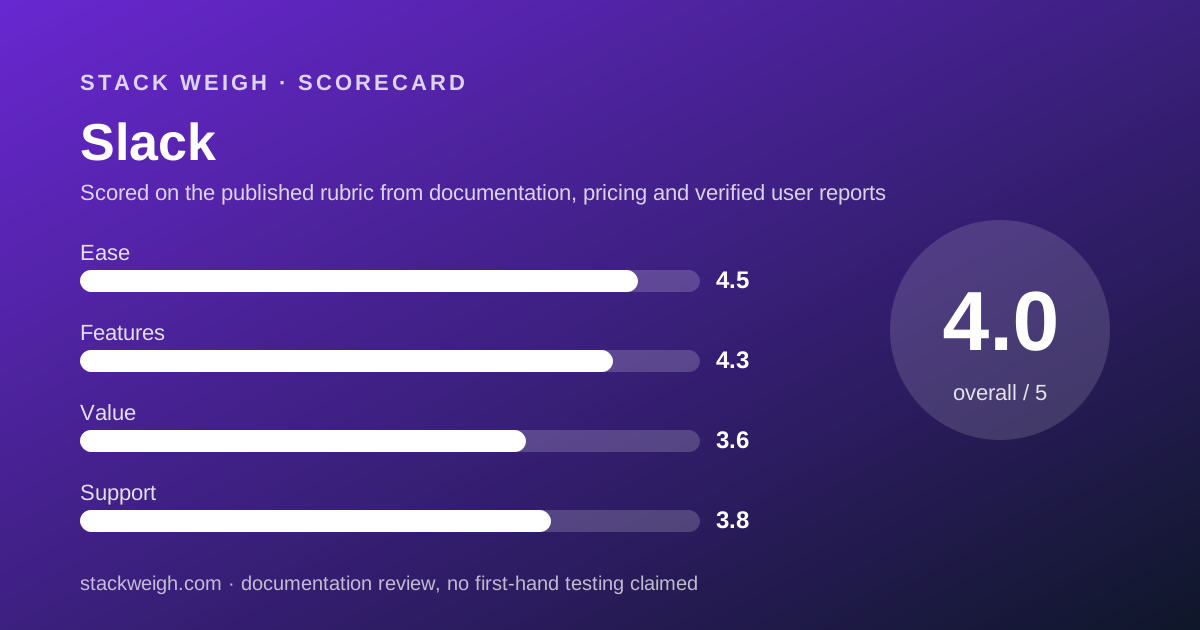
Scored on the published rubric, from documentation, pricing and verified user reports.
Best for: Teams of 5 to 50 that live in chat all day and want the widest app ecosystem, and can justify $870 a year for 10 people on Pro.
Verdict
Slack is the reference point every other team chat tool is priced against, and its pricing page is one of the cleaner ones in the category: four tiers, two billing periods, no seat minimum stated and no AI add-on line. This is a documentation review built from the pricing page and help centre as of October 10, 2026, not from direct use. The number that matters is $7.25 per user per month on Pro, billed annually, which puts a 10-person team at $870 for 12 months by our arithmetic. The free plan is a 90-day window on your own history with 10 app integrations and 1:1 huddles only, which is generous for a pilot and deliberately uncomfortable for a working team. Business+ doubles the price to $15 for advanced AI, 24/7 support and workflow branching, and most teams under 50 will not need it. Value scores 3.6 because Slack costs more than Google Workspace Business Starter while bundling less: no mail, no storage, no 100-person video. Buy it for the chat experience and the integrations, not for the bundle.
Visit Slack
We have no affiliate relationship with this vendor. Link goes to the official site.
Where it is strong
- Clear four-tier pricing with no stated seat minimum, so a 3-person team pays for 3 seats
- Fair billing: members inactive for 28 days are credited, per the pricing page
- Pro unlocks unlimited history, unlimited apps, group huddles and SAML SSO at the entry paid tier
- Annual billing is listed about 17% below monthly on Pro and Business+
- Free plan has no time limit and keeps the last 90 days of messages
Where it falls short
- Pro costs more per seat than Google Workspace Business Starter while including no mail, storage or 100-seat video
- Free plan caps history at 90 days and integrations at 10, which forces the upgrade decision early
- 24/7 support only arrives at Business+, $15 per seat
- Enterprise+ is $45 per seat and sales-only, a 3x jump from Business+
- Storage limits and trial length are not stated on the pricing page
What Slack actually is
Slack is a per-seat chat product with a free tier that works, a paid tier that most teams end up on, and a premium tier aimed at companies with compliance departments. It sells the chat layer only: no mailbox, no document storage quota, no 100-person meeting room.
That matters for a pricing desk because the obvious rivals are bundles. Google Workspace sells chat as one line inside a mail-and-storage subscription. Zoom Workplace sells chat as one line inside a video subscription. Slack sells chat as the whole product.
This review reads the pricing page as published on October 10, 2026. It grades the structure of the pricing, what each tier includes and what a real team pays over a year. It does not describe how Slack feels to use; the editors have not run a test workspace for this piece.
Who Slack is best for
The pricing favours a specific kind of team. Read the list against your own.
- Teams of 5 to 50 where chat is the primary working surface and email is secondary
- Companies that already pay Google or Microsoft for mail and storage and want a better chat layer on top
- Teams whose workflows depend on integrations, because Pro lifts the 10-app cap entirely
- Organisations with fluctuating headcount, because fair billing credits seats that go quiet for 28 days
- Teams that need SAML SSO and SCIM provisioning without paying for a top tier
- Agencies and consultancies that message many outside organisations, since Pro allows group external messaging with up to 250 organisations
Who should skip it
Three profiles pay more than they need to with Slack.
- Teams that want one bill for chat, mail, storage and video; a Google Workspace Business Starter seat costs $7.00 annually and covers all four
- Teams whose main activity is scheduled video meetings; Zoom Workplace Pro at $14.16 annually includes Team Chat alongside 30-hour meetings
- Groups of two or three people who talk mostly one-to-one and rarely need to search beyond 90 days
What the free plan includes (as of October 2026)
The free plan is described on the pricing page as free forever, and its limits are stated plainly. Message history is capped at 90 days, with the page noting that upgrading unlocks the previous 12 months. App integrations are capped at 10. Huddles are 1:1 only. External messaging through Slack Connect is 1:1 only. One workspace.
The page also lists data retention of up to one year and basic AI features plus a limited Slackbot trial on the free tier.
Two figures are missing. The pricing page does not state a file storage limit for the free plan, and it does not state a trial length for paid tiers. We note both as not published rather than guessing.
For a team deciding whether to pay, the 90-day window is the constraint that bites first. Ten integrations is enough for a calendar, a ticketing tool and a few bots; it is not enough for an engineering team.
What sits behind the paywall
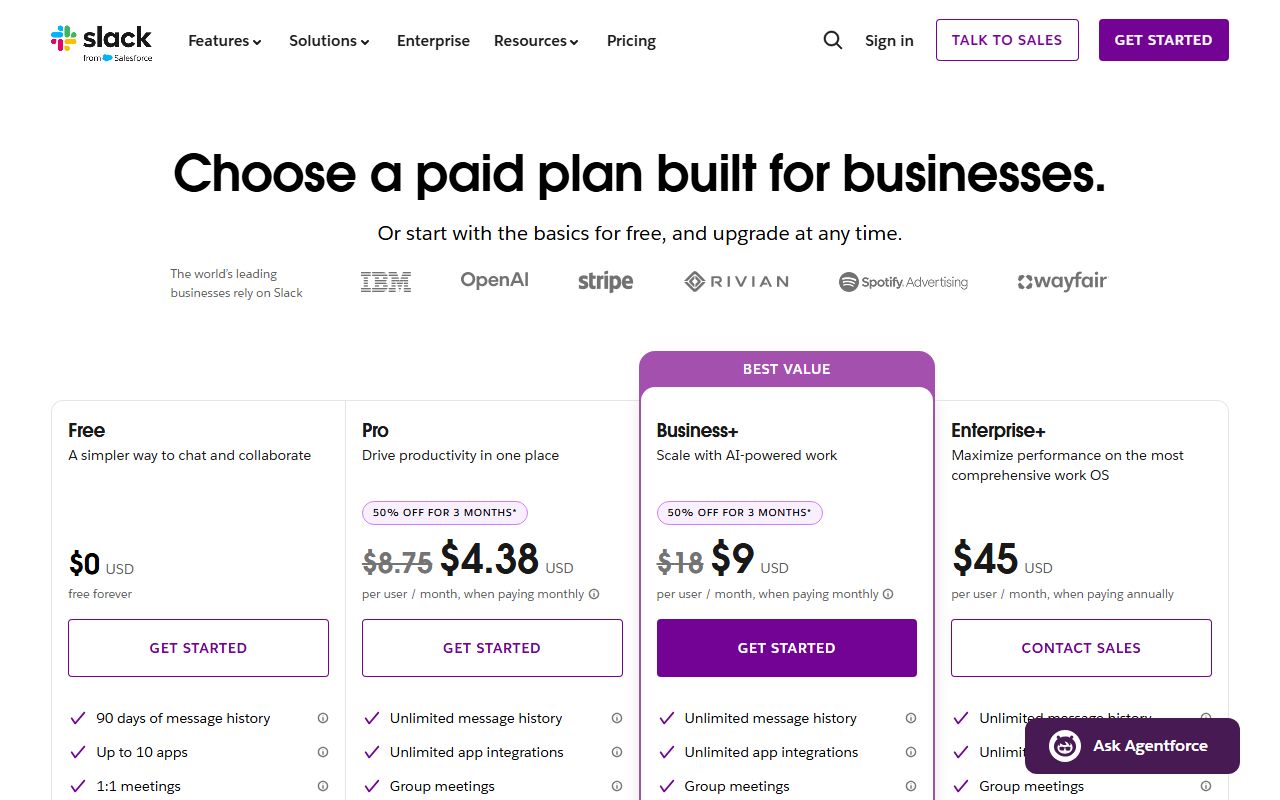
Pro, at $7.25 per user per month billed annually or $8.75 monthly, is where the product becomes complete. Per the pricing page it adds unlimited message history, unlimited app integrations, group huddles, group external messaging with up to 250 organisations, basic AI, SAML-based SSO, SCIM and native data loss prevention. Still one workspace.
Business+, at $15 annually or $18 monthly, adds advanced AI (Slackbot, AI workflow generation, AI search, daily recaps), 24/7 support and conditional branching in Workflow Builder. Still one workspace.
Enterprise+, at $45 annually and sold through sales, adds enterprise search, multiple SAML configurations, granular roles, custom terms of service, information barriers, legal holds, a Discovery API, unlimited workspaces and a 24/7 priority support tier with a 4-hour first response time.
Slack Enterprise Key Management is listed as an add-on with no price shown. No separate AI add-on price appears; AI is bundled by tier. Business+ customers on invoice plans can buy Flex Credits through Salesforce for higher message limits, again with no price given.
Several feature rows on the page show fewer values than there are plan columns, so we cannot confirm which plans include canvases, lists or data residency. Where the vendor's table is ambiguous, the honest answer is that the table is ambiguous.
How the pricing is structured
Slack is pure per-seat pricing with two billing periods and no stated seat minimum. That is the simplest structure in this category, and it means the method in our per-seat guide applies without adjustment: find the tier that contains the feature you cannot live without, count every person who needs access, multiply by twelve.
Annual billing is listed at $7.25 against $8.75 monthly on Pro, which is roughly 17% lower. On Business+ it is $15 against $18, also roughly 17%. These percentages are our arithmetic from the listed prices; the page does not state a discount rate.
The promotional line is worth reading carefully. A 50% discount for 3 months applies only to monthly billing, only to Pro and Business+, and only if you buy online within 7 days of creating the team. After 3 months standard monthly pricing applies. It does not apply to annual plans.
Fair billing is the structural feature that distinguishes Slack from most per-seat vendors. The pricing page states that active members are those who take an action within a 28-day period, and inactive paid members receive a prorated credit. New members are charged a prorated amount for the rest of the billing period.
Payment is by credit card on any plan. Annual plans may qualify for invoicing by ACH or wire. Nonprofit and education discounts exist, with qualification details in the help centre rather than on the page. No tax footnote appears.
If you are weighing Slack against a tool priced per workspace or per message, our guide to comparing quotes in different units walks through the conversion.
What a 10-person team pays for 12 months
The figures below are editorial calculations from the list prices on the pricing page as of October 10, 2026. They assume all 10 seats are active every month, no promotional discount, and no tax. They are not vendor quotes.
- Free: $0, with 90-day history and 10 apps for the whole team
- Pro, billed annually: $7.25 x 10 seats x 12 months = $870
- Pro, billed monthly: $8.75 x 10 x 12 = $1,050
- Pro, monthly with the 3-month 50% promotion: ($4.38 x 3 + $8.75 x 9) x 10 = roughly $919
- Business+, billed annually: $15 x 10 x 12 = $1,800
- Business+, billed monthly: $18 x 10 x 12 = $2,160
- Enterprise+, billed annually: $45 x 10 x 12 = $5,400, though a 10-person team is not the target buyer
The same arithmetic at 1, 5, 20 and 50 seats
Because there is no seat minimum and no volume tier, Slack scales linearly. On Pro billed annually: 1 seat is $87 a year, 5 seats are $435, 20 seats are $1,740 and 50 seats are $4,350. On Business+ annually: $180, $900, $3,600 and $9,000 respectively.
The absence of a volume discount on the public page is a real cost at 50 seats. Teams approaching that size should expect to negotiate rather than pay the list price, but the page gives no signal of where negotiation begins.
Fair billing lowers these figures in practice if some seats go quiet, but we do not model that because the proportion of inactive seats is specific to each team. The note on turning a pricing page into a bill shows the same calculation on three other tools.
Ease of use: what the score is built from
4.5 out of 5. This pillar grades the pricing page and the onboarding path as documented, not the interface. Slack's page states each tier's price in both billing periods on one screen, lists limits as numbers rather than adjectives, and explains fair billing in plain words.
The deductions are for the feature rows that show fewer values than plan columns, which leave a buyer unsure whether canvases or data residency are in their tier, and for the unstated storage limit on the free plan.
Features: what the score is built from
4.3 out of 5. At the Pro tier the documented feature set is complete for a chat product: unlimited history, unlimited integrations, group huddles, external messaging to 250 organisations, SSO, SCIM and DLP. Putting SAML SSO on the entry paid tier is unusual and earns credit.
The deduction is for scope rather than quality. A Slack seat buys chat. A Google Workspace Business Standard seat at $14 annually buys chat, mail, 2 TB pooled storage and 150-person meetings with recording. Slack's feature list is deep inside its lane and narrow outside it.
Value: what the score is built from
3.6 out of 5. The arithmetic drives this score. Slack Pro at $7.25 is $0.25 more per seat than Google Workspace Business Starter at $7.00, and Starter includes a mailbox, 30 GB of storage and 100-participant Meet calls. A team that needs both products pays for both.
Against Zoom Workplace Pro at $14.16, Slack Pro looks cheap, but the comparison is uneven: Zoom's Pro includes 30-hour meetings and 10 GB cloud storage per user, which Slack does not offer at any tier.
What recovers the score is fair billing and the absence of a seat minimum. For a team whose headcount changes month to month, those two terms can be worth more than a lower list price. The score reflects the list price, because that is what the page publishes.
Support: what the score is built from
3.8 out of 5. The pricing page places 24/7 support at Business+ and a 24/7 priority tier with a 4-hour first response at Enterprise+. It does not describe the support level on Free or Pro beyond implying it is standard.
For a 10-person team on Pro, that means support is whatever standard means, and the page does not define it. The deduction is for that gap. Teams for whom a response-time commitment matters should price Business+ at $1,800 a year for 10 seats, more than double Pro.
What verified users report
This review is built from vendor documentation. We have not yet compiled a dated sample of G2, Capterra or Reddit reports for Slack, and we will not summarise impressions we have not collected. This section will be updated with sourced, dated findings when that sample exists.
In the meantime, the questions worth asking other teams are specific: whether fair billing credits appeared on their invoices as described, whether the 90-day free history was a problem before or after they chose to pay, and how long standard support took to respond.
Limits stated by the vendor
From the pricing page, checked October 10, 2026: free message history 90 days; free app integrations 10; free huddles 1:1 only; free and Pro and Business+ limited to one workspace; group external messaging up to 250 organisations on Pro and above; the 50% promotion applies to monthly billing only for 3 months and must be purchased within 7 days of team creation.
Not stated on the page: file storage per plan, trial length for paid tiers, a seat minimum, a participant cap for huddles, and the price of Enterprise Key Management or Flex Credits. Buyers who need any of these should ask sales for the figure in writing before signing.
Alternatives
Two products overlap with Slack enough to be priced against it directly.
Google Workspace
Choose Google Workspace if you need mail, storage and video in the same bill, because Business Starter at $7.00 annually undercuts Slack Pro while bundling all three. Otherwise choose Slack if chat is the product and you already have a mail provider. Our Slack vs Google Workspace comparison runs the numbers at 1, 5, 10, 20 and 50 seats.
Zoom Workplace
Choose Zoom Workplace if scheduled video meetings are the centre of the working week, because Pro at $14.16 annually bundles 30-hour meetings, 10 GB storage per user and Team Chat. Otherwise choose Slack if meetings are occasional and most work happens in text, where Slack costs roughly half as much per seat.
Buy it if / Skip it if
Buy Slack if your team of 5 to 50 lives in chat, already pays for mail elsewhere, and values fair billing and entry-tier SSO. Skip it if you want one bill for chat, mail, storage and video, or if video meetings are the main event. The cheapest chat-and-video stack for a 10-person team lays out the combinations.
Bottom line
Slack's pricing is honest and linear: $7.25 per seat annually on Pro, $870 a year for 10 people by our arithmetic, with no minimum and credit for seats that go quiet. The product it buys is narrower than the bundles it competes with, and the value score reflects that.
If chat is the job, Slack Pro is a fair price for it. If chat is one of four jobs, read the Google Workspace review before you sign. All figures from the pricing page checked October 10, 2026; they will drift, and the method in our guides will not.
Visit Slack
We have no affiliate relationship with this vendor. Link goes to the official site.