 Stack
Stack
Zoom Workplace
Video-first bundle at $14.16 per seat annually, where the published page leaves the seat limits unstated
Scored on the published rubric, from documentation, pricing and verified user reports.
Best for: Teams whose week is organised around scheduled video meetings and who want chat, mail sync and scheduling thrown in rather than bought separately.
Verdict
Zoom Workplace is what Zoom Meetings became once chat, mail, calendar, whiteboards, clips and a scheduler were folded into one seat. This is a documentation review from the public pricing page as of October 10, 2026, not from direct use. The published prices are Pro at $14.16 per user per month billed annually or $16.99 monthly, and Business at $18.33 annually or $21.99 monthly. By our arithmetic a 10-person team on Pro pays $1,699.20 for 12 months. That is roughly double Slack Pro and double Google Workspace Business Starter, and the premium buys 30-hour meetings, 10 GB cloud storage per user and unlimited AI meeting summaries. The free Basic plan keeps its 40-minute meeting cap. What the page does not publish is the part a pricing desk most wants: the number of licences each plan allows, the Business Plus tier, and any add-on prices. Value scores 3.4 because the seat price is high for a team that mostly types, and because those gaps force a sales conversation for figures that should be on the page.
Visit Zoom Workplace
We have no affiliate relationship with this vendor. Link goes to the official site.
Where it is strong
- Pro includes 30-hour meetings, 100 participants and 10 GB cloud storage per user at the entry paid tier
- Team Chat, Mail and Calendar sync, Scheduler, Clips and Whiteboard are bundled into every tier including Basic
- Unlimited AI meeting summaries and in-meeting questions on Pro with no separate AI charge listed
- Annual billing is listed roughly 17% below monthly on both Pro and Business
- Verified nonprofits get 50% off Pro, Business, Webinars and Large Meetings, per the page
Where it falls short
- At $14.16 per seat annually, Pro costs about twice Slack Pro or Google Workspace Business Starter
- Per-plan licence minimums and maximums are not published, though the page says each plan has them
- Business Plus is absent from the public page, and Basic and Enterprise show no price
- No add-on prices are listed for Large Meetings, extra storage or compliance options
- Live phone support requires a subscription over $200 a month, which excludes most 10-person teams
What Zoom Workplace actually is
Zoom Workplace is a per-seat bundle built around the meeting product. One licence buys video meetings plus Team Chat, Zoom Mail and Calendar, a scheduler, short video clips, whiteboards, tasks and an AI layer the page describes with several feature names rather than a single add-on.
The structure is the mirror image of Slack. Slack sells chat and treats calls as a feature; Zoom sells calls and treats chat as a feature. Google Workspace sells mail and treats both as features.
This review reads the public pricing page as published on October 10, 2026. It grades what is on the page, what is missing from it, and what a team pays over 12 months. It makes no claims about call quality or interface; the editors have not run a test account for this piece.
Who Zoom Workplace is best for
The bundle is priced for a particular pattern of work.
- Teams that hold long or large scheduled meetings, where the 40-minute Basic cap or a 100-participant limit is a daily problem
- Client-facing businesses that need a booking page, recorded calls and cloud storage for them in one subscription
- Teams that want AI meeting summaries included rather than priced as a separate add-on
- Organisations running webinars or events at the Enterprise tier, which lists 500-attendee webinars and 1,000-participant meetings
- Nonprofits, which the page says receive 50% off Pro, Business, Webinars and Large Meetings once verified
- Teams that would otherwise buy a meeting tool, a scheduler and a clip recorder as three separate seats
Who should skip it
Three profiles should price something else first.
- Teams whose work is mostly typed; at $14.16 a seat the meeting features are paid for whether or not they are used
- Teams already on Google Workspace or Microsoft 365 for mail, where a meeting product is already in the bill
- Buyers who need a published seat range and add-on prices before committing, which this page does not provide
What the free Basic plan includes (as of October 2026)
Basic shows no price on the page, and its limits are specific. Meetings run 40 minutes with 100 participants. There are 3 editable whiteboards. AI covers meeting summaries for 3 hosted meetings per month and 20 AI queries per month.
Basic also includes Team Chat, VoIP calling within the app, a scheduler with one personal booking page, 5 two-minute clips, mail and calendar sync, tasks and a hub view.
Cloud storage for Basic is not stated on the page, and neither is a trial period for paid tiers. The 40-minute cap is the limit that moves most teams to Pro; for a team of 10 that holds one hour-long meeting a week, it is decisive on day one.
What sits behind the paywall
Pro, at $14.16 per user per month billed annually or $16.99 monthly, extends meetings to 30 hours with 100 participants and adds 10 GB of cloud storage per user. AI becomes unlimited for meeting summaries and in-meeting questions, with basic AI queries, agentic search and 8 custom summary templates per month. Clips become unlimited, with 3 minutes per month of custom avatars. Zoom Mail and Calendar, a canvas with unlimited attachments and live chat support are listed.
Business, at $18.33 annually or $21.99 monthly, raises participants to 300, makes booking pages and whiteboards unlimited, and adds SSO, managed domains, multi-region storage and media control, device management, information barriers and archival and DLP APIs.
Enterprise shows no price. It lists 1,000-participant meetings, a full PBX phone system, 500-attendee webinars, Rooms, workspace reservation, visitor management and translated captions. Customer managed key, hybrid cloud and a contact management network appear as add-ons, and Zoom Compliance Manager as a paid option, none with prices.
Business Plus, a tier Zoom has marketed in the past, does not appear on the page we read. We describe only what is published.
How the pricing is structured
Zoom Workplace is per-seat with two billing periods and, per the FAQ on the page, 1-, 2- and 3-year prepaid packages priced through sales. That is a conventional structure, and the method in our per-seat guide applies directly.
Annual billing is listed at $14.16 against $16.99 monthly on Pro and $18.33 against $21.99 on Business. Both gaps are roughly 17% by our arithmetic; the page states no discount percentage.
The structural problem is the sentence that each plan has specific limits on how many users can be assigned meeting licences, followed by no limits. A buyer cannot tell from the page whether 10 seats fits Pro or requires Business. That is the single most important number for a team-sized buyer and it is not published.
Add-ons follow the same pattern. The FAQ says a Large Meeting add-on raises capacity to 1,000 participants, with no price. Extra cloud storage, phone bundles and compliance options are mentioned or implied without figures. When a vendor routes figures to a sales call, we say so rather than fill the gap; our note on usage-based budgeting covers how to budget around numbers you cannot read.
Support is tiered by spend rather than by plan: live chat for Pro, Business and Enterprise accounts with subscriptions over $10 a month, live phone support for subscriptions over $200 a month. Payment is by credit card, PayPal and other wallet and bank methods depending on eligibility.
What a 10-person team pays for 12 months
Editorial calculations from the list prices on the pricing page as of October 10, 2026. They assume 10 paid licences, no prepaid package, no nonprofit discount, no add-ons and no tax. They also assume 10 licences fits inside the Pro limit, which the page does not confirm.
- Basic: $0, with 40-minute meetings for everyone
- Pro, billed annually: $14.16 x 10 seats x 12 months = $1,699.20
- Pro, billed monthly: $16.99 x 10 x 12 = $2,038.80
- Business, billed annually: $18.33 x 10 x 12 = $2,199.60
- Business, billed monthly: $21.99 x 10 x 12 = $2,638.80
- Pro with 5 licences and 5 Basic users: $14.16 x 5 x 12 = $849.60, viable if only five people host meetings longer than 40 minutes
The same arithmetic at 1, 5, 20 and 50 seats
On Pro billed annually: 1 seat is $169.92 a year, 5 seats are $849.60, 20 seats are $3,398.40 and 50 seats are $8,496. On Business annually: $219.96, $1,099.80, $4,399.20 and $10,998.
Two caveats. The page does not say whether 20 or 50 seats are permitted on Pro, so the larger figures may be theoretical. And the mixed-licence pattern matters more here than for Slack: because Basic users can attend any meeting, a team often needs far fewer paid licences than it has people. Only hosts need Pro.
That makes the honest 10-person figure a range from $849.60 to $1,699.20 depending on how many people host long meetings. The note on turning a pricing page into a bill explains why we model the full-seat case as the upper bound.
Ease of use: what the score is built from
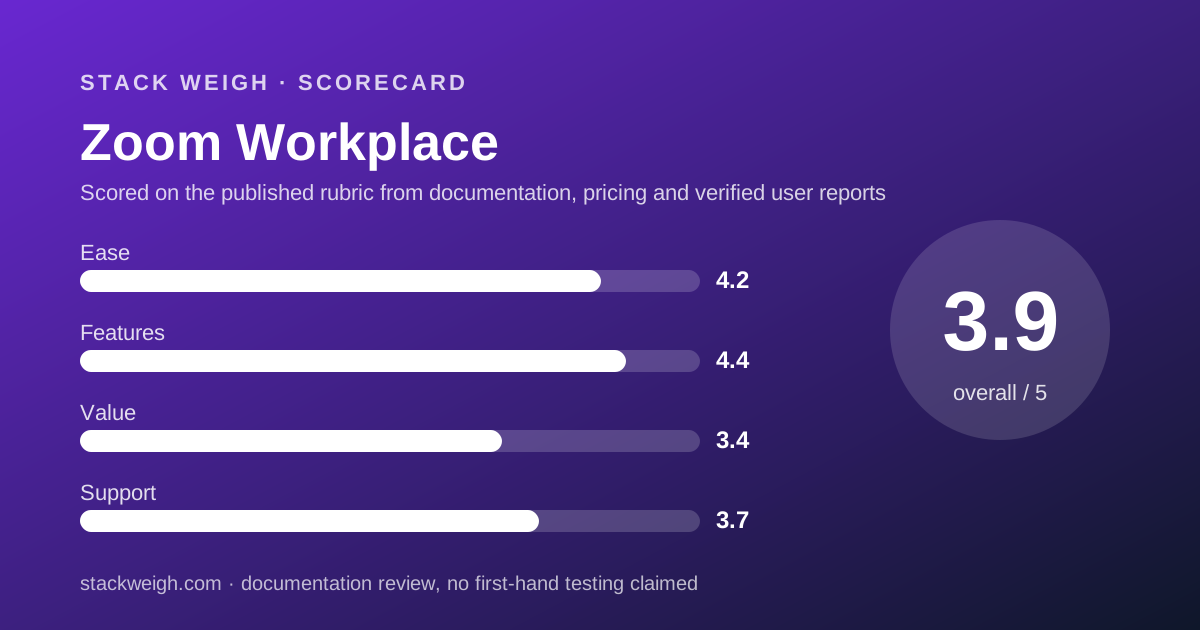
4.2 out of 5. The page presents Pro and Business prices in both billing periods on one screen, labels each tier with an intended buyer, and lists Basic limits as numbers. That is good practice.
Deductions are for the licence limits that are referenced but not stated, for Basic and Enterprise showing no price, and for the AI features being described under several names that are hard to map to a single included-or-not answer.
Features: what the score is built from
4.4 out of 5. Per seat, the documented Pro bundle is the broadest of the three products in this cluster: 30-hour meetings, 10 GB storage per user, unlimited AI summaries, unlimited clips, a scheduler, mail and calendar, chat and whiteboards. Business adds SSO, managed domains and 300 participants.
The deduction is for the missing tier and missing add-on detail, which means the feature map above Business cannot be priced from the page.
Value: what the score is built from
3.4 out of 5. The seat price is the issue. At $14.16 annually, Zoom Pro costs $6.91 more per seat per month than Slack Pro at $7.25 and $7.16 more than Google Workspace Business Starter at $7.00. Over 12 months for 10 people, that is roughly $830 to $860 more.
What the premium buys is real: 30-hour meetings, 10 GB storage per user and unlimited AI summaries. Google Starter caps Meet at 100 participants with no recording listed at that tier; Slack publishes no huddle participant cap. A team that needs long recorded meetings for everyone is paying for something the cheaper seats do not provide.
But most 10-person teams do not need every person to host. The mixed-licence pattern recovers value, and a team that buys 3 to 5 Pro licences and leaves the rest on Basic lands close to Slack's total. The score reflects the full-seat list price, which is what the page publishes.
Support: what the score is built from
3.7 out of 5. Support is gated by monthly spend: live chat above $10 a month, live phone above $200 a month. A 10-person Pro team paying $141.60 a month qualifies for chat and not for phone. The page does not state response times for either channel.
The spend-based gate is unusual and at least transparent. The deduction is for the absence of a response-time commitment at any published tier.
What verified users report
This is a documentation review. We have not compiled a dated sample of G2, Capterra or Reddit reports for Zoom Workplace, and we will not summarise impressions we have not gathered. This section will carry sourced, dated findings once that sample exists.
The questions worth asking other teams are concrete: how many licences their Pro plan actually allowed, whether the 10 GB per-user storage pooled or stayed per user in practice, and what live chat support turnaround looked like.
Limits stated by the vendor
From the pricing page, checked October 10, 2026: Basic meetings 40 minutes and 100 participants; Pro meetings 30 hours and 100 participants; Business 300 participants; Enterprise 1,000 participants and 500-attendee webinars; Pro cloud storage 10 GB per user; Basic 3 whiteboards, 3 AI-summarised meetings and 20 AI queries per month; Pro 8 custom summary templates per month and 3 minutes of custom avatars per month; Basic 5 two-minute clips.
Not stated: licence minimums and maximums per plan, Basic and Enterprise prices, Business Plus, storage on Basic, Business and Enterprise, any add-on price, trial length and support response times.
Alternatives
Two products are priced close enough to Zoom Workplace to deserve a side-by-side.
Google Workspace
Choose Google Workspace if you need mail and storage anyway, because Business Standard at $14.00 annually costs $0.16 less per seat than Zoom Pro and includes 150-participant Meet with recording, 2 TB pooled storage and Gmail. Otherwise choose Zoom Workplace if meetings run past the length and participant limits of Meet at your tier, or if the scheduler and clips replace tools you already pay for.
Slack
Choose Slack if the team works in text and meets occasionally, because Pro at $7.25 annually is roughly half the price of Zoom Pro. Otherwise choose Zoom Workplace if the 40-minute cap on a free meeting tool is the recurring pain and Team Chat is good enough for the typed part. Our Slack vs Google Workspace comparison covers the two cheaper options head to head.
Buy it if / Skip it if
Buy Zoom Workplace if long or large scheduled meetings are the centre of the week and you want chat, scheduling and clips bundled. Skip it if your team mostly types, if you already pay for Google or Microsoft mail with a meeting tool inside, or if you need published seat limits before signing. The cheapest chat-and-video stack for a 10-person team shows where Zoom fits and where it does not.
Bottom line
Zoom Workplace Pro is $14.16 per seat annually, $1,699.20 a year for 10 people by our arithmetic, and the bundle behind that number is the broadest in this cluster. The page's weakness is what it leaves out: seat limits, a missing tier and every add-on price.
If everyone on the team hosts long meetings, the price is defensible. If three people do, buy three licences and leave the rest on Basic. All figures from the pricing page checked October 10, 2026; expect them to drift.
Visit Zoom Workplace
We have no affiliate relationship with this vendor. Link goes to the official site.