 Stack

Dashlane
Two packages priced per user per month that look like tiers and are not, because the cheaper one has no password vault in it at all
Scored on the published rubric, from documentation, pricing and verified user reports.
Best for: Companies that want credential risk detection across domains outside single sign-on and have budget for a second per-seat line on top of the vault.
Verdict
Dashlane publishes the two cheapest-looking numbers in this category and the most expensive bill behind them. This is a documentation review built from the pricing page as displayed on October 20, 2026, not from direct use. Two packages are shown side by side: Omnix Password Management at $8 and Omnix Credential Protection at $4, both labelled Per user/month billed annually. The $4 figure reads like an entry tier and is not one. In the comparison table on the same page, Credential Protection shows a dash against Secure Vault, Collections, AI-Powered Autofill, Password Generator, Secure Sharing, Password Health dashboard, Vault security alerts, Admin Vault Policies, single sign-on, SCIM provisioning and Yubico. It is a detection layer, not a password manager, and it carries no Buy now button either. So the real entry price for a Dashlane vault is $8 per user per month, which is $960 a year for ten people by our arithmetic, and a team that wants both packages pays $12 per user per month, or $1,440 a year. Ease scores 2.9 because the price cells render empty to a direct fetch.
Visit Dashlane
We have no affiliate relationship with this vendor. Link goes to the official site.
Where it is strong
- Both package prices are stated with the billing period attached: $8 and $4, each labelled Per user/month billed annually
- The pricing FAQ repeats both figures in prose, which gives a second readable source on the same page: the Omnix Password Management package costs $8 per user per month (billed annually) and includes a 14-day free trial
- The comparison table marks absences with a dash instead of dropping the row, so the gaps in each package are visible rather than inferred
- Credential Protection is the only product in this group that prices risk detection as a line item rather than bundling it invisibly
- Phone support, onboarding support and a Customer Success Manager are all ticked on both packages, which is the broadest support row of the four pages we read
- The Enterprise threshold is stated rather than implied: built for organizations with more than 50 users
- Collections are listed as Unlimited on the Password Management package
Where it falls short
- The $4 package contains no password vault. Secure Vault, autofill, the generator, secure sharing and Admin Vault Policies are all dashed out on that column
- Credential Protection has no self-serve purchase path: its card offers Contact Sales and Request a demo where the vault package offers Buy now
- The price cells render as empty placeholders to a direct fetch, so the two figures only appear in a real browser or in the page markup
- No month-to-month rate is published for either package, so the annual-billing discount cannot be measured
- The pricing page states no SOC 2 or ISO 27001 certification. We found no such string on the page, only a patented, zero-knowledge architecture claim
- A team wanting both the vault and the detection layer pays $12 per user per month, the highest published figure in this category
- No seat minimum is stated anywhere on the page, and no free tier is offered
At a glance
| Starting price | $8 per user per month billed annually for Omnix Password Management; $4 for Omnix Credential Protection |
|---|---|
| Pricing note | From $8 per user per month billed annually for the vault package, with the $4 Credential Protection package sold alongside it rather than below it and reachable only through sales (pricing page, checked October 20, 2026) |
| What the $4 package is | A browser-based detection and response layer. The table dashes out Secure Vault, Collections, autofill, the password generator, secure sharing and the password health dashboard |
| Monthly-billing price | Not published for either package. Both read only Per user/month billed annually |
| Free plan | None on the business pricing page. A 14-day free trial is stated for the Password Management package |
| Seat minimum | None stated |
| Enterprise threshold | Omnix Enterprise is described as built for organizations with more than 50 users, with custom volume-optimized pricing |
| Self-serve purchase | Buy now on Password Management only. Credential Protection shows Contact Sales and Request a demo |
| Single sign-on | Ticked on Password Management, dashed on Credential Protection, with the tooltip Dedicated onboarding assistance available for organizations with 50 seats or more |
| Support channels | Expert email support 7 days a week, live chat, phone support, onboarding support and a Customer Success Manager, all ticked on both packages |
| Certifications stated on the page | None. The page claims a patented, zero-knowledge architecture enhanced by cloud-based confidential computing and names no audit standard |
What Dashlane actually sells, and what the $4 buys
Dashlane sells two products on one pricing page, and the page lays them out as though they were two tiers of the same thing.
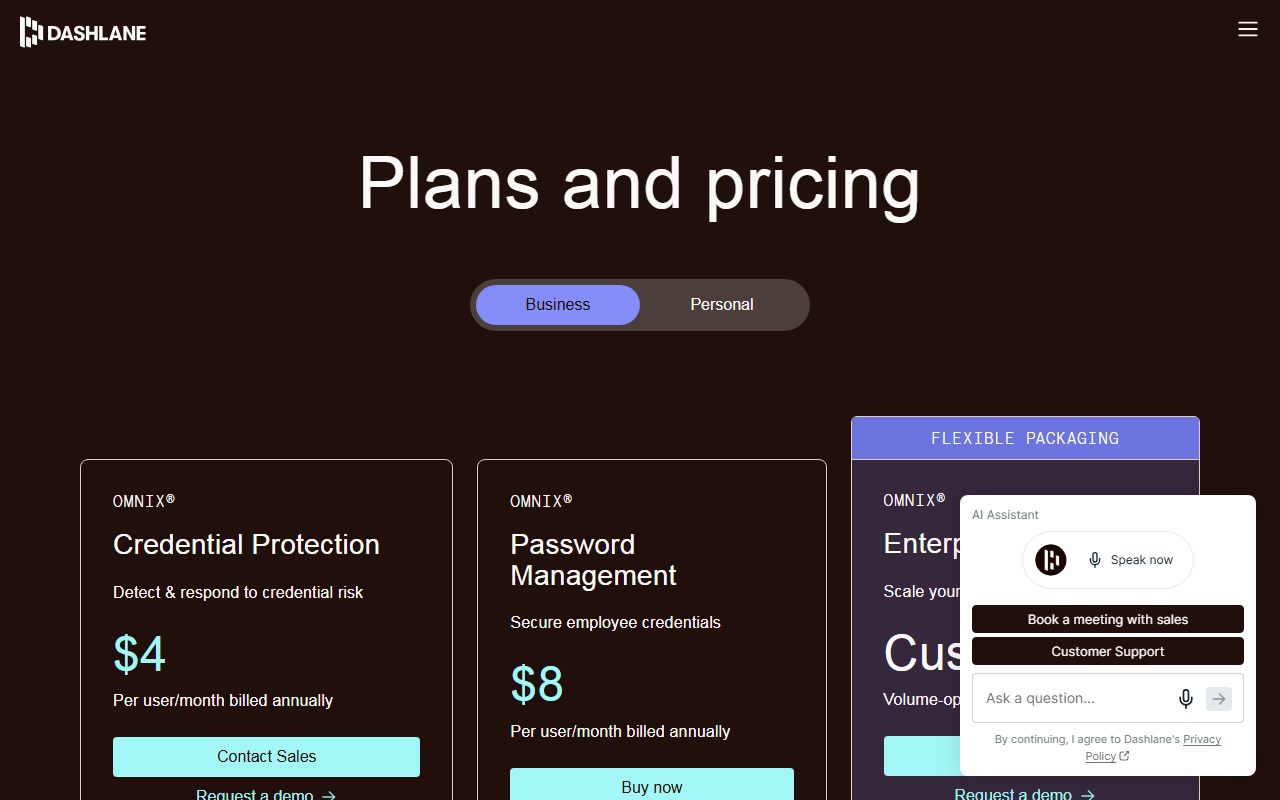
Omnix Password Management shows $8 with the caption Per user/month billed annually, the subtitle Secure employee credentials, and a Buy now button.
Omnix Credential Protection shows $4 with the same caption, the subtitle Detect and respond to credential risk, and no Buy now button at all. Its actions are Contact Sales and Request a demo.
The comparison table below settles what the $4 is. Credential Protection shows a dash against Secure Vault, Collections, AI-Powered Autofill, Password Generator, Secure Sharing, Password Health dashboard, Vault security alerts and Admin Vault Policies.
It also dashes single sign-on, SCIM provisioning and Yubico. So the cheaper number is not a cheaper password manager. It is a different product with no vault in it.
This review reads the pricing page as displayed on October 20, 2026. It grades the price list and the twelve-month arithmetic. The editors have not run an account for this piece.
Who Dashlane is best for
A two-product price list suits buyers with a specific risk problem rather than buyers with a credential-storage problem.
- Security teams that want visibility into logins on domains outside single sign-on, which is what Credential Protection is sold to do
- Companies that have already decided phishing detection belongs in the browser rather than in email filtering
- Organisations above fifty users, where the page routes to a bundled Enterprise agreement with volume pricing
- Small teams that value phone support and a named Customer Success Manager, both ticked on the entry packages here and restricted elsewhere in this category
- Buyers who need SOAR and IGA tool integrations, which appear only on the Credential Protection column
- Teams that want unlimited collections on the vault package rather than a numeric cap
Who should skip it
Three buyers will find this the wrong shape of price list.
- Anyone shopping on price, since $8 per user per month is the second dearest published vault rate of the four pages we read
- Teams that need a self-serve checkout for every line they buy, because half of this catalogue is sales-only
- Buyers who need a certification statement before a pilot, as the pricing page names no audit standard
How the pricing is structured
Three packages, one billing period, no currency code and no monthly rate.
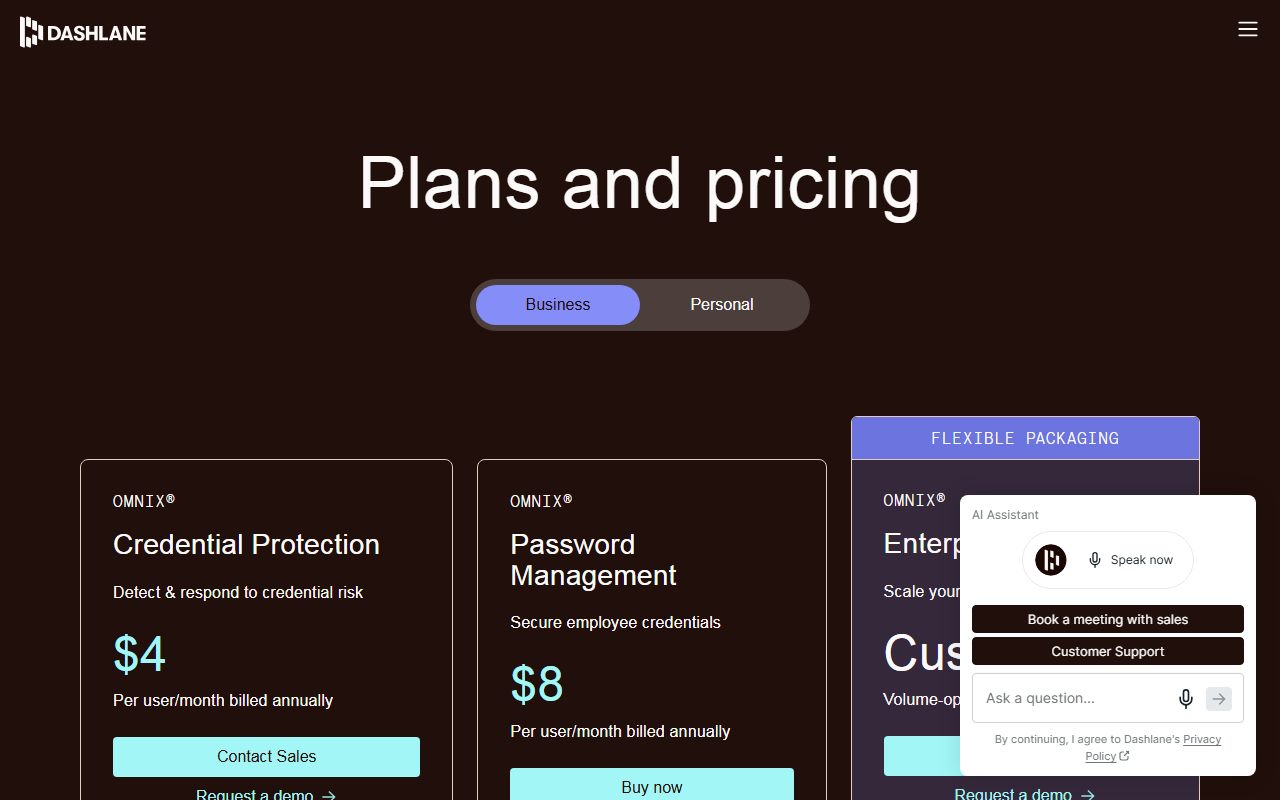
Password Management is $8 and Credential Protection is $4, both per user per month billed annually. Omnix Enterprise shows the word Custom with the caption Volume-optimized pricing and a Contact Sales button.
The FAQ repeats the two figures in prose, which gives a second readable source on the same page.
It reads that the Omnix Password Management package costs $8 per user per month (billed annually) and includes a 14-day free trial. It puts Omnix Credential Protection at $4 per user per month (billed annually).
No month-to-month rate appears for either package. Neither does a seat minimum.
The Enterprise threshold is stated plainly, which is rare. The FAQ says Omnix Enterprise is built for organizations with more than 50 users and that an Enterprise agreement lets you bundle both Password Management and Credential Protection.
That sentence is the real pricing model. The two cheap-looking numbers are halves, and the bundle is a quote.
What 10, 20 and 50 people pay for 12 months
These are editorial calculations from the displayed annual-billing prices on October 20, 2026, excluding tax. The third column is the one most buyers will actually be quoted.
- Password Management at 10 people: $960 a year. Credential Protection at 10: $480. Both together: $1,440
- Password Management at 20 people: $1,920 a year. Both together: $2,880
- Password Management at 50 people: $4,800 a year. Both together: $7,200
- Above 50 people: no published figure. The page routes to Omnix Enterprise with volume-optimized pricing
- Cost of one extra hire: $96 a year on the vault alone, $144 a year on both packages
- For reference, the cheapest flat per-seat vault rate we read in this category is $4 per user per month, which is $480 a year at ten seats, exactly half the Dashlane vault figure
The dash column is the most important thing on this page
A pricing page that prints two numbers invites a buyer to treat the smaller one as the entry point. Here that reading is wrong in an expensive direction.
The Credential Protection column carries a dash on every row a password manager is bought for. No Secure Vault. No Collections. No autofill. No generator. No secure sharing. No password health dashboard. No admin vault policies.
The Password Management column carries the mirror image. No Credential Risk Detection, no AI Phishing Detection, no Risk Insights dashboard, no Admin Detection Controls, and dashes across the whole Risk Response section.
The only rows ticked on both are the patented security architecture, SIEM integration, and every row in the Support section.
So these are not tiers. They are two halves of a product that the Enterprise agreement exists to rejoin.
A buyer who budgets $4 and discovers they needed $8, or budgets $8 and needed $12, has made the mistake this page makes easy.
How to read a per-seat pricing page covers the habit that prevents it: read the comparison table before the cards.
The price cells are empty to anything but a real browser
This is a reachability problem worth recording, because it changes what a careful buyer can verify.
A direct fetch of the pricing page on October 20, 2026 returned the full feature table, the FAQ headings and both plan names, with the price cells rendered as a placeholder rather than a figure.
The two numbers appeared only in a headless-browser read of the same URL, where the markup carries them as $8 and $4 next to the caption Per user/month billed annually.
That matters for two reasons. A buyer comparing pages quickly may conclude Dashlane does not publish prices when it does. And any automated price watch built on a simple fetch will see nothing change, forever.
The FAQ text is the saving grace. It carries both figures in prose and does render to a plain fetch, so the numbers are recoverable without a browser if you know where to look.
We record this because a figure we could not see ourselves is a figure we will not print. Our note on turning a pricing page into a bill sets out the same rule for quotes.
Ease of use: what the score is built from
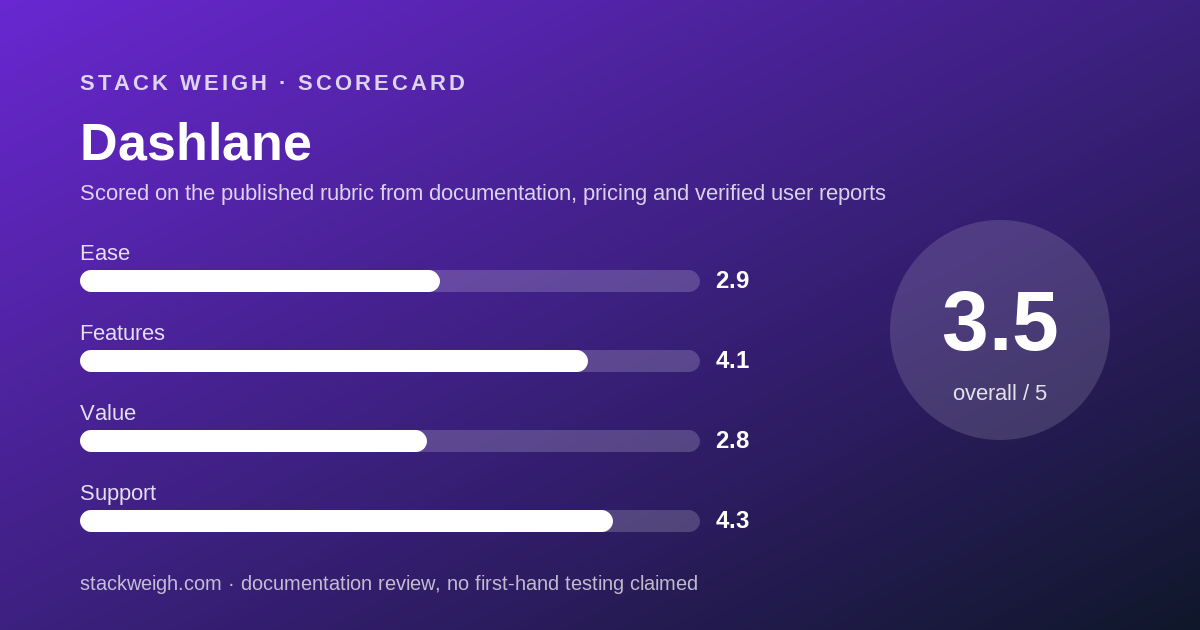
2.9 out of 5, the lowest ease score on this desk. This pillar grades the pricing page and the documented buying path, not the product.
Three deductions drive it. The price cells do not render to a plain fetch. The cheaper package is sales-only despite carrying a list price. And the layout presents two products as two tiers.
No month-to-month rate is printed, so the words billed annually carry no measurable discount behind them.
What the page does well is state its Enterprise threshold as a number, fifty users, and repeat both prices in FAQ prose. Both are more than most pages in this category offer.
The tooltips are also unusually honest, noting that dedicated onboarding assistance and one-to-one SCIM help are available for organisations with 50 seats or more.
Features: what the score is built from
4.1 out of 5. Taken as two products rather than two tiers, the documented set is strong and the division is coherent.
The vault package covers what a workforce needs daily: passwords and passkeys, AI-powered autofill, secure sharing, unlimited collections, a password health dashboard, enforceable admin policies, single sign-on, SCIM and Yubico.
The detection package covers what no other price list in this group itemises at all: credential risk detection across domains outside single sign-on, browser-native AI phishing detection, risk and remediation dashboards, and admin detection and response controls.
It also carries the integrations a security team asks for, with SOAR and IGA tools ticked only on that column and KnowBe4 marked Limited on the vault side.
The deduction is for the split itself. Buying the complete picture means two per-seat lines or an Enterprise quote, and the page never prints a bundle price.
Value: what the score is built from
2.8 out of 5, the weakest value score on this desk, and it is arithmetic rather than opinion.
At $960 a year for ten seats, the Dashlane vault costs double the cheapest flat per-seat vault we priced in this category and more than three times the cheapest pack-priced plan.
At $1,440 a year for ten seats with both packages, it is the dearest published figure in the group by a clear margin.
What the premium buys is real and narrow: a detection layer nobody else prices. Whether that is worth the gap depends entirely on whether credential risk outside single sign-on is on your risk register.
The score would be higher if the page published a bundle rate. As it stands the product a security buyer actually wants has no price on the page at all.
For teams weighing one dear line against a whole stack, budgeting for usage-based pricing and our review of Confluence show how a single doubled per-seat rate reshapes a small software budget.
Support: what the score is built from
4.3 out of 5, the strongest support row of the four pricing pages we read for this category.
The Support section ticks five rows on both packages: expert email support seven days a week, live chat support, phone support, onboarding support and a Customer Success Manager.
A Customer Success Manager ticked on an entry package is unusual. A rival in this category restricts the same thing to organisations with 101 or more users.
The deductions are the ones that apply across the whole page. No response-time target is stated for any channel, and no hours window is given for the phone line.
The SSO and SCIM tooltips also hint that the deepest onboarding help is really a fifty-seat benefit, which qualifies the ticks above.
What verified users report
This review is built from the vendor's own price list. We have not compiled a dated sample of G2, Capterra or Reddit reports on Dashlane billing, and we will not summarise impressions we have not collected.
The page does carry five named customer quotes. We have not verified them and do not treat vendor-published testimonials as a source for anything priced.
Two questions are worth putting to other buyers: what the bundled Enterprise rate came out at per seat, and whether Credential Protection was sold below its $4 list price in a bundle.
Limits stated by the vendor
From the pricing page and its FAQ, checked October 20, 2026: $8 and $4 per user per month billed annually; a 14-day free trial on the Password Management package; Omnix Enterprise for organisations with more than 50 users.
Collections are Unlimited on the vault package. KnowBe4 integration is marked Limited on the vault package. Dedicated onboarding and one-to-one SCIM assistance are noted for 50 seats or more.
Not published: any month-to-month rate, a seat minimum, a bundle price for both packages, any Enterprise figure, a refund window, a support response target, a data residency list, and any certification standard.
The only security claim on the page is a patented, zero-knowledge architecture enhanced by cloud-based confidential computing.
Alternatives
The alternative to Dashlane is not a cheaper vault with worse detection. It is a cheaper vault with no detection line at all, which is what the rest of this category sells.
A flat per-seat vault at $4 a user per month halves the Dashlane vault bill at every headcount and publishes nothing resembling credential risk detection. That is the honest trade.
A tier-plus-add-on vendor gets closer, pricing dark-web monitoring as a published annual add-on rather than a second per-seat product. It is the cheapest way to buy some detection with a vault.
A pack-priced vendor is cheapest of all at exactly ten seats and offers no detection layer whatsoever.
Choose Dashlane if credential risk detection is a funded requirement rather than a nice idea. Choose anything else in this group if the requirement is a managed vault.
Teams holding quotes in different shapes should read comparing quotes priced in different units first.
For the same exercise on another category, see choosing an e-signature plan by monthly volume and our review of Docusign.
Buy it if, skip it if
Buy Dashlane if you are funding detection as well as storage, want phone support at a small headcount, and are comfortable with a sales conversation for half the catalogue. Skip it if you are buying a vault on price.
Before committing, get the bundle rate for both packages in writing. The page prices the halves and never the whole, which means the number you will actually pay is not on it.
Bottom line
Dashlane prints $4 and $8 and sells neither as a complete answer. The $4 package has no vault in it and cannot be bought without a sales call. The $8 package has no risk detection in it.
Ten people cost $960 a year for the vault, $480 for the detection layer and $1,440 for both, by our arithmetic from the displayed annual-billing rates. That makes it the dearest published option in this category and the only one that itemises detection.
All figures come from the pricing page as displayed on October 20, 2026, read through a headless browser because the price cells render empty to a direct fetch. Confirm the bundle rate and the currency before you commit a year.
Buy it if
- You specifically want credential risk detection outside single sign-on, which is the one thing in this group only Dashlane prices as a product at $4 per user per month
- Phone support and a named Customer Success Manager matter at a small headcount, since both are ticked on the entry packages rather than reserved for Enterprise
- You are above 50 users, where the page explicitly routes to volume-optimized pricing and a bundled Enterprise agreement
- You want AI phishing detection in the browser as a contracted feature rather than a marketing line
Skip it if
- You are buying a password manager on price, because $8 per user per month is twice the cheapest flat per-seat rate in this category and $960 a year for ten people by our arithmetic
- You read the $4 figure as an entry tier, which it is not: that column has no vault, no autofill and no sharing
- You need a certification statement on the pricing page, since this one names none
Frequently asked
How much does Dashlane cost for a 10-person team?
$960 a year for the vault, by our arithmetic from the displayed $8 per user per month billed annually. Credential Protection at $4 adds $480 a year, so a team buying both pays $1,440. No seat minimum is stated on the page as read on October 20, 2026.
Is Dashlane Credential Protection a cheaper password manager?
No. On the comparison table it shows a dash against Secure Vault, Collections, AI-Powered Autofill, Password Generator, Secure Sharing, Password Health dashboard and Admin Vault Policies. It is a detection and response layer that works whether or not employees use a vault.
Can I buy Dashlane Credential Protection online?
Not from the pricing page. Its card offers Contact Sales and Request a demo, while the Password Management card offers Buy now and Try free for 14 days. So the $4 figure is a published list price reached through a sales conversation.
Does Dashlane have a free plan for teams?
No free business tier appears on the pricing page as read on October 20, 2026. The page offers a 14-day free trial of the Omnix platform, described in the FAQ as included with the Password Management package.
Which Dashlane package includes single sign-on?
Password Management, at $8 per user per month. The Integrations rows place single sign-on, SCIM provisioning and Yubico on that column and dash them out on Credential Protection. A tooltip adds that dedicated onboarding assistance is available for organisations with 50 seats or more.
Can I pay Dashlane monthly?
The pricing page does not say. Both package figures carry only the suffix Per user/month billed annually, and the FAQ repeats both as billed annually. We could not read a month-to-month rate on that page on October 20, 2026.
When does Dashlane move a buyer to Enterprise?
Above fifty users. The FAQ states that Omnix Enterprise is built for organizations with more than 50 users that require a unified credential security posture, with pricing customized and volume-optimized based on your user seat count and integration requirements.
Does the Dashlane pricing page claim SOC 2 certification?
Not as read on October 20, 2026. We searched the page for SOC 2 and ISO 27001 strings and found neither. What the page claims is a patented, zero-knowledge architecture enhanced by cloud-based confidential computing. Ask for the audit reports separately.
Sources
- Dashlane business plans and pricing page (package cards, feature comparison table, integration tooltips) - checked October 20, 2026
- Dashlane pricing FAQs on the same page (both package prices in prose, the 14-day trial, the Enterprise 50-user threshold) - checked October 20, 2026
Update history
- October 20, 2026 - First published from the Dashlane pricing page as displayed on October 20, 2026. A direct fetch returned the feature table with empty price cells, so both figures and every feature tick were read from a headless-browser DOM dump of the same URL and cross-checked against the FAQ prose on the page.
Visit Dashlane
We have no affiliate relationship with this vendor. Link goes to the official site.