 Stack

Box
Six published business tiers with unlimited storage from the second one up, a Save 25 percent badge that is never exactly 25 percent, and a maximum seat count that reads Unlimited on the table and 100 at the checkout
Scored on the published rubric, from documentation, pricing and verified user reports.
Best for: Teams of three or more that need unlimited storage with a published compliance list, and can absorb separately priced add-ons for threat detection and classification.
Verdict
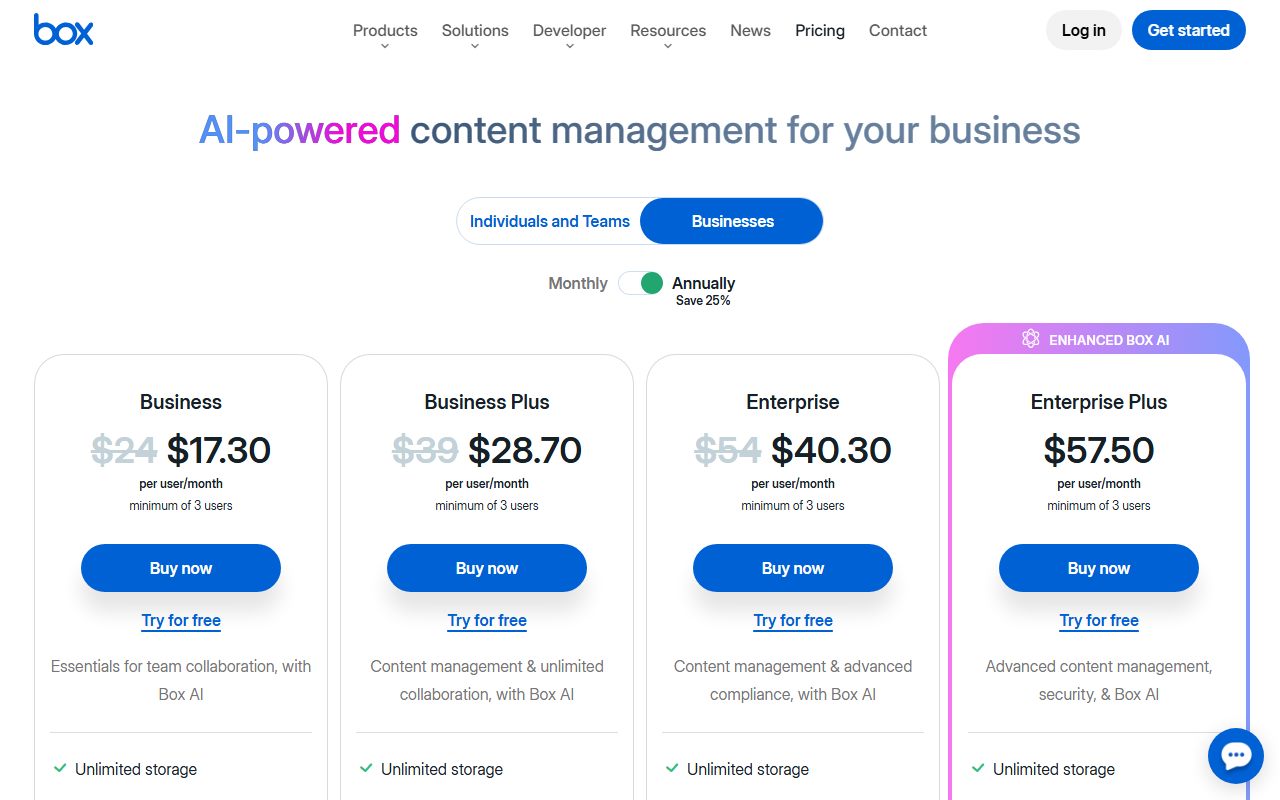
Box publishes more of its price list than anyone else in this category, and then contradicts part of it. This is a documentation review of the pricing page and the self-serve checkout as displayed on October 22, 2026, not a report of direct use. Six business tiers carry figures. On annual billing, read in USD, they are $5.80, $17.30, $28.70, $40.30 and $57.50 per user per month, with Enterprise Advanced going to Contact us. The monthly rates are $8, $24, $39 and $54. Every business tier states a minimum of 3 users. The plan comparison table says Maximum users: Unlimited, while Box's own checkout options for the same products state maxSeats of 100, and 10 on Starter. The billing toggle carries a Save 25% badge and a data attribute reading 25, but the actual gap between monthly and annual is 25.4 percent on Enterprise and 27.9 percent on Business by our arithmetic. Twenty people on the Business tier is $4,152 a year, against $5,760 if you pay monthly.
Visit Box
We have no affiliate relationship with this vendor. Link goes to the official site.
Where it is strong
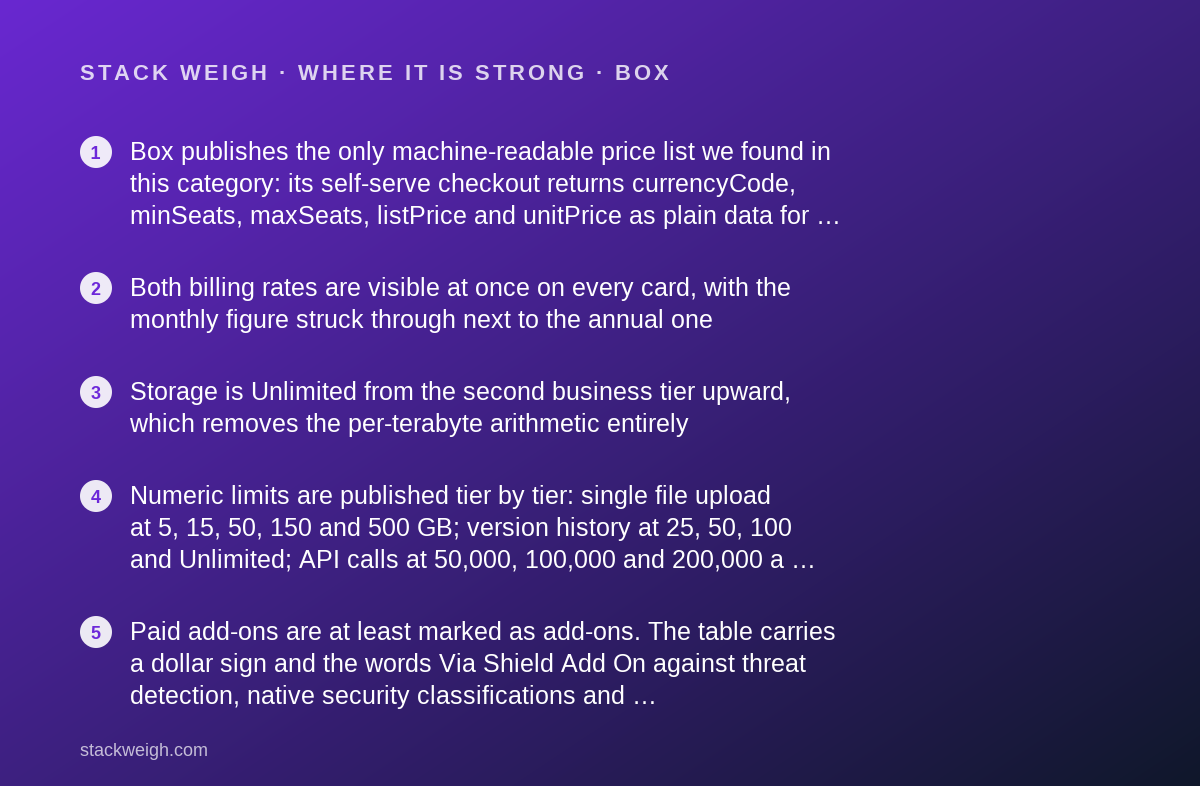
- Box publishes the only machine-readable price list we found in this category: its self-serve checkout returns currencyCode, minSeats, maxSeats, listPrice and unitPrice as plain data for each product
- Both billing rates are visible at once on every card, with the monthly figure struck through next to the annual one
- Storage is Unlimited from the second business tier upward, which removes the per-terabyte arithmetic entirely
- Numeric limits are published tier by tier: single file upload at 5, 15, 50, 150 and 500 GB; version history at 25, 50, 100 and Unlimited; API calls at 50,000, 100,000 and 200,000 a month
- Paid add-ons are at least marked as add-ons. The table carries a dollar sign and the words Via Shield Add On against threat detection, native security classifications and classification-based access policies
- The compliance list is specific rather than decorative: SOC 1/SOC 2/SOC 3, PCI DSS, HIPAA/HITECH-eligible, FedRAMP Moderate, with FedRAMP High marked Additional Cost
- A free single-user Box Individual plan sits on the same pricing page, stated as 10 GB storage, a 250 MB upload limit and 1 file version
Where it falls short
- Maximum users reads Unlimited in the plan comparison table and maxSeats 100 in Box's own checkout payload for the same products, both read October 22, 2026
- The Save 25% badge is not 25 percent on any tier. By our arithmetic it is 27.5 percent on Starter, 27.9 percent on Business, 26.4 percent on Business Plus and 25.4 percent on Enterprise
- The page title still reads Box Plans & Pricing From $5 Per User/Month while the cheapest business figure displayed is $5.80
- Business Starter is capped at ten seats and 100 GB, so the cheap number is unavailable to exactly the teams a per-seat price list is aimed at
- External collaborators read Required paid accounts on the Business tier, which is a cost the page never prices
- Enterprise Plus publishes no monthly rate at all. The card reads Switch to Annual billing to view Enterprise Plus pricing
- The pricing page returned a bot-protection challenge to plain requests and only rendered with a browser user-agent string, so the figures are not reachable to a simple price watch
- Several named capabilities carry a dollar sign or the words Additional Cost with no figure: Premier Support, FedRAMP High, GxP compliance with 21 CFR Part 11, AI units beyond the included allowance
At a glance
| Starting price | $5.80 per user per month on annual billing for Business Starter; $8 on monthly billing |
|---|---|
| Pricing note | From $5.80 per user per month on annual billing for Business Starter, capped at ten users, with the first unlimited-storage tier at $17.30 annually against $24 monthly (pricing page and self-serve checkout, both checked October 22, 2026) |
| First unlimited-storage tier | Business at $17.30 per user per month annual, $24 monthly. The checkout states this as listPrice 288 and unitPrice 207.60 per user per year |
| Upper tiers | Business Plus $28.70 annual and $39 monthly; Enterprise $40.30 and $54; Enterprise Plus $57.50 on annual billing only; Enterprise Advanced shown as Contact us |
| Seat minimum | 3 users on every business tier, stated on the cards and repeated as minSeats 3 in the checkout payload |
| Seat maximum | Unlimited per the plan comparison table. The checkout payload says maxSeats 10 on Starter and 100 on Business, Business Plus and Enterprise |
| Storage | 100 GB on Starter; Unlimited from Business upward |
| Single file upload | 2 GB on Starter, then 5, 15, 50, 150 and up to 500 GB on Enterprise Advanced |
| Version history | 25 file versions on Starter, then 50, 100 and Unlimited |
| Bandwidth limits | Shared-link downloads 2 TB per user per month on Business plans; upload and download ingress and egress 1 TB per user per month, under the Fair Use Policy |
| AI allowance | Business and Business Plus carry a dollar sign rather than an allowance. Enterprise includes 1,000 AI Units a month, Enterprise Plus 2,000, Enterprise Advanced 20,000 |
| Free plan | Box Individual, free, single user, 10 GB storage, 250 MB upload limit, 1 file version, 5 Box Sign documents a month. No free business tier |
| Currency | Stated in markup rather than prose. Every price carries the attribute data-pricing-currency-code="USD", and the checkout payload repeats currencyCode USD |
| Support | Standard business support on all tiers with Premier Support marked optional and priced with a dollar sign; Enhanced support 24 hour coverage from Enterprise Plus; local business hours stated on Starter |
What Box sells, and the two numbers on every card
Box sells six business tiers and shows two prices on each of them at once.
On the Businesses tab, with the Annually toggle selected, every card carries a struck-through monthly figure next to the annual one. Business Starter reads $8 then $5.80. Business reads $24 then $17.30. Business Plus reads $39 then $28.70. Enterprise reads $54 then $40.30.
Enterprise Plus breaks the pattern. It reads $57.50 per user per month with the line Switch to Annual billing to view Enterprise Plus pricing, and no monthly figure exists for it. Enterprise Advanced carries no price at all.
Every business card repeats minimum of 3 users. Every price carries the markup attribute data-pricing-currency-code="USD", which is how we know the currency rather than guessing from the dollar sign.
This review grades the price list and the twelve-month arithmetic as displayed on October 22, 2026. The editors have not run a Box account for this piece.
Who Box is best for
Unlimited storage with a published seat price suits teams whose file volume is growing faster than their headcount.
- Teams of three or more that have outgrown a fixed storage pool and want the terabyte question to stop mattering
- Regulated buyers who need SOC 1/2/3, PCI DSS, HIPAA/HITECH or FedRAMP Moderate named as rows in a published table
- Companies that send very large single files, where the 50 GB and 150 GB upload ceilings on the enterprise tiers are the deciding number
- Finance teams that want to automate price verification, because Box exposes its own list and unit prices as structured data at the checkout
- Teams of three to ten with small files, for whom $5.80 a seat and 100 GB is the cheapest published business storage we read in this category
Who should skip it
Three buyers will find this price list the wrong shape.
- Solo operators and pairs, since every business tier states a 3 user minimum and the only single-seat route is a personal plan
- Buyers who need threat detection or data classification in the base price, as both are sold through an add-on with no published figure
- Teams above 100 seats that want to buy without a sales call, which Box's own checkout does not allow
How the pricing is structured
Per seat, per month, with a three-seat floor and two published billing cycles on four of the six tiers.
The annual figures are per user per month but billed as a year. Box's checkout states the year explicitly: box_business carries a listPrice of 288 and a unitPrice of 207.60 per user per year.
That removes the per-month-but-paid-yearly ambiguity entirely, which no other vendor in this category manages.
Seat floors and ceilings also come from the checkout: minSeats 3 on every business product, maxSeats 10 on Starter and 100 on the three tiers above it.
The add-ons are where the published list stops. Threat detection rules and alerts, native security classifications and classification-based access policies all read $ Via Shield Add On. FedRAMP High and GxP compliance read Additional Cost. Premier Support reads Optional with a dollar sign.
None of those carries a number. Our note on turning a pricing page into a bill sets out the discipline: price every row you intend to switch on before you compare two vendors.
What 3, 5, 20 and 50 people pay for 12 months
These are editorial calculations from the published annual unit prices on October 22, 2026, excluding tax. One seat is not available: the floor is three.
- Business Starter at 3 people: $208.80 a year. At 5: $348. At 10, the tier ceiling: $696
- Business at 3 people: $622.80 a year. At 5: $1,038. At 20: $4,152. At 50: $10,380
- Business on monthly billing at 20 people: $5,760 a year. At 50: $14,400
- Business Plus at 5 people: $1,722 a year. At 20: $6,888. At 50: $17,220
- Enterprise at 5 people: $2,418 a year. At 20: $9,672. At 50: $24,180
- Enterprise Plus at 20 people: $13,800 a year, from the published $57.50 a seat on annual billing
- One extra hire on Business: $207.60 a year on annual billing, $288 on monthly
The Save 25 percent badge is not 25 percent on any tier
The billing toggle carries the label Annually followed by Save 25%, and the surrounding markup carries data-discount-percentage="25".
The published prices do not match it. Working from the monthly and annual figures on the same cards, the actual gap by our arithmetic is 27.5 percent on Business Starter, 27.9 percent on Business, 26.4 percent on Business Plus and 25.4 percent on Enterprise.
The personal tier is further out again at 28.1 percent.
This cuts in the buyer's favour, which is why it is worth saying plainly rather than treating as an error. Every annual tier is cheaper than the badge promises, by between four tenths of a point and nearly three points.
It also means the badge is not a shortcut. A buyer who multiplies the monthly rate by 0.75 will overstate the annual bill on all five tiers.
The same page carries a second small inconsistency. Its title tag reads Box Plans & Pricing From $5 Per User/Month, while the cheapest figure on the Businesses tab is $5.80.
That is the kind of stale number how to read a per-seat pricing page treats as a warning sign: a figure in the chrome of a page is not the figure in the cart.
Maximum users is Unlimited on the table and 100 at the checkout
This is the one contradiction on the page that could change a purchase decision, and we print both sides of it.
In the plan comparison table, under USERS AND ADMIN CONTROLS, the row Minimum users reads 3 and the row Maximum users reads Unlimited.
Box's own self-serve checkout disagrees. The options payload behind the Buy now button returns maxSeats 10 for box_starter and maxSeats 100 for box_business, box_business_plus and box_enterprise. Both were read on October 22, 2026.
The likely reconciliation is that Unlimited describes what the platform supports and 100 describes what the online checkout will sell. That is a guess, and we are not printing it as fact.
If you expect to pass 100 seats inside the contract term, ask in writing whether seats can be added self-serve past that number.
The Starter cap of ten bites sooner, and it agrees with the card copy, which reads for up to 10 users.
The pricing page hides from robots; the checkout does not
This is a reachability note, and it matters for anyone verifying Box prices repeatedly.
Plain requests to the pricing page on October 22, 2026 returned a bot-protection interstitial titled Just a moment rather than any prices. The page rendered only once a desktop browser user-agent string was supplied.
The checkout is the opposite. Its options payload returns the currency code, the seat floor, the seat ceiling, the list price and the unit price as plain structured data.
So the authoritative numbers on this vendor are easier to reach than the marketing ones, which is the reverse of the usual arrangement.
We record it because the two sources agree exactly: the card's $17.30 a month and the checkout's $207.60 a year are the same number.
Ease of use: what the score is built from
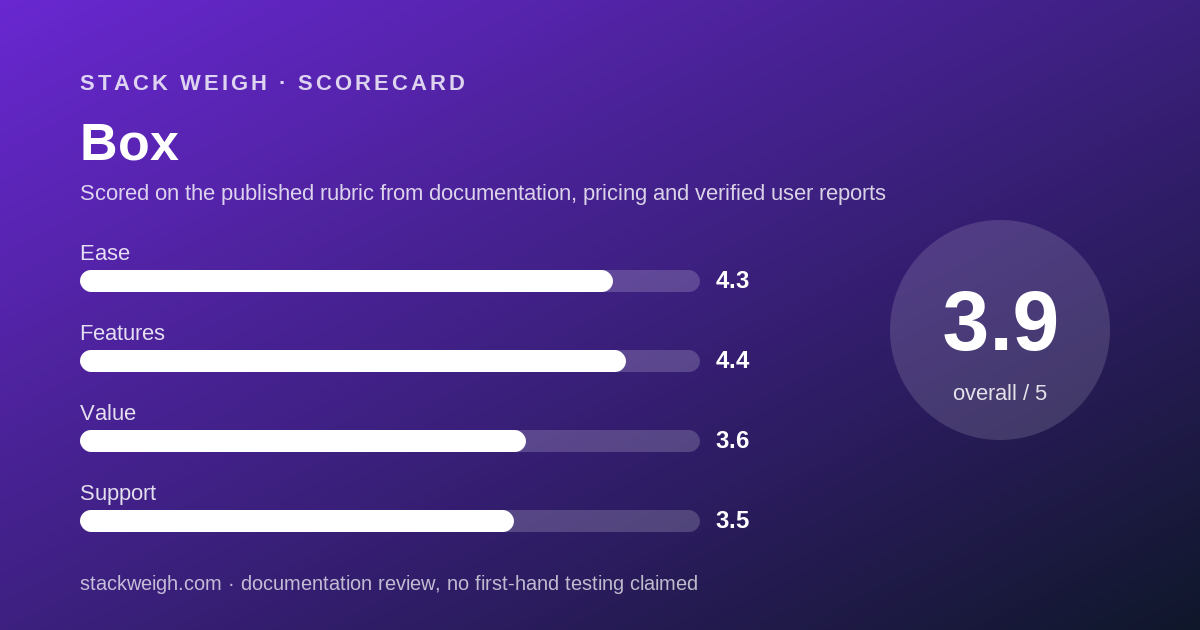
4.3 out of 5, the highest ease score we have given a pricing page in this category. This pillar grades the price list and the buying path, not the product.
Five of the six tiers print a figure. Both billing rates appear at once. The currency is declared in markup. The seat floor appears on the card and again in the checkout. Numeric limits are given per tier rather than as ticks.
The deductions are the bot challenge on the page itself, the Unlimited against 100 conflict, the stale $5 in the title tag, and the Save 25% badge that no tier matches. Together they cost roughly half a point.
Features: what the score is built from
4.4 out of 5. The published table is the most detailed in this category, and its ladder is coherent rather than arbitrary.
Storage goes 100 GB then Unlimited. Single file upload goes 2, 5, 15, 50, 150 and 500 GB. Version history goes 25, 50, 100, Unlimited. API calls go 50,000, 100,000, 200,000 a month.
AI is itemised rather than bundled invisibly: a dollar sign on the two Business tiers, then 1,000, 2,000 and 20,000 AI Units a month on the Enterprise tiers.
E-signature is included rather than sold separately, which matters if you were about to buy a second subscription for it. The table reads Unlimited eSignatures via Box Sign, with 100 and 150 requests a year through third-party integrations.
Compare what a standalone vendor charges in choosing an e-signature plan by monthly volume.
The deduction is the Shield add-on. Threat detection, native classifications and classification-based access policies are the features a security buyer comes for, and all three are a separate purchase with no published rate.
Value: what the score is built from
3.6 out of 5, and the score is split in two directions.
Unlimited storage at $17.30 a seat on annual billing is good value against any vendor that meters terabytes. Twenty seats is $4,152 a year with no storage ceiling, where a fixed-pool rival charges $3,600 for a stated 3,000 GB.
Business Starter at $5.80 a seat looks cheaper than anything else here and mostly is not usable. It caps at ten seats and 100 GB.
So the real Box entry price for a team with files is $17.30 a seat, more than double the cheapest per-terabyte vendor in this category at $7.99 per user per month for 1 TB each.
The add-ons cost it the rest of the half point. A buyer who needs Shield features cannot model the bill from the published page at all.
Teams weighing several per-seat lines at once will find budgeting for usage-based pricing and comparing quotes priced in different units more useful than another feature table.
Support: what the score is built from
3.5 out of 5, built from the SUPPORT block of the plan comparison table.
Standard business support appears on every tier. Business Starter is qualified on its card as Technical Support during local business hours. Enhanced support 24 hour coverage appears from Enterprise Plus upward.
Premier Support is listed as Optional with a dollar sign and no figure, which means the best support Box sells has no published price.
The deductions are the usual ones here: no response-time target on any channel, no hours window for the business-hours line, and a 24-hour promise that arrives only at $57.50 a seat.
What verified users report
This review is built from Box's own price list and checkout. We have not compiled a dated sample of G2, Capterra or Reddit reports on Box billing, and we will not summarise impressions we have not collected.
Two questions are worth putting to buyers who have signed. What the Shield add-on came out at per seat, and whether seats could still be added self-serve beyond 100.
Limits stated by the vendor
From the pricing page and the checkout options, checked October 22, 2026: $5.80, $17.30, $28.70, $40.30 and $57.50 per user per month on annual billing; $8, $24, $39 and $54 on monthly; minSeats 3 everywhere; maxSeats 10 on Starter and 100 above it.
Also stated: 100 GB then Unlimited storage; 25 to Unlimited file versions; 50,000 to 200,000 API calls a month; 1,000 to 20,000 AI Units; shared-link downloads 2 TB per user per month and ingress and egress 1 TB per user per month.
Not published: any figure for Shield, Premier Support, FedRAMP High, 21 CFR Part 11 or extra AI units; any Enterprise Advanced price; any refund window; any support response target; any trial length on the cards, which read only Try for free.
Alternatives
The alternative to Box is a vendor that meters storage and charges less for the seat.
One rival sells 1 TB per user at $7.99 per user per month on annual billing with a three-user minimum, roughly a third of the Box Business seat price. It publishes no single sign-on row and a much shorter compliance list.
Another sells a fixed 3,000 GB team pool at $15 a seat with a single-seat entry, cheaper than Box at three people and worse per terabyte at twenty.
Choose Box if unlimited storage and a named compliance list are the requirement. Choose a per-user-terabyte vendor if the requirement is cost per terabyte.
For neighbouring lines in the same budget, see our rankings for the cheapest team wiki and the cheapest team chat and video, plus our review of Google Workspace, which already bundles storage many teams pay twice for.
Buy it if, skip it if
Buy Box if you need unlimited storage with a published seat price, a specific compliance list and a checkout you can verify with a script. Skip it if you are under three people, or if the features you actually need sit inside the Shield add-on.
Before committing a year, get two numbers in writing: the Shield rate per seat, and whether seats can be added self-serve past 100.
Bottom line
Box is the best-documented price list in this category and still needs reading twice. Five business figures on annual billing, four on monthly, a three-seat floor everywhere, and a checkout that publishes list and unit prices as data.
The two things to distrust are the Save 25% badge, which understates the real annual discount on every tier, and the Maximum users row, which reads Unlimited where the checkout says 100.
Twenty people on the Business tier is $4,152 a year on annual billing and $5,760 on monthly, by our arithmetic from the published rates. Ten people is $2,076.
All figures come from the pricing page and the self-serve checkout as displayed on October 22, 2026. The pricing page required a browser user-agent string to render at all.
Buy it if
- You want unlimited storage with a published price, which starts at $17.30 per user per month on annual billing and is the cleanest answer to a growing file volume in this category
- You need a named compliance list before a pilot, since SOC 1/2/3, PCI DSS, HIPAA/HITECH and FedRAMP Moderate are all printed as rows rather than implied
- You want to automate your own price checks, because Box's checkout publishes listPrice, unitPrice, minSeats and maxSeats as data for every product
- Your team is between three and ten people with small files, which is the narrow window where $5.80 a seat and 100 GB actually fit
Skip it if
- You are one or two people, because every business tier states a 3 user minimum and the single-seat route is a personal plan at $11.50 a month on annual billing
- You need threat detection, classification policies or FedRAMP High in the base price, since all three are marked as separately priced add-ons with no published figure
- You are buying for more than 100 seats and want to self-serve, because Box's own checkout caps at 100 even where the comparison table says Unlimited
Frequently asked
How much does Box cost for a 10-person team?
$2,076 a year on the Business tier with annual billing, by our arithmetic from the published $207.60 per user per year. Monthly billing is $2,880. Business Starter at ten seats is $696 a year, which is the cap of that tier.
Does Box have a free plan?
Yes, but not for teams. Box Individual is free for a single user with 10 GB of storage, a 250 MB upload limit, 1 file version and 5 Box Sign documents a month. Every business tier starts at 3 users and carries a price.
Is Box storage really unlimited?
Storage reads Unlimited from the Business tier upward, and Business Starter reads 100 GB. Bandwidth is not unlimited: the FAQ states 2 TB per user per month for shared-link downloads and 1 TB per user per month for uploads and downloads.
How much does annual billing save on Box?
Between 25.4 and 27.9 percent depending on the tier, by our arithmetic, against a badge that reads Save 25%. Business falls from $24 to $17.30 a seat and Enterprise from $54 to $40.30, both read on October 22, 2026.
What is the maximum number of users on a Box business plan?
Box prints two answers. The plan comparison table reads Maximum users: Unlimited. The self-serve checkout for the same products returns maxSeats of 100, and 10 on Business Starter. Above that you are in a sales conversation.
Which Box tier includes single sign-on?
The plan comparison table carries a row for Active directory and SSO (Single Sign-On) integration inside its Security and Compliance block. The card copy puts advanced security and admin controls from Business Plus upward, so confirm the tier at checkout.
What does Box charge extra for?
The table marks four things with a dollar sign or the words Additional Cost and no figure: Premier Support, FedRAMP High, GxP compliance with 21 CFR Part 11, and the Shield add-on covering threat detection, classifications and classification-based access policies.
Can I pay for Box monthly?
Yes on four tiers and no on one. Business Starter, Business, Business Plus and Enterprise print $8, $24, $39 and $54 per user per month. Enterprise Plus reads Switch to Annual billing to view Enterprise Plus pricing.
Sources
- Box plans and pricing page, Businesses tab, Annually toggle (plan cards with monthly and annual figures, USD currency attributes, Save 25% badge, full plan comparison table) - checked October 22, 2026
- Box self-serve checkout options for box_business (currencyCode USD, minSeats 3, maxSeats 100, listPrice 288, unitPrice 207.60) - checked October 22, 2026
- Box self-serve checkout options for box_starter, box_business_plus and box_enterprise (per-product seat caps and yearly unit prices) - checked October 22, 2026
Update history
- October 22, 2026 - First published from the Box pricing page and the Box self-serve checkout options as displayed on October 22, 2026. Plain requests to the pricing page returned a bot-protection interstitial, so the page was read through a headless browser with a desktop user-agent string; every price was then confirmed independently against the checkout options payload for the same product, which returned matching USD list and unit prices. The Maximum users conflict and the Save 25% badge discrepancy are printed as found rather than resolved.
Visit Box
We have no affiliate relationship with this vendor. Link goes to the official site.