 Stack
Stack
PandaDoc
Per-seat document and e-signature software with a real free tier, both billing rates printed, and a document limit the page describes two different ways
Scored on the published rubric, from documentation, pricing and verified user reports.
Best for: Small sales and operations teams that want a free e-signature tier to start on, both billing rates visible before checkout, and proposals, quotes and signatures on one invoice.
Verdict
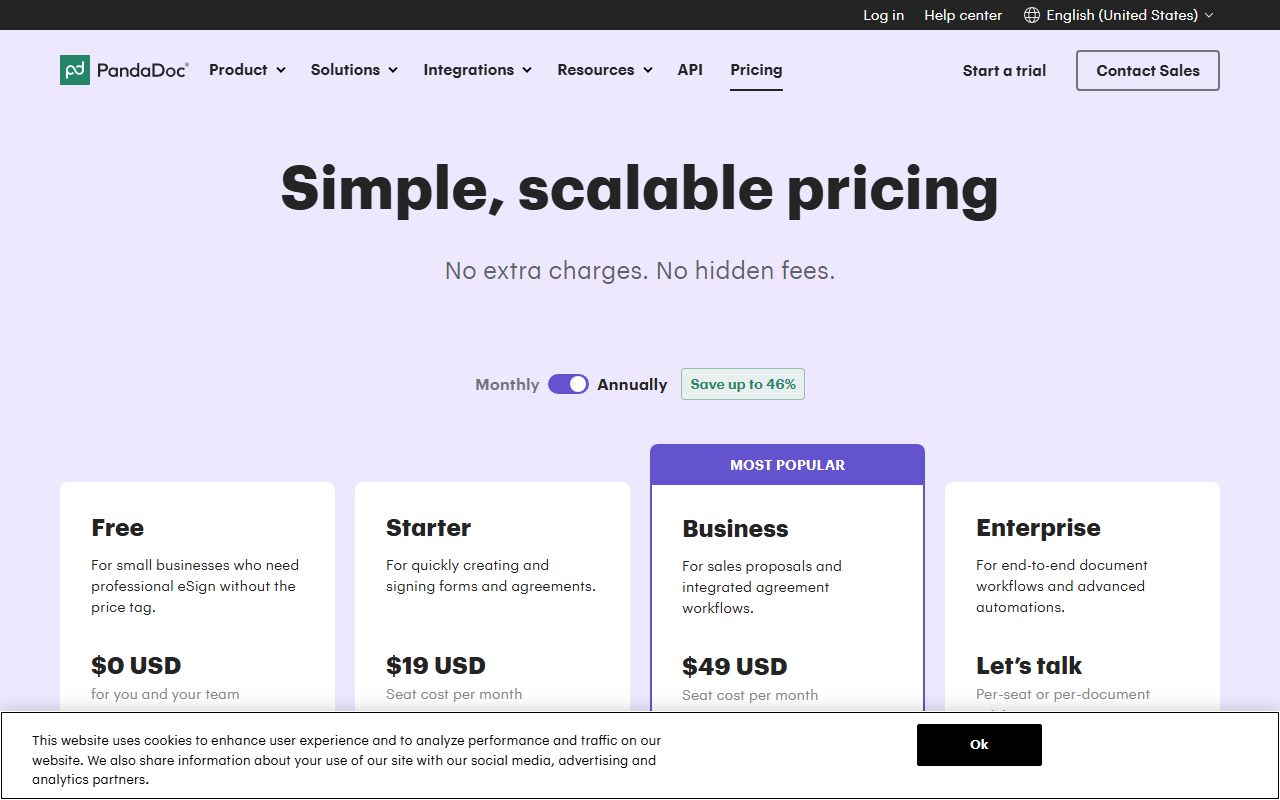
PandaDoc does the thing most vendors in this category refuse to do: it prints both the monthly and the annual rate, in explicit USD, next to each other. This is a documentation review built from the pricing page as displayed on October 13, 2026, not from direct use. The page shows Free at $0 USD, Starter at $19 USD per seat per month and Business at $49 USD per seat per month on annual billing, with $35 USD and $65 USD as the monthly-billing equivalents, and Enterprise as Let us talk. Ease scores only 3.4 because the same page contradicts itself on the one limit that decides the bill. The plan card and the feature table both call Starter document creation unlimited, while the FAQ explains what happens when you reach your document limit and prices overage at $3.50 per document on Starter Monthly, $2 on Starter Annual and $2.60 on Business Monthly. Both statements were live on the same page at the same time. Confirm the limit at checkout before you commit a year.
Visit PandaDoc
We have no affiliate relationship with this vendor. Link goes to the official site.
Where it is strong
- Both billing rates are printed: $19 USD per seat per month annually against $35 USD monthly on Starter, and $49 USD against $65 USD on Business
- Prices carry an explicit USD label on the plan cards rather than a bare dollar sign, which removes any doubt about currency
- A genuine free tier exists at $0 USD with 5 documents a month, a drag-and-drop editor, real-time tracking and 24/7 email and chat support
- 24/7 email and chat support is listed on every tier including Free, which is unusual at this price point
- The free trial length is stated plainly in the FAQ as 14 days, with no card required to start one
Where it falls short
- The page contradicts itself on Starter's document limit: the plan card and feature table say unlimited, the FAQ prices per-document overage for Starter Monthly and Starter Annual
- Several named features carry an asterisk meaning they require usage credits or are a paid add-on, including API, CRM integrations, bulk send, web forms and workflow automation, and none of those credit packs is priced on the page
- Qualified Electronic Signature and recipient verification are marked annual plan only, so a monthly subscriber loses two compliance features rather than just paying more
- Single sign-on, team workspaces and notarisation sit on Enterprise, which is priced only through a sales conversation
- Unused documents do not roll over between billing periods, per the FAQ, so a quiet month is simply lost on any capped plan
What PandaDoc actually sells you
PandaDoc sells a document factory with signatures attached, priced per seat. The seat is the person who creates and sends documents; recipients need no account or licence.
That is a different product from a pure signature service. The paid tiers add pricing tables, a product catalogue, deal rooms, approval workflows and configure-price-quote, which puts PandaDoc closer to a proposal tool than a signature pad.
The page is organised the way a buyer reads: four cards, a monthly and annual toggle, a feature table, then a FAQ on volume. Prices carry an explicit USD label rather than a bare dollar sign.
This review reads that page as displayed on October 13, 2026 through a headless browser, because a direct fetch was rate-limited. It does not describe how the product feels to operate.
If per-seat pricing is new to you, start with how to read a per-seat pricing page.
Who PandaDoc is best for
The free tier, the printed monthly rate and the proposal features point at a particular buyer. Read the list against your own team.
- Small sales teams whose agreements are quotes and proposals, not bare signature requests, since pricing tables and product catalogue are included from Business
- Anyone sending 5 documents a month or fewer, who can stay on the $0 USD free tier indefinitely
- Buyers who want to compare monthly against annual before committing, because both numbers sit on the same card
- Teams that need 24/7 email and chat support at the bottom of the price list rather than at the top
- Companies that need US or EU data residency named in documentation rather than promised in a call
- Operations teams that will use approval workflows and deal rooms, both unlimited on Business
Who should skip it
Three profiles will find the published price list does not describe their bill.
- Teams whose volume must be guaranteed in writing before signing, because the page states unlimited documents on Starter and prices Starter overage in the same breath
- API-driven and CRM-driven workflows, where document creation runs on usage credits whose pack price is not published anywhere on the page
- Buyers who need single sign-on, notarisation or team workspaces, all of which sit on Enterprise with no figure
The free tier is a real product, with one hard cap
Free is listed at $0 USD for you and your team, and the page is specific about what that buys: 5 documents created a month as a shared limit, the rich-media editor, real-time tracking and notifications, 24/7 email and chat support and limited API access.
The feature table adds the detail that documents created through the API and automations count inside the same 5 a month, with no separate allowance. Templates are capped at 5 and deal rooms at 3.
Five documents a month is 60 a year. For a landlord, a freelancer or a two-person consultancy issuing one contract a fortnight, that is a working tool rather than a demo.
A free tier that is capped by volume rather than by headcount is rare. The free tiers we graded in the docs category, including Confluence at 10 users, cap people instead.
The free tier also makes the 14-day trial less important than it looks. Sit on Free, learn the editor, and upgrade when the cap bites.
How the pricing is structured
Per seat per month, with both billing periods shown. The toggle reads Monthly and Annually, and a banner above it says save up to 46 percent.
On annual billing the cards show Free at $0 USD, Starter at $19 USD per seat per month and Business at $49 USD per seat per month. On monthly billing the same two paid tiers read $35 USD and $65 USD.
That is the pair of numbers most vendors in this category hide. The 46 percent claim can be checked against it.
The drop from $35 down to $19 is a drop of about 46 percent, and $65 down to $49 is about 25 percent, so the banner describes the best case rather than both.
Enterprise is priced as Let us talk, with the note that it can be per-seat or per-document, and a separate offer of a document-based package with unlimited seats sold through sales. No figure appears for either.
No seat minimum is stated on any tier. A two-person team can buy two Starter seats. The page also notes that prices exclude any applicable taxes.
Where two vendors quote in different units, our guide to comparing quotes priced in different units sets out how to normalise them before deciding.
What 1, 5, 20 and 50 seats pay for 12 months
The figures below are editorial arithmetic from the prices displayed on October 13, 2026, in USD. They assume no usage credits, no overage and no tax, and they are not vendor quotes.
- Free: $0 at any headcount, with 5 documents a month shared across the whole team rather than per person
- Starter billed annually at $19: 1 seat $228; 5 seats $1,140; 20 seats $4,560; 50 seats $11,400
- Starter billed monthly at $35: 1 seat $420; 5 seats $2,100; 20 seats $8,400; 50 seats $21,000
- Business billed annually at $49: 1 seat $588; 5 seats $2,940; 20 seats $11,760; 50 seats $29,400
- Business billed monthly at $65: 1 seat $780; 5 seats $3,900; 20 seats $15,600; 50 seats $39,000
- Choosing annual over monthly on Starter saves $192 per seat per year by our arithmetic, or $9,600 across 50 seats
- Enterprise: no price published. Per-seat or per-document, by quote
The document limit is where the page argues with itself
This is the finding that sets the ease score. Two parts of the same page, live at the same moment on October 13, 2026, say different things about Starter.
The Starter card lists unlimited document uploads and e-signatures. The feature table row for documents created in the PandaDoc interface reads unlimited for Starter and Business against 5 a month shared on Free.
The FAQ, lower on the same page, is headed what happens when you reach your document limit.
It answers that you will be notified as you approach it, and that past the limit you can keep creating documents at $3.50 per document on Starter Monthly, $2 for Starter Annual and $2.60 for Business Monthly.
A second FAQ repeats those three rates. A third says unused documents do not roll over between billing periods, which only makes sense if a period has an allowance.
We are not choosing a side. Printing one and hiding the other would remove half the truth. Treat unlimited as unconfirmed, ask for the allowance in the order form, and note that no overage rate is published for Business Annual at all.
Our note on turning a pricing page into a bill covers how to get a cap written down first.
The asterisks are the other half of the price
A footnote under the cards reads that an asterisk means the feature requires usage credits or is a paid add-on. Reading the table with that in mind changes the picture.
Asterisked on Starter or Business: API, CRM and Salesforce integrations, workflow automation, bulk send, web forms, content locking, email whitelabelling, HIPAA compliance, configure-price-quote and internal automations.
A usage credit, per the FAQ, is consumed when a document is created through an integration or automated workflow such as the API, Zapier, Make, Forms or bulk send. Starter and Business include trial credits for first-time customers only.
After that you buy a recurring credit pack, and no pack price appears on the page. API is credit-pack only: once credits hit zero, API calls are rejected until you buy more.
For anyone driving PandaDoc from a CRM, the seat price is a floor rather than a budget. Budgeting for usage-based pricing sets out how to put a ceiling on a line like that.
Ease of use: what the score is built from
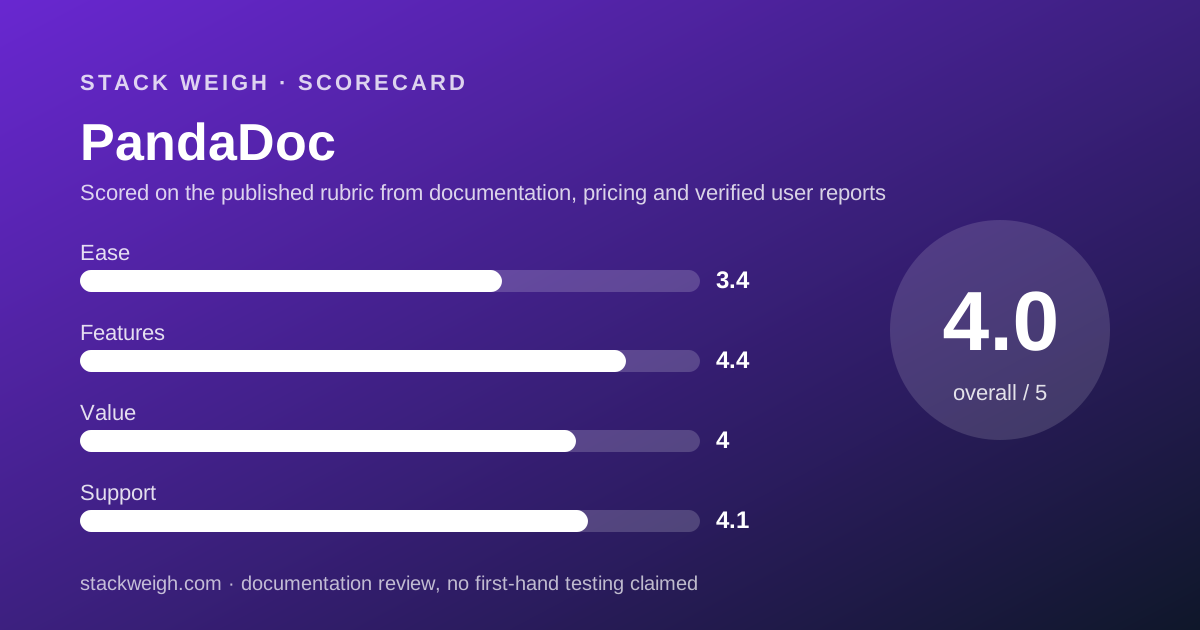
3.4 out of 5. This pillar grades the pricing page and the documented buying path, not the editor.
PandaDoc earns the two points that matter most on a pricing desk. Currency is labelled USD on the cards, and both billing rates are printed so the advertised discount can be verified rather than trusted.
The deduction is the contradiction on Starter's document limit, which is not a minor footnote. It is the single number that decides whether a 20-seat annual commitment costs $4,560 or $4,560 plus $2 a document.
A smaller deduction is for the asterisk system. A feature table where eleven rows mean maybe, depending on a credit pack we do not price, is harder to budget from than a table of plain yes and no.
Features: what the score is built from
4.4 out of 5. The documented set is broad, and it is broad in a direction pure signature tools do not go.
Starter covers the editor, templates, signing order, in-person signing, audit trail, recipient analytics, auto reminders, expirations and unlimited storage. Business adds custom branding, content library, deal rooms, approval workflows, pricing tables, product catalogue and contract repository.
Compliance is itemised: SOC 2 Type 2, GDPR, eIDAS, the US ESIGN Act, passcode and SMS verification, and knowledge-based authentication with ID verification included rather than metered.
Two deductions. Qualified Electronic Signature and recipient verification are marked annual plan only, so billing choice removes features rather than just raising the rate. And single sign-on, notarisation and team workspaces are Enterprise.
Bundling raises the same question we put to Notion in the docs category and worked through in Notion against Confluence: a bundle only saves money if you would have bought the parts.
Value: what the score is built from
4.0 out of 5, the strongest of the three pillars where price is the input.
At $19 USD per seat per month billed annually, Starter is well under Docusign Standard at $30 per user per month, and if the unlimited claim holds, it removes the volume cap that drives Docusign's cost per signature to $3.60 by our arithmetic.
The free tier adds real value for the smallest buyers, and the printed monthly rate means nobody discovers the annual discount at checkout.
The score is held back by the unpriced credit packs and by the contradiction on the document limit. A price you cannot model is worth less than the same price written down, even when the headline is lower.
Support: what the score is built from
4.1 out of 5, the highest support score on our e-signature desk, and it is earned at the bottom of the price list rather than the top.
The feature table lists the help centre knowledge base 24/7 and web ticket and email support 24/7 across every tier including Free. Chat support is listed on the paid tiers. Premium support is marked optional.
The deduction is for what is still missing: no response-time target, no phone channel and no hours window appear for any self-serve tier. Optional premium support carries no price.
What verified users report
The page cites three review-site scores with dates attached, which is more disclosure than most vendors offer: 4.7 out of 5 from 3,324 reviews as of 06/11/2026, 4.5 from 1,197 reviews as of 02/01/2025 and 4 from 560 reviews as of 02/01/2025.
The platform names sit in images we did not read, so we are not attributing them.
We have not compiled our own dated sample of user reports on PandaDoc billing, and we will not summarise impressions we have not collected. The question worth asking other buyers is simple: what document allowance appeared on their Starter order form.
Limits stated by the vendor
From the pricing page and its FAQ, checked October 13, 2026: Free gives 5 documents a month shared, 5 templates and 3 deal rooms, with API and automation documents counting inside the same 5.
Starter and Business show unlimited interface documents in the table while the FAQ prices overage at $3.50, $2 and $2.60 per document depending on plan and billing period.
The trial is 14 days. Upgrades are prorated. Prices exclude applicable taxes. Data residency is offered in the US or EU.
Not published: credit pack prices, Enterprise pricing, premium support pricing, any overage rate for Business Annual, and any seat minimum.
Alternatives
Two rival structures sit on either side of PandaDoc on price.
Above it is per-seat billing with a per-seat volume allowance, which costs more per seat and caps what each seat may send. That suits teams where every person signs steadily.
Below it is a flat account fee with unlimited team members and one cap on signature requests for the whole account. That is far cheaper for a large team with low volume and far worse for a small team with high volume.
Choose PandaDoc if your documents are proposals and quotes, your seat count is modest, and you want both billing rates visible before you commit.
Buy it if, skip it if
Buy PandaDoc if you can start free, want the annual and monthly rates side by side, and your agreements carry pricing tables rather than just a signature line.
Skip it if you need the document allowance guaranteed in writing first, or if the API and CRM paths are central and the credit packs stay unpriced.
For the headcount-versus-volume trade-off across the whole category, read budgeting for usage-based pricing before the order form.
Bottom line
PandaDoc is the most transparent price list on our e-signature desk and the most self-contradictory at the same time. Starter at $19 USD per seat per month billed annually is $228 a seat a year, against $420 billed monthly, by our arithmetic.
The free tier at $0 USD with 5 documents a month is a real floor, not a teaser.
The unresolved question is whether Starter is unlimited, as two places on the page say, or metered at $2 a document, as two other places on the same page say.
All figures come from the pricing page as displayed on October 13, 2026 in USD. Verify the document allowance at checkout before committing a year.
Visit PandaDoc
We have no affiliate relationship with this vendor. Link goes to the official site.