 Stack
Stack
Coda (Superhuman Docs)
The docs tool that bills only the people who create documents, now sold as Superhuman Docs at $12 per Doc Maker on annual billing
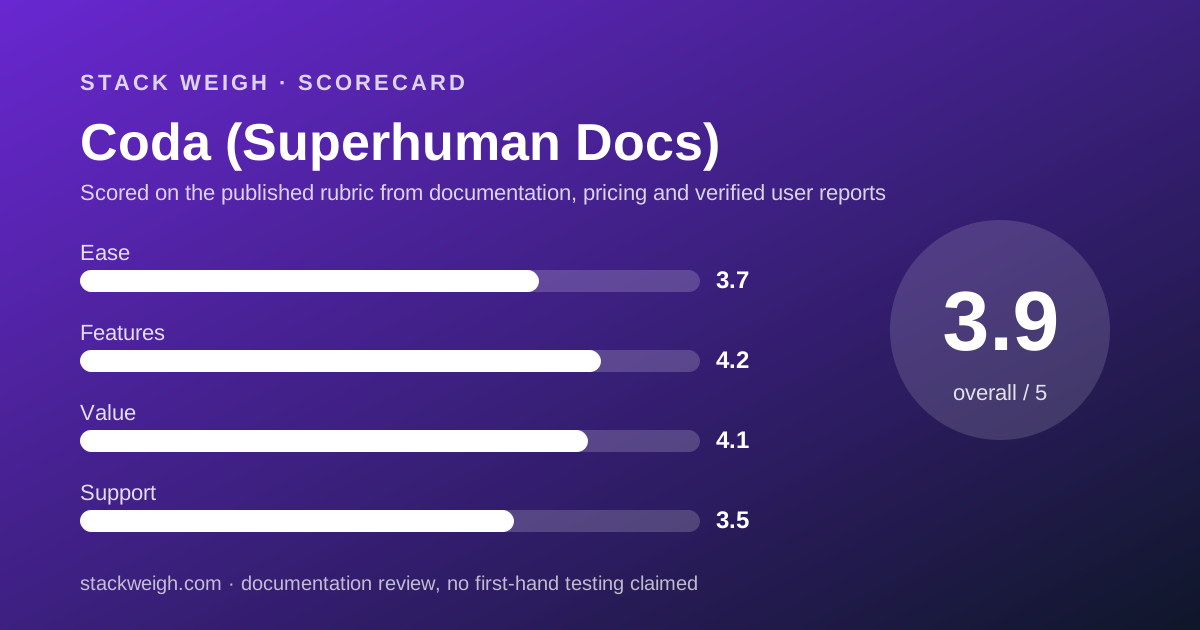
Scored on the published rubric, from documentation, pricing and verified user reports.
Best for: Teams where two to five people build documents and trackers and everyone else edits them, because only the builders are billed and the total can be a fraction of a per-seat tool.
Verdict
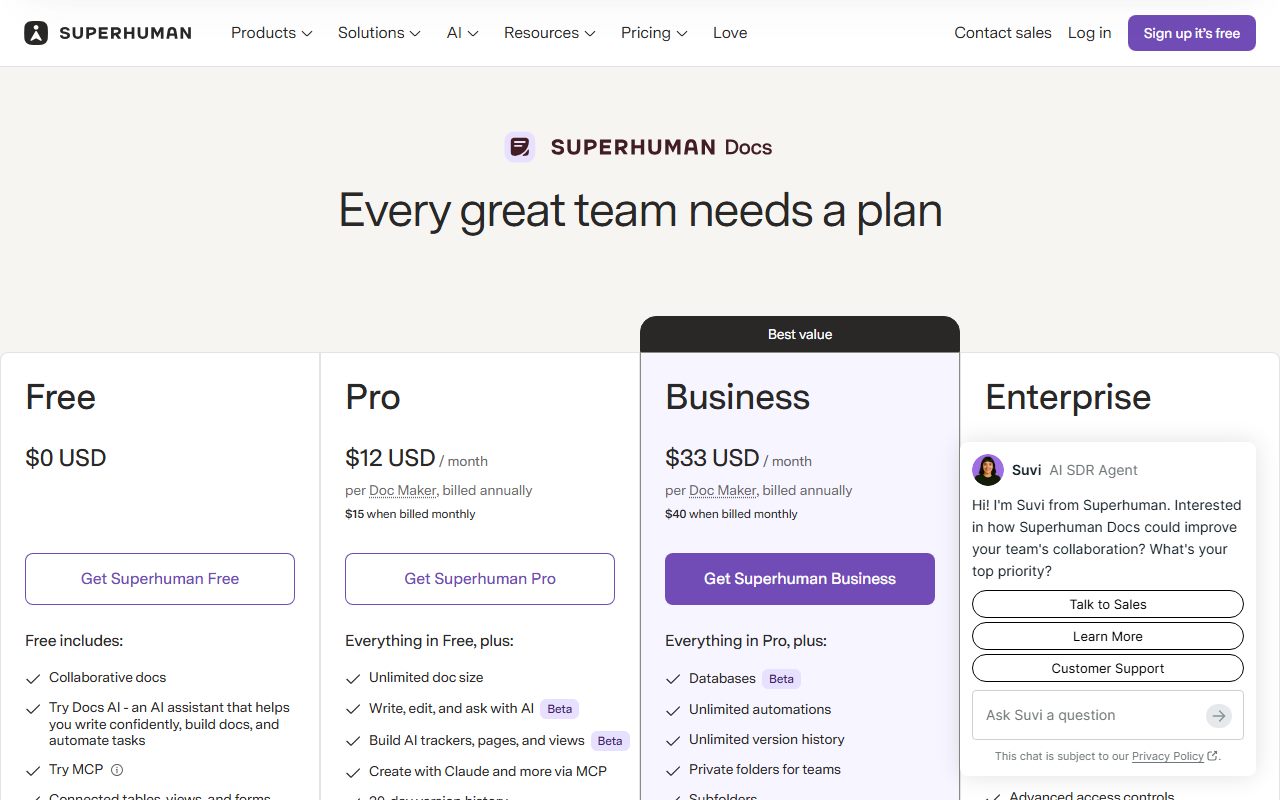
Coda is the one product in this cluster whose bill depends on roles rather than headcount, and that is both its strongest pricing argument and the thing a buyer most often gets wrong. This is a documentation review built from the pricing page as of October 10, 2026, not from direct use. The first fact is the name: coda.io/pricing now redirects to superhuman.com/plans/docs, and the page sells the product as Superhuman Docs after the Grammarly and Superhuman consolidation. The second fact is the unit. Pro is $12 per Doc Maker per month billed annually or $15 monthly; Business is $33 annually or $40 monthly; Editors, Viewers and guest editors are free. A 10-person team with 3 Doc Makers pays $432 a year on Pro by our arithmetic; the same team with 10 Doc Makers pays $1,440. Business is where unlimited automations, unlimited version history, hourly connector refresh, private folders and locking live, and it costs nearly three times Pro. SAML SSO, SCIM and audit events are Enterprise only. Value scores 4.1 because the role model undercuts Notion and even Confluence for builder-light teams, and because the page prints both billing rates. Ease scores 3.7 because the rename, the Beta labels and the vague automation quotas make the page harder to read than its rivals. Buy it for the billing model, and count your Doc Makers honestly first.
Visit Coda (Superhuman Docs)
We have no affiliate relationship with this vendor. Link goes to the official site.
Where it is strong
- Only Doc Makers are billed; Editors, Viewers and guest editors are free on every plan
- Both billing rates are printed: Pro $12 annual or $15 monthly, Business $33 annual or $40 monthly
- Pro includes unlimited doc size, 30-day version history, 5 GB attachments per doc and custom domains
- Removing members or cancelling produces a prorated credit, per the page's FAQ
- Docs AI, in Beta, is included with unlimited access on any paid plan under a fair-use policy
Where it falls short
- The product has been renamed: the Coda URL redirects to a Superhuman page, and a buyer searching for Coda pricing lands on a different brand
- Automation quotas on Free and Pro are described only as 'low' and 'medium', with no numbers
- SAML SSO, SCIM, audit events and SOC 2 reporting are Enterprise only, with no published price
- Business at $33 per Doc Maker is 2.75 times Pro, the steepest tier jump in this cluster
- No trial length is stated for paid plans; support beyond the help centre is listed without hours or response times
What Coda actually is
Coda is a document tool where a page can hold tables that behave like a database, and where the people who build those documents are billed differently from the people who use them. The pricing page calls the builders Doc Makers and everyone else Editors or Viewers, and only Doc Makers pay.
The product is now sold under a different name. On October 10, 2026, a request to coda.io/pricing returned a redirect to superhuman.com/plans/docs, and the page sells Superhuman Docs alongside Superhuman Mail, Go and Grammarly. The FAQ still speaks of Doc Makers and workspaces, so the model this review describes is the one a buyer will meet.
For a pricing desk the comparison set is the team docs tool. Notion bills every member. Confluence bills every user who can log in. Coda bills a role. That makes it the one product here where a 10-person team cannot be priced without a second question: how many of the ten build?
This review reads the pricing page as published on October 10, 2026. It does not describe how Coda feels to use; the editors have not run a workspace for this piece.
Who Coda is best for
The Doc Maker model favours a specific team shape. Read the list against your own.
- Teams where two to five people build trackers, dashboards and docs and the other ten to forty fill them in
- Operations and project teams whose documents are tables with buttons and formulas rather than prose
- Teams that want both the annual and monthly rate on the page before they commit
- Teams that share working documents with clients, since guest editors are free and can edit the specific docs they are invited to
- Teams willing to accept Beta-labelled databases and AI in exchange for a lower bill
- Teams that already pay for Grammarly or Superhuman Mail and would use the bundle
Who should skip it
Three profiles pay more, or know less, with Coda.
- Teams where everyone creates documents, because $12 per Doc Maker on annual billing is more than double Confluence Standard at $5.42 per user
- Companies that need SAML SSO, SCIM or audit events without a custom Enterprise contract
- Buyers who need numbered automation quotas before they sign, since Free and Pro are described as 'low' and 'medium' only
What the free plan includes (as of October 2026)
The free plan is listed at $0 and includes collaborative docs, a trial of Docs AI, connected tables, views and forms, formulas and automations, and trials of Grammarly and Go. The comparison table adds the limits: pages and objects limited for shared docs, a low automation quota, 1 GB of attachments per doc, manual connector refresh, limited cross-doc tables, 7-day version history and a limited MCP trial.
The limit that matters is the first one. Shared docs have a page and object cap, and the page does not number it. A solo user building a personal tracker may never meet it; a team sharing a doc will.
Two figures are missing. The automation quota is a word, not a number, and no trial length is stated for Pro or Business. We note both as not published rather than guessing.
For a team deciding whether to pay, the useful fact is that Editors are free at every tier including Free, so the only question the free plan asks is whether the shared-doc cap and the 7-day history are tolerable for the builders.
What sits behind the paywall
Pro, at $12 per Doc Maker per month billed annually or $15 monthly, is where shared documents lose their caps. Per the pricing page it adds unlimited doc size, 30-day version history, 5 GB of attachments per doc, daily connector refresh, a medium automation quota, cross-doc tables, hidden pages, custom icons, branding and domains, Docs AI with unlimited access during Beta, and MCP access. Grammarly and Go are included.
Business, at $33 annually or $40 monthly, adds unlimited automations, unlimited version history, hourly connector refresh, cross-doc actions, databases in Beta, private folders for teams, subfolders, doc and page locking, group trainings and Superhuman Mail.
Enterprise is custom priced. It adds SAML SSO, SCIM provisioning, AI admin controls, doc and folder governance, advanced access controls, audit events, advanced user management, a SOC 2 Type 2 report and HIPAA compliance. FERPA, legal hold and e-discovery are listed as contact sales. BYOK is listed as coming soon.
One bundled line has its own price: Grammarly is included on annual billing but listed at $15 per month per Maker on monthly billing, which means a monthly Pro Doc Maker who wants Grammarly pays $30 rather than $15. That footnote is easy to miss and doubles the seat.
How the pricing is structured
Coda is per-role pricing with two billing periods, both printed. Pro is $12 annual against $15 monthly, a 20% gap by our arithmetic. Business is $33 against $40, roughly 17.5%. The page does not state a discount rate; these are our calculations from the listed prices.
The billing unit is the Doc Maker. The FAQ states that at the end of each billing cycle the workspace is billed for the number of Doc Makers in it, that mid-cycle changes are prorated, and that Editors and Viewers are always free. Guest editors from outside the workspace are also free.
The annual plan has an unusual mechanic. Per the FAQ, you are billed up front for all paid users, new Doc Makers added mid-year are charged monthly with proration for the rest of the billing year, and a charge is triggered whenever the running bill exceeds $1,000 from added members. A team that grows during the year will see invoices between renewals.
Removing members or cancelling produces a prorated credit on the account for future charges, not a refund. The page does not describe a cash refund window.
Because the unit is a role rather than a seat, Coda cannot be compared to Notion or Confluence by reading the headline price. Our guide to comparing quotes priced in different units is written for exactly this case: convert both quotes to a 12-month total for the same ten people before comparing anything.
What a 10-person team pays for 12 months
The figures below are editorial calculations from the list prices on the pricing page as of October 10, 2026. They assume no mid-year changes, no Grammarly on monthly billing and no tax. They are not vendor quotes. The decisive variable is how many of the ten are Doc Makers.
- Free: $0 for any mix, with shared-doc caps and 7-day history
- Pro, 3 Doc Makers and 7 Editors, annual: $12 x 3 x 12 = $432
- Pro, 3 Doc Makers, monthly: $15 x 3 x 12 = $540
- Pro, 10 Doc Makers, annual: $12 x 10 x 12 = $1,440
- Pro, 10 Doc Makers, monthly: $15 x 10 x 12 = $1,800
- Business, 3 Doc Makers, annual: $33 x 3 x 12 = $1,188
- Business, 10 Doc Makers, annual: $33 x 10 x 12 = $3,960
- Business, 10 Doc Makers, monthly: $40 x 10 x 12 = $4,800
The same arithmetic at 1, 5, 20 and 50 people
For a solo user, Pro is $144 a year on annual billing. For 5 people with 2 Doc Makers, $288. For 20 people with 4 Doc Makers, $576. For 50 people with 8 Doc Makers, $1,152. Those builder ratios are illustrative; a team's real ratio is the number to find before pricing anything.
If every person is a Doc Maker the numbers become $144, $720, $2,880 and $7,200 on Pro, which puts Coda above Notion Plus at $10 per member and well above Confluence Standard at $5.42 per user.
The lesson is that Coda is the cheapest tool in this cluster for a builder-light team and the most expensive for a builder-heavy one. The note on turning a pricing page into a bill calls this 'the headcount the vendor counts', and here the vendor counts roles.
Ease of use: what the score is built from
3.7 out of 5. This pillar grades the pricing page and the onboarding path as documented, not the interface. The page prints both billing rates and explains the Doc Maker model in its FAQ, which earns credit.
The deductions are for friction a buyer meets before the first invoice. The brand has changed and the old URL redirects, so a buyer comparing 'Coda pricing' lands on a page that does not say Coda in its headline. Databases, Docs AI and AI views carry Beta labels. Automation quotas are adjectives. And the Grammarly footnote changes the monthly seat price by $15 without appearing on the plan card.
Features: what the score is built from
4.2 out of 5. At the Pro tier the documented set covers what a docs-and-trackers team needs: unlimited doc size, connected tables, forms, cross-doc tables, 30-day history, custom domains and AI during Beta. Business adds unlimited automations and history, locking and private folders.
The deduction is for the identity and governance stack, which is entirely Enterprise: SSO, SCIM, audit events, SOC 2 report. Confluence includes audit logs at Standard; Notion includes SSO at Business. Coda includes neither below a custom contract.
Value: what the score is built from
4.1 out of 5. The arithmetic drives this score and it cuts both ways. For a 10-person team with 3 builders, Pro at $432 a year is the cheapest paid option in this cluster, below Confluence Standard at $650.40 and Notion Plus at $1,200. For a team with 10 builders, Pro at $1,440 is the most expensive of the three.
What earns the score is transparency: both billing rates are printed, proration is described, and the free tier allows unlimited free editors. What holds it back is the Business jump to $33, 2.75 times Pro, for features like unlimited history and locking that the other two tools include at lower multiples.
The score reflects a team with a realistic builder ratio of roughly one in three. A team that is all builders should mentally subtract half a point.
Support: what the score is built from
3.5 out of 5. The comparison table lists a help centre, webinars and trainings, a private resource library, customer success, priority support, live chat and guided onboarding, with the higher items attached to the higher plans. It does not state hours, channels by plan in plain text, or response times.
For a 10-person team on Pro, support is the help centre and whatever live chat is available, and the page does not define it. The deduction is for that gap. Confluence prints 9/5 on Standard and a 1-hour critical response on Premium; this page prints neither for any self-serve tier.
What verified users report
This review is built from vendor documentation. We have not yet compiled a dated sample of G2, Capterra or Reddit reports for Coda or Superhuman Docs, and we will not summarise impressions we have not collected. This section will be updated with sourced, dated findings when that sample exists.
The questions worth asking other teams are specific: how the rename affected their account and billing, what the 'medium' automation quota turned out to be in practice, and whether mid-year Doc Maker additions produced the interim invoices the FAQ describes.
Limits stated by the vendor
From the pricing page, checked October 10, 2026: free attachments 1 GB per doc and Pro 5 GB; free version history 7 days, Pro 30 days, Business unlimited; connector refresh manual on Free, daily on Pro, hourly on Business; automation quota low on Free, medium on Pro, unlimited on Business; Grammarly $15 per month per Maker on monthly billing; a charge triggered whenever the running bill from added members exceeds $1,000 on annual plans.
Not stated on the page: the numeric page and object cap for shared docs on Free, the numeric automation quotas on Free and Pro, a trial length, support hours or response times, Enterprise pricing, and data residency. Buyers who need any of these should ask for the figure in writing before signing.
Alternatives
Two products overlap with Coda enough to be priced against it directly.
Notion
Choose Notion if most of the team creates pages and you want SSO available at a self-serve tier, because Business at $20 per member includes SAML. Otherwise choose Coda if only a few people build, since $12 per Doc Maker with free editors will undercut $10 per member for every team whose builder ratio is below about 80%.
Confluence
Choose Confluence if the team is 10 or fewer and wants a wiki for $0, or if audit logs and printed support hours matter, because Standard at $5.42 per user is the lowest seat in the cluster. Otherwise choose Coda if your documents are trackers and tables rather than wiki pages. Our Notion vs Confluence comparison covers the two per-seat tools head to head.
Buy it if / Skip it if
Buy Coda if two to five people build and the rest edit, you want both billing rates in front of you, and Beta labels do not worry you. Skip it if everyone builds, if SSO is a day-one need, or if you must know your automation quota as a number. The cheapest team wiki for a 10-person team prices all three at several builder ratios.
Bottom line
Coda's pricing is honest about its rates and unusual about its unit: $12 per Doc Maker on annual billing, $15 monthly, editors free, $432 a year for a 10-person team with 3 builders by our arithmetic. The rename to Superhuman Docs changes the URL and the branding, not the model.
If you can count your builders and the count is small, Coda Pro is the cheapest paid docs tool here. If everyone builds, read the Confluence review before you sign. All figures from the pricing page checked October 10, 2026; they will drift, and the method in our guides will not.
Visit Coda (Superhuman Docs)
We have no affiliate relationship with this vendor. Link goes to the official site.